I am currently using ANSYS Mechanical 2025 R2 as part of my university work, and I am experiencing a persistent user interface issue.
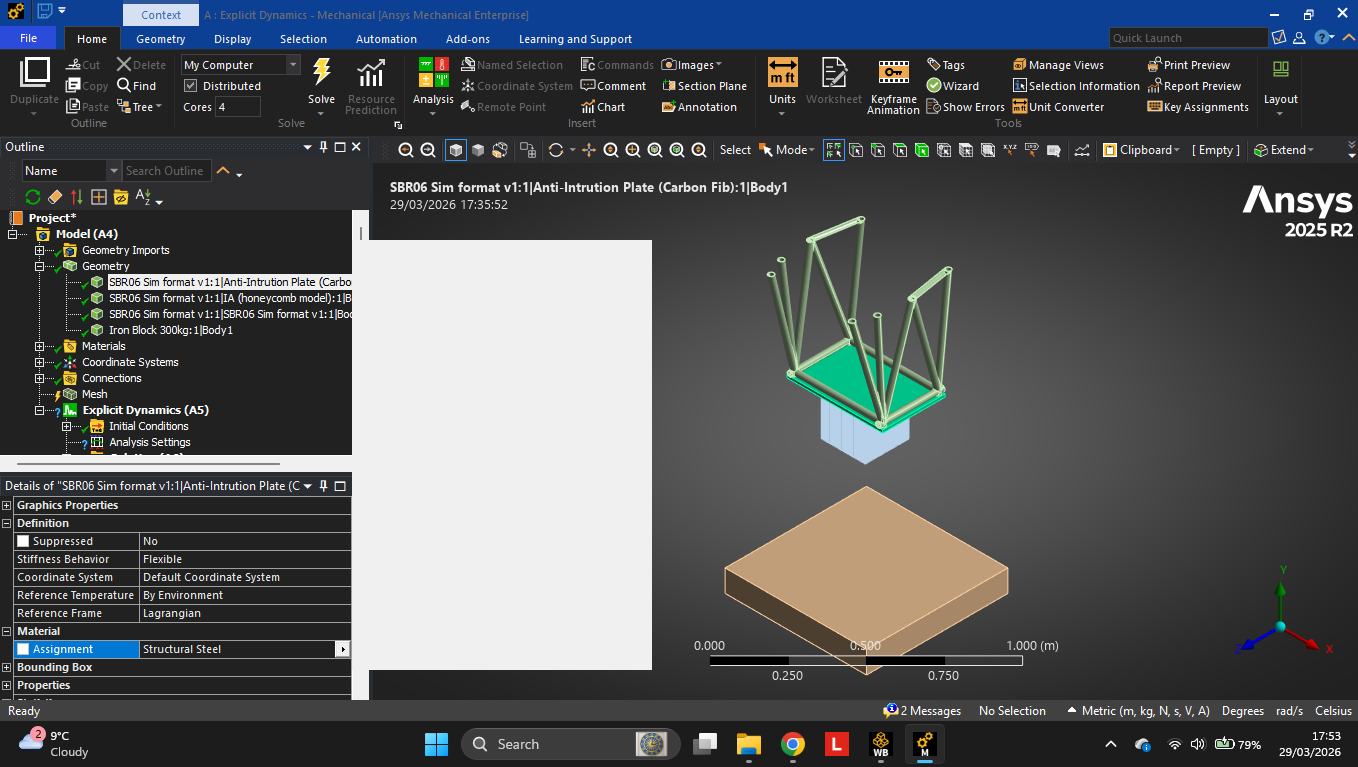
When attempting to assign materials to geometry bodies, the material selection panel appears as a blank white box instead of displaying the available materials. This prevents normal interaction with the material selection interface.
I have already attempted the following troubleshooting steps:
Resetting the UI layout
Deleting the ANSYS AppData configuration folder (v252)
Forcing software rendering using environment variables
Changing Windows graphics settings to use integrated graphics
Restarting the application and system multiple times
Despite these steps, the issue persists.
This appears to be a rendering/UI bug specific to this version. I have attached screenshots demonstrating the issue.
Could you please advise on:
Any known fixes or patches for this issue
Whether this is a known bug in ANSYS 2025 R2
Recommended workaround or configuration changes
System details:
ANSYS Version: 2025 R2
OS: Windows 11
GPU: RTX 5050
This issue is currently affecting my ability to efficiently complete a Formula Student impact attenuator simulation.
Thank you for your support.






















 You are navigating away from the AIS Discovery experience