-
-
March 7, 2025 at 10:46 am
franziska.amberger
SubscriberI am just starting with FE modeling in ANSYS Workbench and trying to simulate an experiment using the LS-DYNA analysis system in Workbench. I would like to use the material model MAT_072R3, but unfortunately, it does not appear in the list of available material models in LS-DYNA.
What can I do to access or enable this material model in ANSYS Workbench?
Any help would be greatly appreciated!
-
March 7, 2025 at 3:36 pm
Raman Babu
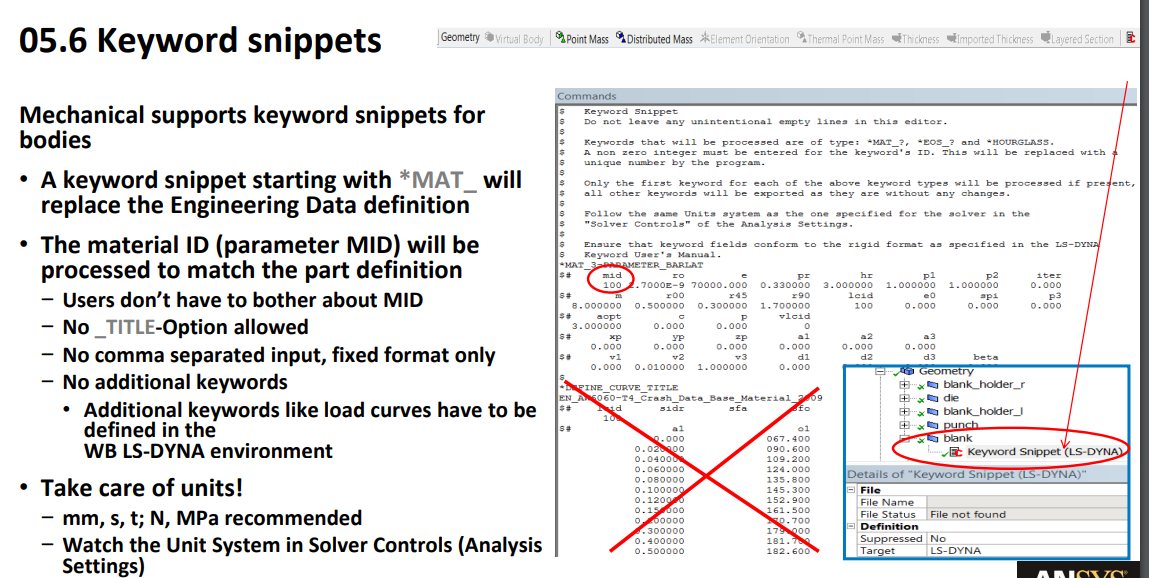
Ansys EmployeeYou need to insert the command object under a body to assign any material which is not directly available in engineering data. In the command object, you can insert the material card.Â
To have a proper format for the material model, please first define a mat card in lsprepost and write an input file. Please copy the material card details and paste them in the command object. Please make sure there should not be _title command for the material name in the command prompts.
Please see the below snapshot for your reference.
-
March 10, 2025 at 6:12 am
franziska.amberger
SubscriberThank you for your response!
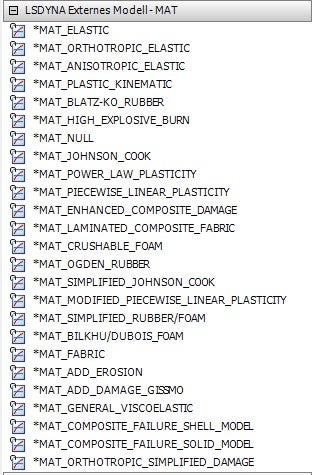
I appreciate your explanation. However, I noticed that the provided screenshot is from LS-DYNA itself, while I only have access to the ANSYS Workbench interface, where LS-DYNA is integrated.
In the attached image, you can see the available LS-DYNA material models within Workbench. However, this list does not include all material models available in LS-DYNA. My specific question is: Is it possible to implement an existing LS-DYNA material model that is not listed in Workbench?
Thank you in advance for your help!

-
March 11, 2025 at 3:50 am
Raman Babu
Ansys EmployeeThis material model will be introduced in Ansys V2025R2 (the next upcoming version). In the meantime, please use the Command Object to add the material model if it is not available in Engineering Data.
-
- You must be logged in to reply to this topic.
-
6535
-
1906
-
1463
-
1311
-
1022
© 2026 Copyright ANSYS, Inc. All rights reserved.