-
-
July 28, 2022 at 2:23 pm
martinmi
SubscriberHallo,
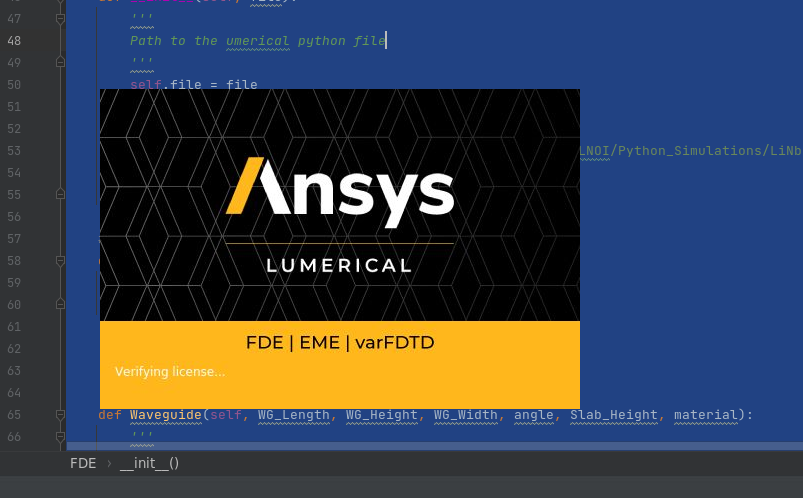
i have a problem with Lumerical Python Automations. I was using Lumerical to simulate some MMI and suddenly i get a PyCharm Error, i close PyCharm and start it again and since then when i try to start Lumerical from Python i get stuck on Verifying license... Screen and nothing happend after this. Do anyone know hor to fix this? The OS is Linux CentOS7. And Version of Lumerical is 2021-r1.1. I will attach a photo of the stuck screen. My code to start Lumerica is :
class FDE:
#Init Programm
def __init__(self, file):
'''
Path to the lumerical python file
'''
self.file = file
lumpai = imp.load_source('lumapi', self.file)
self.lum = lumpai.MODE()
# self.lum = lumpai.FDTD()
self.lum.importmaterialdb("......../lib.mdf")
print('Lumerical FDE API is started')
#Close Programm
def Close(self):
self.lum.close()
print('Lumerical FDE API is closed")Thank you fro your Help.
-
July 28, 2022 at 5:07 pm
Lito
Ansys Employee@martinmi,
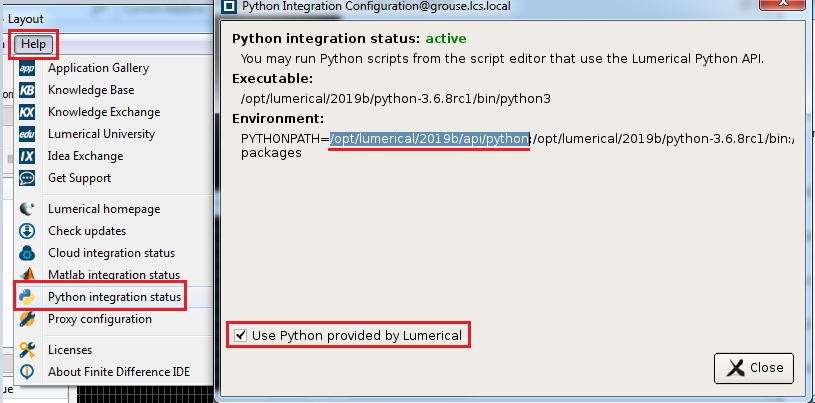
Please see this Knowledge Base (KB) article. Also ensure that you have write access to the “/tmp” folder on your Linux box.
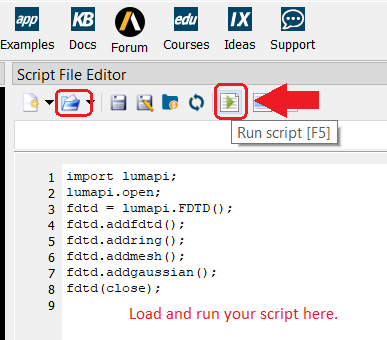
To troubleshoot the issue — try running the example python script below (lumtest.py) from the Lumerical CAD/GUI using our bundled Python3.
import lumapi
fdtd = lumapi.FDTD()
fdtd.addfdtd()
fdtd.addring()
fdtd.addmesh()
fdtd.save("mytestpy.fsp")-
July 29, 2022 at 9:48 pm
martinmi
Subscriber@Lito,
I just tested the example you gave me in the Lumerical CAD/GUI and everything works fine. I also tested accessing the /tmp directory and it is fine. However, the problem is still there. When I try to start Lumerical from PyCharm, I get the screen with "Verifying License"....
-
August 2, 2022 at 8:48 pm
Lito
Ansys Employee@martin,
Please try the latest release, Lumerical 2022 R2.1. Otherwise, should the issue persist with PyCharm and Lumerical 2022R2.1, run the API script directly from terminal. >>>https://optics.ansys.com/hc/en-us/articles/5771091294739
-
August 4, 2023 at 9:52 pm
Amirali Atrli
SubscriberHello.
I have also encountered the same problem. The problem persists even when I run the eme-solutions directly on the linux terminal, or when I run the python API code directly from the terminal: the screen remains stuck on "verifying license". Is there anyway to overcome this problem?
Thank you.
-
August 5, 2023 at 1:26 am
Lito
Ansys Employee@Amirali,
Try to run the Python API from the CAD/GUI > Script editor window. Otherwise, see this Knowledge Base (KB) to configure your shell environment.
How to run Lumerical API (Python) scripts in Linux – Ansys Optics
Note that the KB shows the bash shell environment. Modify your's according to your linux distro and shell. Running scripts will always require a CAD/GUI connection and a GUI license. Ensure that you are connected to your Linux machine via GUI connection.
Lumerical product components and licensing overview – Ansys Optics
Remote connection to Linux with a graphical interface – Ansys Optics
-
August 5, 2023 at 3:14 am
Amirali Atrli
Subscriber@Lito
Thank you for your response! I need to run the API from the terminal, since I am working on a ssh server, and plan to detach the screen after running the API code. That being said, I believe the problem is not from the API code. I tried running the ../lumerical/v/bin/mode-solutions using the terminal, and it again gets stuck on verifying the license. The mode software works fine, though, when opened using the launcher.
It’s also worth noting that my API worked for multiple times, before running into this problem.
-
August 5, 2023 at 8:11 am
martinmi
SubscriberI resove the problm after my department switch the Lumerical 2021 to 2022 version. We also switch the remote desktop connecting programm. We use to work with X2Go remote desktop to connec to the server. After changing the remote desktop programm and updating Lumerical the problem was solve. Since i am not the server admin in our department coulnd debugg the problem to give you more information. My best guess is that something was overwritten the last time the licence was checked in and the programme goes into this infinite licence check loop. If you have resolve the problem please let me know.
-
August 8, 2023 at 7:49 pm
Lito
Ansys Employee@martinmi,
Glad to hear that the issue has been resolved. This issue could either be the 2021 release or how you are connecting to your Linux machine. We recommend to always use the latest release, currently 2023 R2 which has all the patches and bug fix. And connect via a supported remote display connection. e.g. VNC, RDP or mobaXterm from a Windows PC.
-
-
-
July 29, 2022 at 11:28 am
martinmi
Subscriber
-
- The topic ‘Lumerical stuck after time on “Verifying License” screen’ is closed to new replies.

-
5844
-
1906
-
1420
-
1305
-
1021
© 2026 Copyright ANSYS, Inc. All rights reserved.