Hi, I have some questions about LS-OPT.
I am setting my dyna model to optimize the thickness of some shell so that I can get the least weight.
Currently, I am handling with two problems here.
- Using the parameter in keywords to change the thickness do work, however, other material keyword such as NLOC is not working.
I checked the changed keyword file but the parameter that is set for NLOC doesn't seem to change
Does LS-OPT doesn't use other parameters as the optimizing variables? Or is there any possible way that I can change NLOC.
I want to use NLOC, to change the standard surface of the shell, instead of middle. This should be done to prevent the penetration of the two contact surface, when the thickness is changed.
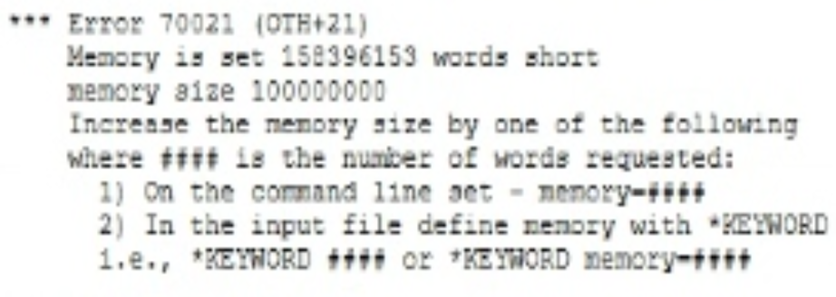
2. For the constraint conditions, I set different types of Dyna model to check the results. Here, in the loop of optimizing, the first model works fine but the second model doesn't, due to the memory issue.
Is there possible solution to change the memory space while using OPT? Both of the models work fine in the Dyna.
I tried to change the memory space in command line, but doesn't work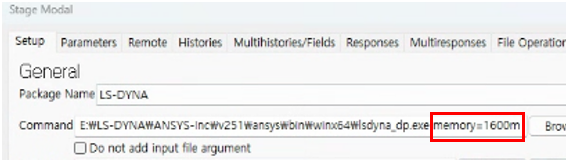 (Never mind for the number 1600, I tried for bigger ones as well)
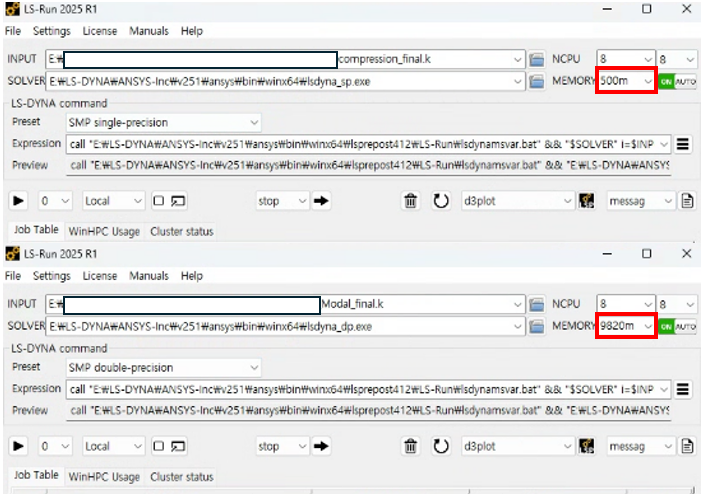
First picture is the first and second model and the memory it needs when running. Second picture is the error message I received in OPT
Thank you.. I would appreciate any help or comment...


















 You are navigating away from the AIS Discovery experience