-
-
October 12, 2019 at 1:06 am
ChelsyClaire0328
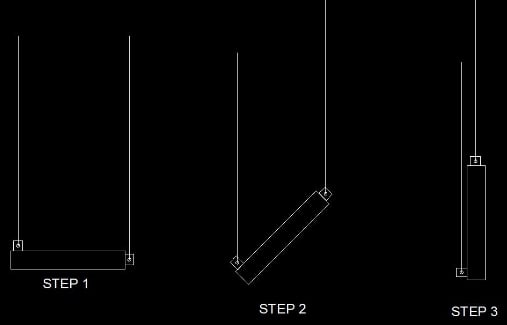
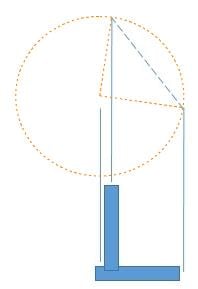
SubscriberHi how can i make a lifting simulation in Ansys where the structure i want to analyze will show different step of rotation, my structure will have a sling wire at both ends, starting at horizontal position until it reach vertical position, i attach an image for easy understanding.
I have found a sample video in youtube showing how the structure will react when it rotates vertically
https://youtu.be/VkPAkY0lYxE
Thanks

-
October 12, 2019 at 11:10 pm
peteroznewman
SubscriberHello ChelsyClaire,
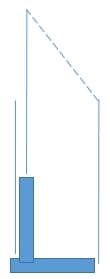
I have inserted the image from your attachment because ANSYS Staff cannot open attachments.
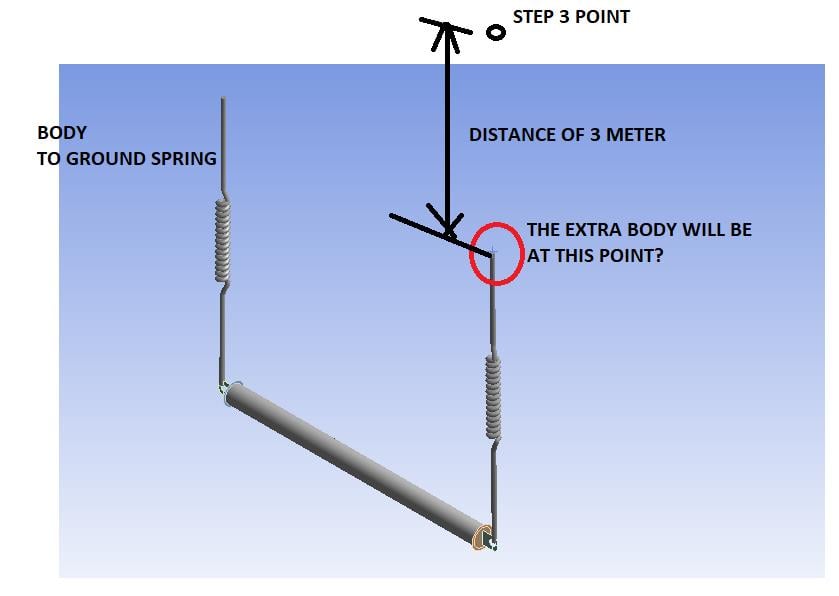
- The video showed them using springs for the cables and you can do the same.
- Let the left spring be fixed to ground.
- You know the start and end points of the top of the right spring. Is the path between them a straight line?
- If so, I suggest you create an extra body to attach the right spring to.
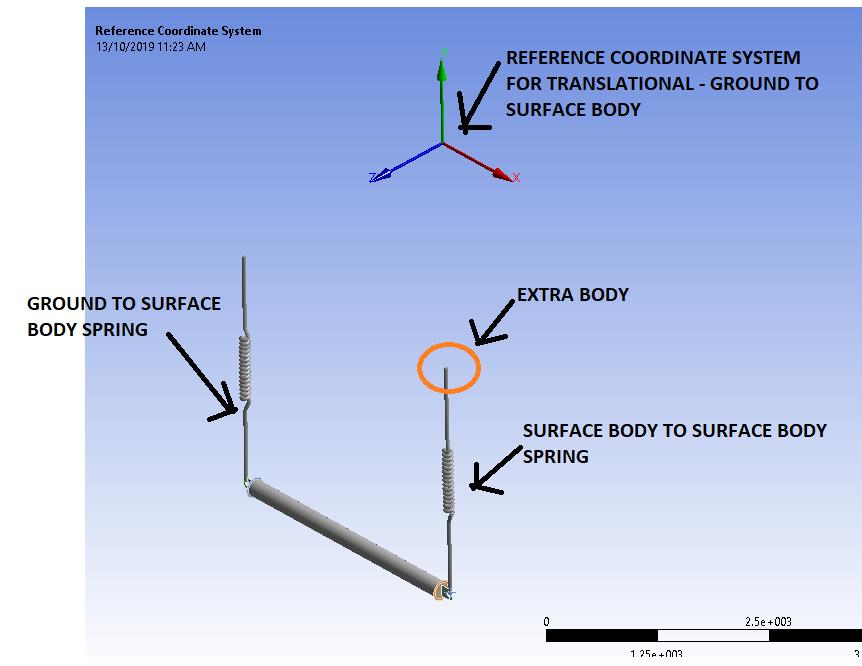
- Under the connections folder, Insert a Translation Joint between Ground and the extra body.
- Edit the coordinate system under the Joint to point the X axis along the line from the start to the end point.
- Add a Joint Load, Displacement, using the distance between the start and end points.
- Under Analysis Settings, turn on Large Deflection, turn on Auto Time Stepping.
- Set the Initial, Minimum and Maximum Substeps to 100.
- The model will have an Inertial load of Standard Earth Gravity.
- Make this a two step analysis, where step 1, the Joint Displacement is zero, but the springs stretch due to gravity.
- In step 2, the Joint Displacement occurs.
If the endpoints are in the XY plane, you might add a Displacement BC of Z=0 to make the solution easier to compute.
-
October 13, 2019 at 1:07 am
ChelsyClaire0328
SubscriberHi Peter,
Can i do this under static structural?
If so, I suggest you create an extra body to attach the right spring to. <<<<<<<<<<< The extra body that i will create will be at the right top position on step 1?
Under the connections folder, Insert a Translation Joint between Ground and the extra body. <<<<< The ground will be the right top position of step 3?
-
October 13, 2019 at 2:18 am
-
October 13, 2019 at 3:33 am
-
October 13, 2019 at 4:39 am
peteroznewman
SubscriberYes, but the X axis of the Joint Coordinate System is the translation axis, so you have to use the fields in the Detail window to orient the X axis to be parallel with the dotted line.
-
October 13, 2019 at 11:20 am
peteroznewman
SubscriberHi Claire,
Here is an idea, put the coordinate system at the center of the orange circle with Z pointing out of the screen. Change the Translational Joint to a Revolute Joint. The Load then becomes a rotation that takes the end of the spring along an arc. This will behave like a four-bar mechanism and will keep the tension in the springs much more even during the move.
Regards,
Peter
-
- The topic ‘Lifting simulation’ is closed to new replies.
-
6369
-
1906
-
1457
-
1308
-
1022
© 2026 Copyright ANSYS, Inc. All rights reserved.