-
-
September 5, 2023 at 1:47 am
Megan Knobeloch
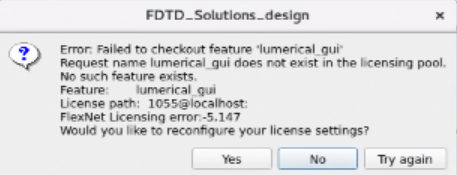
SubscriberWe have begun getting a license error message when we attempt to run the Lumerical FDTD software (I have attached a screenshot of the message). For context, we have been using two separate licenses - one FDTD license that we purchased a while ago and I have been using without problem for many months now, and the other I believe was a free trial of the FDTD software that another student in our group was using. The free trial recently ended, so we have purchased a second FDTD license. This error seemed to begin happening when the free trial ended (even though I should still be using the original license that we had before), but it may have just been a coincidence. I have been having issues getting my Ansys Lumerical account to work (it keeps failing the screening process) and I have reached out to have it re-screened multiple times without luck so far, so I can't email Lumerical support about this. Any help on all or any of these problems would be greatly appreciated so that we can get back to running our FDTD simulations!
-
September 5, 2023 at 11:48 pm
Lito
Ansys Employee@Megan,
Please try the following:Â
- Close all running Lumerical applications including the Ansys Optics Launcher.Â
- Remove theÂ
Lumerical preference.ini files from your computer, including theÂLicense.ini file.Â
  > Ansys Lumerical product preference files – Ansys Optics - Open the Optics Launcher.Â
  Â/opt/lumerical/v232/bin/launcher - When prompted, select,Â
"I have a license from Ansys", thenÂ"I want to configure my license only for Lumerical products", thenÂ"Go to licensing setup" - Re-type/Re-EnterÂ
localhost, thenÂApply and Restart the Launcher when prompted. - Open FDTD from the launcher or directly from terminal
  Â/opt/lumerical/v232/fdtd-solutions &
-
- The topic ‘Licensing issues with Lumerical FDTD’ is closed to new replies.
-
4688
-
1565
-
1386
-
1242
-
1021
© 2025 Copyright ANSYS, Inc. All rights reserved.