-
-
October 7, 2021 at 1:35 pm
K Kramer
SubscriberI'm trying to get into SpaceClaim scripting (not a professional programmer) and have a few questions:
- What are the differences between SpaceClaim and DesignModeler?
- Is there a comprehensive command reference other than the API documentation? Looking up commands in the API doc can be a bit tedious at times since they are spread across multiple categories and poorly documented, which means I basically have to learn the syntax by recording scripts.
- I noticed scripts can be saved as either *.py or *.scscript files. Is there any difference between them?
- Just out of interest: The Python scripts are directly processed by SpaceClaim, but afaik the API can also be used with C# (at least the syntax is in the doc). Does anyone know how a C# program would connect to SpaceClaim?
Thanks a lot.
October 7, 2021 at 2:16 pmAniket Chavan
Forum ModeratorSpaceClaim is a direct modeler while DesignModeler is more of a classic history-based Modeler. SpaceClaim is being developed actively, while the DM is now in maintenance mode along with scripting in DM.
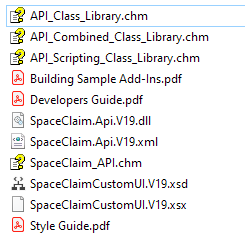
C:\Program Files\ANSYS Inc\v212\scdm\ should have more resources under the API versions folders with names such as SpaceClaim.Api.V19 etc, have you taken a look at it?
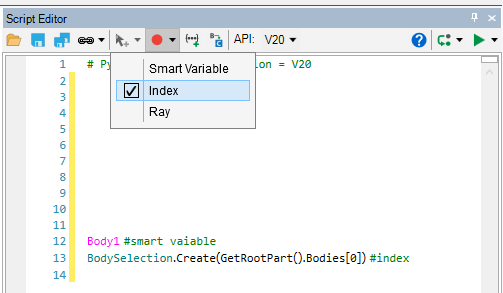
later can store smart variables, and is encrypted, so can't be read in text editors
resources at answer 2 should have examples there.
-Aniket
How to access Ansys help links
Guidelines for Posting on Ansys Learning Forum
October 7, 2021 at 2:23 pmOctober 7, 2021 at 3:44 pmAniket Chavan
Forum Moderatorsmart variables are variables with metadata, with short names unlike the index-based variables for entity selection.

-Aniket
How to access Ansys help links
Guidelines for Posting on Ansys Learning Forum
October 7, 2021 at 3:55 pmK Kramer
SubscriberThanks a lot.
Viewing 4 reply threads- The topic ‘Learning to script in SpaceClaim’ is closed to new replies.
Innovation SpaceTrending discussionsTop Contributors-
5874
-
1906
-
1420
-
1306
-
1021
Top Rated Tags© 2026 Copyright ANSYS, Inc. All rights reserved.
Ansys does not support the usage of unauthorized Ansys software. Please visit www.ansys.com to obtain an official distribution.
-
Ansys Assistant will be unavailable on the Learning Forum starting January 30. An upgraded version is coming soon. We apologize for any inconvenience and appreciate your patience. Stay tuned for updates.