Ansys Assistant will be unavailable on the Learning Forum starting January 30. An upgraded version is coming soon. We apologize for any inconvenience and appreciate your patience. Stay tuned for updates.
General Mechanical

General Mechanical

Topics related to Mechanical Enterprise, Motion, Additive Print and more.

Kinetic, internal and potential energies

    • user deleted
      Subscriber

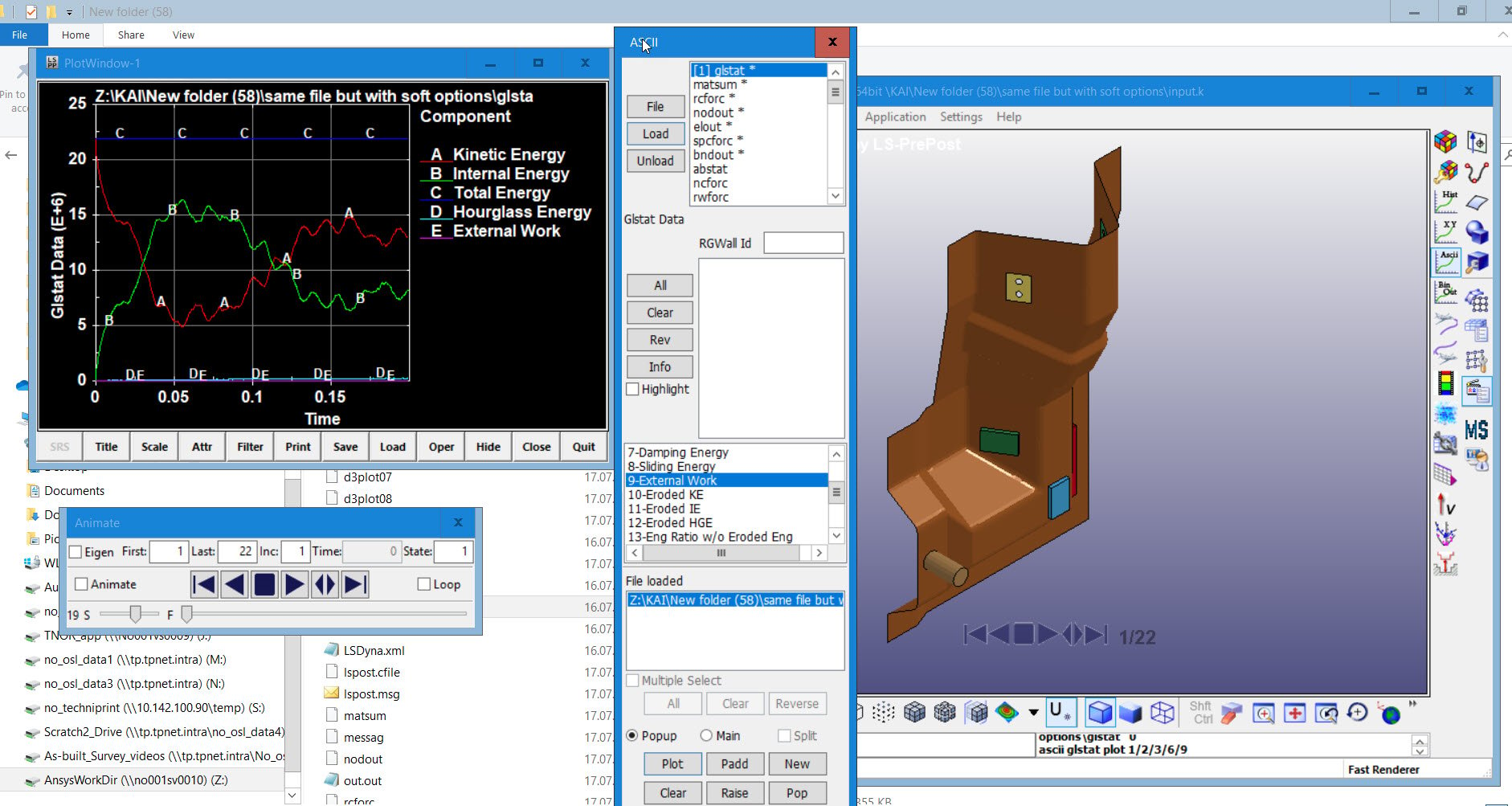
      Hi, can somebody help me, why my total energy doesn't give sum from kinetic and internal for a dropped object case? Thank you


    • user deleted
      Subscriber

      Thank you, what is external work in this case? energy of my object is 20kj (with the mass and speed it has) I also have added mass layer (water). Thank you again.

    • Wenlong
      Ansys Employee

      Do you have any external load applied to the system? The work external load did to your system will be the external work. If you have a controlled displacement or velocity or acceleration, then at the controlled boundary conditions there will also be external load acting on the system. 


      If you only have initial condition (like velocity) then leave the system unloaded, then your external work will be zero. 


      You can plot the external work from row 9 in the LS-Prepost window you shared. 


      Regards,


      Wenlong



    • Wenlong
      Ansys Employee

      Hi,


      I wasn't right previously. I double check and found that, in LS-DYNA (https://www.dynasupport.com/howtos/general/total-energy):


      Total energy reported in GLSTAT (see *DATABASE_GLSTAT ) is the sum of


      • internal energy

      • kinetic energy

      • contact (sliding) energy

      • hourglass energy

      • system damping energy

      • rigidwall energy


      So there can be other energy components that contribute to your total energy. 


      Please note that in Ansys Explicit Dynamics (using Autodyn solver), the total energy is only the sum of internal and kinetic energy (https://ansyshelp.ansys.com/account/secured?returnurl=/Views/Secured/corp/v201/en/wb_sim/ds_Energy_Results.html?q=energy%20error%20explicit).


      Regards,


      Wenlong


      ================ Note ====================


      If you have trouble opening the links I attached, please see the first useful link below


      Useful Links


    • user deleted
      Subscriber

      It is equal to zero, seems like I need to check the model. Thank you


    • Wenlong
      Ansys Employee

      Hi, 


      Sorry I was wrong about the external work. It is not included in Total energy. My most recent reply was correct about total energy. 


      Then the reason your plots are like this is probably caused by contact energy because it can be negative (https://www.dynasupport.com/howtos/general/contact-energy) This website describes why it is negative in some cases, and also shows suggestions about how to alleviate negative contact energy. 


      Regards,


      Wenlong


    • user deleted
      Subscriber

      May I ask you where to find these setups if you have a chance to answer. Thank you


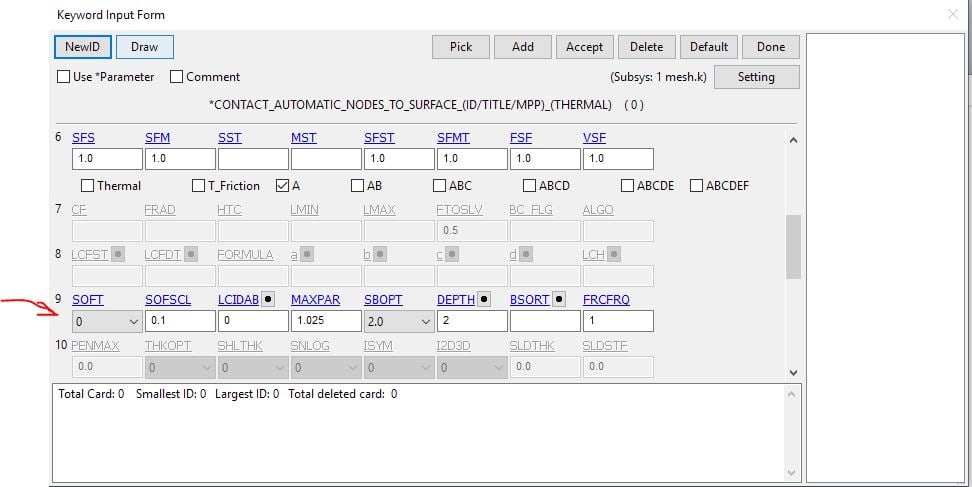
      • Set contact controls back to default except set SOFT=1 and IGNORE=2 (Optional Card C).

      • For contact of sharp-edged surfaces, set SOFT=2 on Optional Card A.   SOFT=2 is also referred to as segment-based contact and so is not applicable to any NODE_TO_SURFACE type contacts.  Two important companion variables to SOFT=2 are SBOPT and DEPTH.Two important companion variables to SOFT=2 are SBOPT and DEPTH.
        SBOPT:  Unless sliding between surfaces is prevalent, set SBOPT=3.  When sliding is prevalent, set SBOPT=5.
        DEPTH:  DEPTH=13 or 23 is recommended unless shell edge-to-edge contact must be considered, in which
        case set DEPTH=25 or 35.
        Please note that SOFT=2 contact carries some additional expense as compared to SOFT=0 or 1,
        particularly using nondefault values of SBOPT or DEPTH.


    • Wenlong
      Ansys Employee

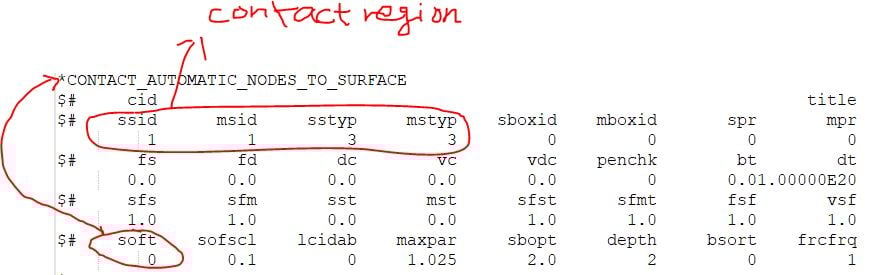
      Yes, If you look at the .k file (the input file), or open the .k file in LS-Prepost, under the "*contact_...." keyword, you can see these options:


      Regards,


      Wenlong



    • user deleted
      Subscriber

      Hi, it helped to decrease time step scale factor. The energy should look like as second picture below. Thank you


    • user deleted
      Subscriber

      Hi, this is a bit out of topic and sorry for being so stupid, but I have several soft in my input file and ignore only one. I have 4 bonded contacts (for other parts) and 1 frictionless contact for the dropped object. I do not understand link/dependence between of them. Would you please advise? Thank you.

    • Wenlong
      Ansys Employee

      Hi, It is never stupid to ask a question. In the keyword file, each *contact card defines a contact pair, and the following soft keyword defines this *contact's behavior. Is this what you are asking about?


      Regards,


      Wenlong


    • user deleted
      Subscriber

      Thank you Wenlong, Actually, the case is still open, because when I increased the end time, the energy plot started to look like this. It is still a miracle, why it happens. Thank you


    • user deleted
      Subscriber

      Tusen takk!! 


      See below with soft 1, finally good results!


Viewing 12 reply threads
  • The topic ‘Kinetic, internal and potential energies’ is closed to new replies.
[bingo_chatbox]