

-
-
April 21, 2022 at 10:58 am
Azarias
SubscriberHello,
I have not found a way to run my ACT Mechanical script file in batch mode. Is there any possibility?
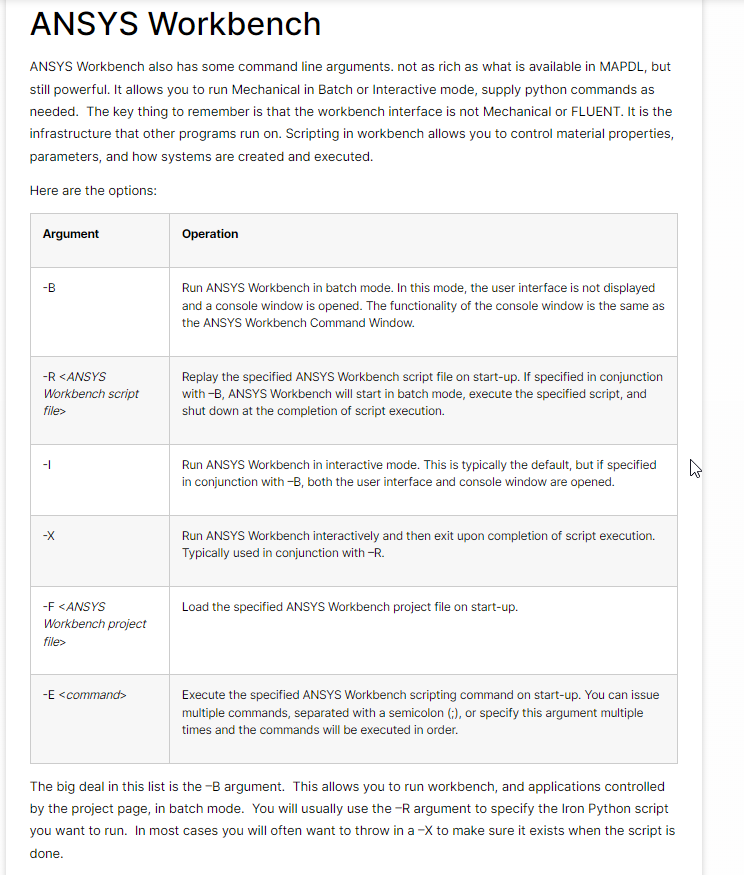
I have found in my research that there is a possibility to run Workbench in batch mode. And you can pass a Workbench Journal there.
April 21, 2022 at 12:39 pmErKo
Ansys EmployeeThis shows how to read a file with act calls, and then how to execute it from the journal file.
https://www.google.com/url?sa=t&source=web&rct=j&url=/forum/discussion/19206/run-mechanical-macro-from-workbench&ved=2ahUKEwjstcWulqX3AhXMOcAKHRGwC6YQFnoECAcQAQ&usg=AOvVaw1ImLiZlujklOc3f6QlBxid
April 22, 2022 at 9:08 amAnsys Employee
Below is a small example that we can run in batch from the command prompt and that creates first a static system in workbench, adds a Geometry (obviously you need to add your own geometry file as you can not use the one define here Bracket is just for this example ), and then it adds an ACT API call to add a comment (see cmd'' AddComment()"" and the model.SendCommand in the wbjn below). Be aware though that not all API calls might come through (this is a limitation). Also if you want to read the command in from a file, so instead of typing them in as below in the wbjn example, then see the above post and the link where this is done (read in api calls from file, using the open and read methods). Finally it saves the wbpj.
wbjn journal sample file:
--
SetScriptVersion(Version="19.4.112")
template1 = GetTemplate(TemplateName="Static Structural",Solver="ANSYS")
system1 = template1.CreateSystem geometry1 = system1.GetContainer(ComponentName ="Geometry")
geometry1.SetFile(FilePath ="C:\Bracket.agdb")
cmd='''
ExtAPI.DataModel.Project.Model.AddComment '''
modelComponent1 = system1.GetComponent(Name="Model")
modelComponent1.Refresh
model = system1.GetContainer(ComponentName="Model")
model.Edit(Interactive=False)
model.SendCommand(Language="Python", Command=cmd)
Save(FilePath="C:/testcomment.wbpj",Overwrite=True)
--
Below is what you need to copy paste into the command prompt (this is for version v212 so you might need to change that part accordingly depending on your version and installation location) - also you (command prompt) need to be in the same directory as the wbjn file:
"C:\\Program Files\\ANSYS Inc\\v212\\Framework\\bin\\Win64\\runwb2" -B -R "testcomment.wbjn"
Hope this helps -
Erik
April 23, 2022 at 7:00 pmSubscriberThank you both for your help. Unfortunately, due to the limitations of the commands in batch mode for my script, it does not seem to be possible to run this using it.
Viewing 3 reply threads- The topic ‘Is it possible to run ACT Mechanical Scripting in batch mode?’ is closed to new replies.
Innovation Space Trending discussions
 Top Contributors
-
peteroznewman
 6625
6625 -
scabo
 1906
1906 -
Dennis Chen
 1469
1469 -
javat33489
 1312
1312 -
Shyam Prasad V Atri
1022
Top Rated Tags
© 2026 Copyright ANSYS, Inc. All rights reserved.
Ansys does not support the usage of unauthorized Ansys software. Please visit www.ansys.com to obtain an official distribution.
-


The Ansys Learning Forum is a public forum. You are prohibited from providing (i) information that is confidential to You, your employer, or any third party, (ii) Personal Data or individually identifiable health information, (iii) any information that is U.S. Government Classified, Controlled Unclassified Information, International Traffic in Arms Regulators (ITAR) or Export Administration Regulators (EAR) controlled or otherwise have been determined by the United States Government or by a foreign government to require protection against unauthorized disclosure for reasons of national security, or (iv) topics or information restricted by the People's Republic of China data protection and privacy laws.

 You are navigating away from the AIS Discovery experience