Ansys Assistant will be unavailable on the Learning Forum starting January 30. An upgraded version is coming soon. We apologize for any inconvenience and appreciate your patience. Stay tuned for updates.
General Mechanical

General Mechanical

Topics related to Mechanical Enterprise, Motion, Additive Print and more.

Incomplete Access to Analysis & Component Systems in Workbench 2023

    • Edmund Totah
      Subscriber

      Hello,

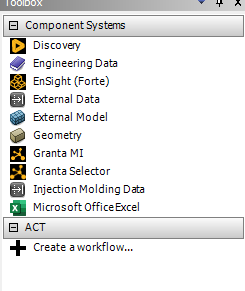
      I am having an issue with accessing all of the different component & analysis systems in Workbench (see image below). I currently only have access to a few component systems and no analysis systems. This problem first arose when I updated ANSYS to 2022, but I was able to get around it by opening my existing Static Structural files from 2021 in 2022. Having recently updated to 2023, I have reached a point where this work around doesn't work anymore as I need to open new systems.

      Since I am able to open my Static Structural files with no issue in 2023, Im thinking this shouldn't be too complicated of an issue. I did some troubleshooting to no avail, though I discoverd that the issue could potentially be with the licensing.

      I am wondering if anyone else has had a similar issue or have any advice on how to regain access to all of the component systems. Thanks!

    • Sampat Kumar
      Ansys Employee

      Hi Edmund Totah,
      Have you tried to reset the configuration of Ansys 2023 by renaming the %appdata% and %temp% please let me know. 
      1. Reset the AppData – (Go to the start menu, search for %appdata%, or type %appdata% in the address bar of the file explorer, and then click on the ANSYS folder, where you will find the particular Ansys version folder. Just rename the particular Ansys version like v231 to V231.old or if you want to reset all the versions of Ansys then you can directly rename the Ansys folder to Ansys.old. 
      2. Go to the Start Menu and open %temp% folder-> Search for ‘.ansys’ folder and rename it to ‘.ansys.old’ then launch the application. 


      Regards,
      Sampat


    • Edmund Totah
      Subscriber

      Hi Sanpat,

      Thank you for your advice. I have not previously tried that method. However, after reseting the confirugation, I am still getting the same error. Are there any other configurations changes (or other changes in general) I could make that may solve the issue?

      Thank you,

      Edmund Totah

    • Edmund Totah
      Subscriber

      Quick update: so I reinstalled ANSYS, and looking over the instructions provided by my university, they instruct us to not install the license manager. I find that a little odd, would installing and configuring the license manager potentially solve the issue?

Viewing 3 reply threads
  • The topic ‘Incomplete Access to Analysis & Component Systems in Workbench 2023’ is closed to new replies.

[bingo_chatbox]