Ansys Assistant will be unavailable on the Learning Forum starting January 30. An upgraded version is coming soon. We apologize for any inconvenience and appreciate your patience. Stay tuned for updates.
3D Design

3D Design

Topics related to Ansys Discovery and Ansys SpaceClaim.

Importing drawing file to Ansys Design Modeler

    • arjang
      Subscriber

      Hello


      I have a simple 2D geometry designed in AutoCAD and I would like to import it into Design Modeler. However I receive the following error message when I try to import DWG and DXW files:


      I would appreciate it if I could get some advice on how to resolve this issue.

    • Rob
      Forum Moderator

      It's possible that you've not installed the CAD readers but equally dxf/dwg files can cause problems due to the format. Can you export STEP and try that? 

    • Keyur Kanade
      Ansys Employee

      with student version you can not import dwg files. please check following link. 


      https://www.ansys.com/en-in/academic/free-student-products?utm_source=studentcommunity&utm_campaign=studentcommunity&utm_content=Studentproduct&utm_source=studentcommunity&utm_campaign=studentcommunity&utm_content=Studentproduct


      please use step, iges or parasolid format 

    • arjang
      Subscriber

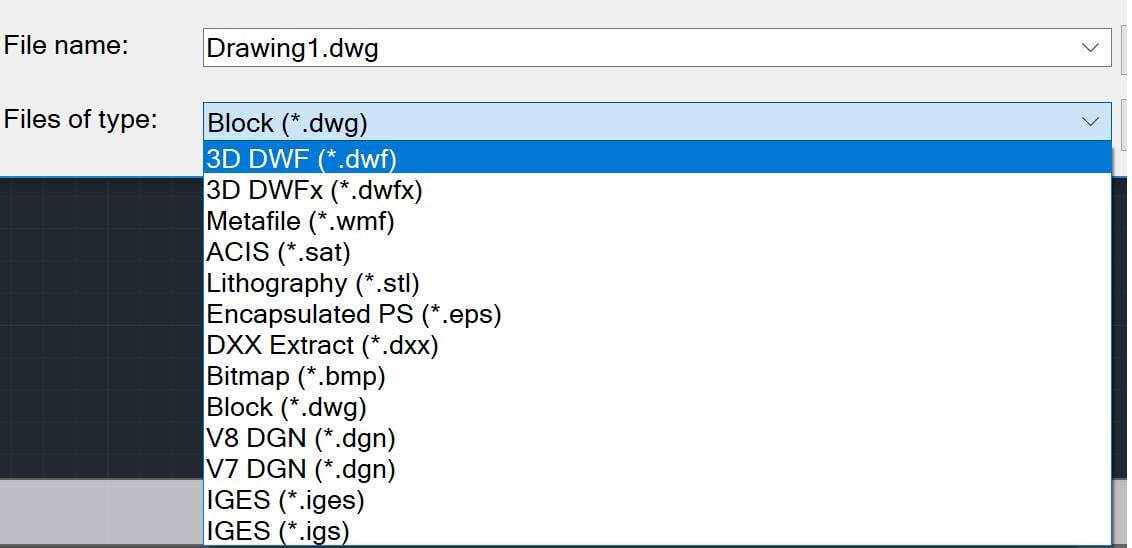
      Thank you kkanade for your response. I tried IGES format but I got the same error. I tried all the other available formats that I could export my drawing (image below) and none of them worked. For some reason I do not see the step or parasolid format. Do you think there is is till some issue with my version of ANSYS? Or is there another way to resolve the issue?


    • arjang
      Subscriber

      Hello rwoolhou


      Thank you for your response. For some reason I am not able to export STEP, maybe my AutoCAD is limited. As I mentioned to kkanade, I tried all the available export formats (image below) and none of them opened in ANSYS, I got the same error message. Do you know of any alternate solution?


    • Keyur Kanade
      Ansys Employee

      please convert your drawing in autocad into a surface or solid body. then try.

    • Rob
      Forum Moderator

      Also, click on the DesignModeler box and set properties to mixed lines & surfaces (or similar): I've had another user have problems with AutoCAD & SolidEdge and think there's something odd with the export.  Creating faces or solids ought to resolve this too. 

    • arjang
      Subscriber

      Hello rwoolhou and kkanade


      Thanks to your useful advice, my issue is resolved! I first exported the IGES files using AutoCAD Mechanical and then set the properties of DesignModeler to mixed lines and surfaces. I did not need to try to create a surface or solid on AutoCAD.

    • Keyur Kanade
      Ansys Employee

      good. 


      can you mark this as 'is solution' to help others on forum. 

    • mahmoud14
      Subscriber


      Does anybody know how I can import a 2D AutoCAD  file as a section! to ANSYS workbench and assign it to a line body.
      Many thanks

    • Keyur Kanade
      Ansys Employee

      please create a new post as this is marked as solved. 

    • mahmoud14
      Subscriber

      Hi,
      Does any body know how to import a CAD file to ANSYS workbench as a CROSS- SECTION  for beam.
      Thanks a lot for your helps.

Viewing 11 reply threads
  • The topic ‘Importing drawing file to Ansys Design Modeler’ is closed to new replies.

[bingo_chatbox]