-
-
April 24, 2018 at 4:04 pm
niklas
SubscriberHow can I import CAD models with parameters from Inventor? I am aware that I need DS or ANS before the parameter name (DS_example, ANS_example), am I missing something here? I have these licences; ANSYS AIM Pro, ANSYS Academic Research, ANSYS Academic Teaching Advanced, ANSYS Academic Teaching DesignSpace.
-
April 24, 2018 at 8:53 pm
peteroznewman
SubscriberDid you run the CAD Configuration Manager? It's under Utilities in the Windows Start menu under ANSYS.
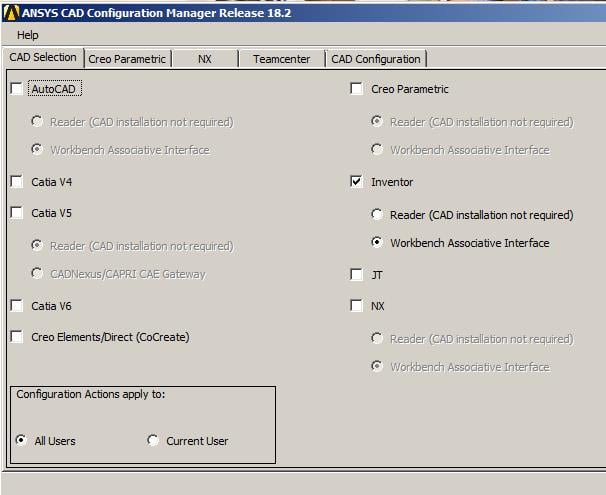
Start that, then check Inventor and select Workbench Associative Interface.
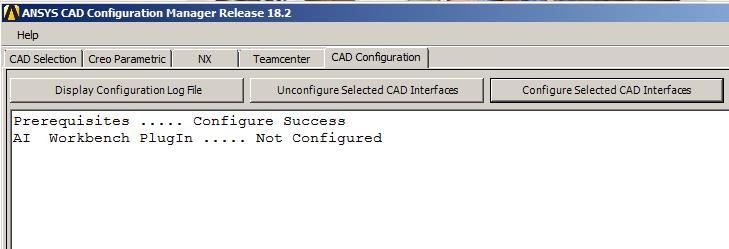
Then click the Next >> button, and finally click Configure Selected CAD Interfaces button.
I don't have Inventor, but if I did, it would say Configure Succcess instead of Not Configured.
-
April 25, 2018 at 7:39 am
niklas
SubscriberI did now try that and it did not work, got this;Â AIÂ Workbench PlugIn ..... Configure Failed -- Registration Error.
-
April 25, 2018 at 6:24 pm
peteroznewman
SubscriberOkay, do you in fact have a license for the AI Workbench PlugIn?
At work, we have three CAD Associative Interface licenses: Pro/E, NX (which used to be called UG), and SOLIDWORKS.
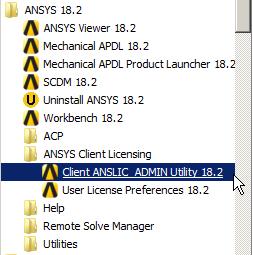
Use the Windows Start menu to look at All Programs and pick the highlighted item.
When that opens, click Display the License Status
Here are our licenses for UG and SOLIDWORKS.
hostname--rocl3503.jpg?width=690&upscale=false" alt="">
You should have something like Users of piai or some such code. If you don't then contact your IT/Purchasing/ANSYS rep.
If you do, then perhaps the CAD interface was not selected during Product Installation on your computer.
Â
-
- The topic ‘Importing CAD models with parameters from Inventor’ is closed to new replies.

-
6465
-
1906
-
1458
-
1308
-
1022
© 2026 Copyright ANSYS, Inc. All rights reserved.