Hello everyone,
For my PhD work, I am attempting to run a whole “Static Structural” simulation on Ansys mechanical using only the scripting feature, utilizing PyMechanical to run the simulation through VS Code. So far, I have been using the “Recording” feature in Mechanical Scripting for help with the code needed to run the simulation.
I have csv files that have displacement and temperature data for multiple timesteps for the model on which I am running the simulation. I have so far been able to implement displacements and velocities in every timestep without the need to use “Imported Load” since these boundary conditions only apply to certain edges/bodies. However, my temperature data consists of x and y coordinates (2-D Geometry) and the temperature at that point for every timestep. Doing this while utilizing GUI, I am easily able to utilize “Imported Load” to set each column to a timestep and everything is imported without issue. However, with scripting, I get stuck at filling up the table to assign timesteps to specific rows:
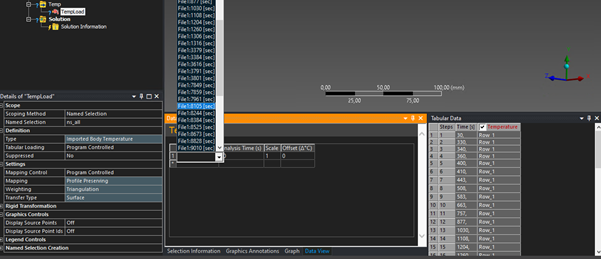
The ”Recording” feature has unfortunately not been of much help, as when I assign a column of my imported data to an analysis time to fill up the table, no code is being recorded, which leads me to believe that this task is not automatable.
I am using the following code to initialize the imported load:
analysis = Model.AddStaticStructuralAnalysis()
Temp = analysis.AddImportedLoadExternalData()
TempLoad = Temp.AddImportedBodyTemperature()
Of course, this is just to initialize, and I use other commands to import my csv file. But my question is: is there any function that is able to input data into the table such that I can fill it up with the appropriate columns for each timestep? If not, is there any other way to use the temperature data in the csv file to automatically run the simulations?
Thanks in advance

 This topic has been answered!!

















 You are navigating away from the AIS Discovery experience