

TAGGED: geometry, mesh, multiple-bodies
-
-
September 4, 2020 at 6:17 pm
ThePhontyfex
SubscriberHi guys!!
I've already asked this question and got an answer, but couldn't figure out how to do it.
So I ask again, explaining myself better.
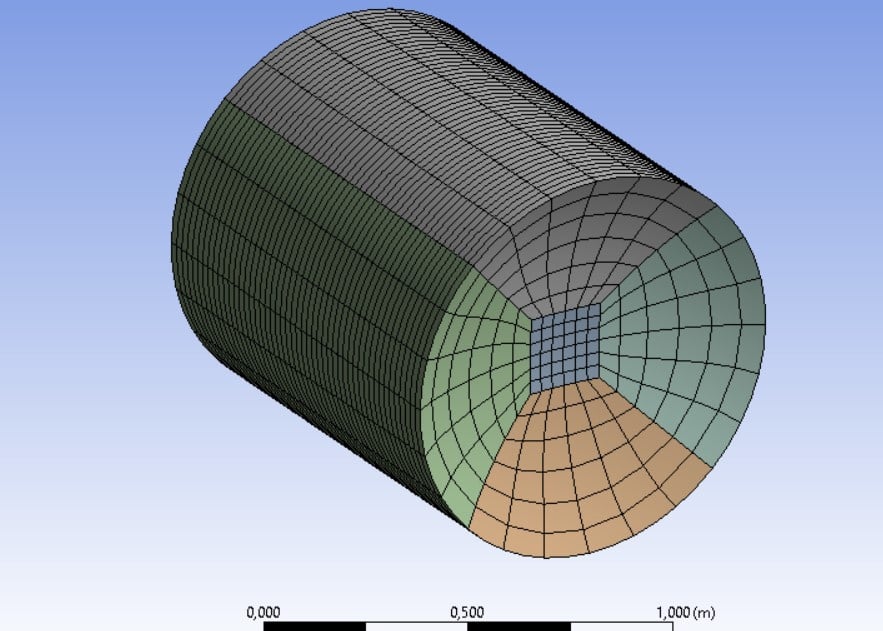
i have these two projects in ansys: the cylindrical beam and the sphere.
I want to join these two bodies, creating only one and keeping the same mesh. is it possible to do this?
could you explain it to me step by step?
thanks for the help.
P.S the beam is built with Mechanical while the sphere is built with APDL
September 7, 2020 at 5:46 amKeyur Kanade
Ansys EmployeeIt was answered at nHi guys!!I have a question: can I import two different project (geometry and mesh) in Workbench? I have a beam (geometry and mesh) and a sphere (geometry and different mesh) that fit together. I have different project: the beam created with workbench and the sphere created with Mechanical APDL (with command promt). Is it possible to combine them in a single project on the workbench? How can i do it?P.S. The new website is spectacular!!!/forum/discussion/19229/import-multiple-mesh
Which step you are stuck, please explain. nRegards,nKeyurnGuidelines for Posting on Ansys Learning ForumnHow to access ANSYS help linksnnSeptember 7, 2020 at 8:24 pmSubscriberI import .cbd file from apdl to workbench (external model connected to data and mesh of a modal analysis) then I have to import the cylindrical beam in the same project. how can i do that?nSeptember 8, 2020 at 5:39 amAnsys EmployeeIt is very clearly mentioned in Aniket's post how to import cbd file and connect with other components. Please go through help for more details. You can also search on this forum about importing files. nRegards,nKeyurnGuidelines for Posting on Ansys Learning ForumnHow to access ANSYS help linksnnViewing 3 reply threads- The topic ‘Import different project to do one only’ is closed to new replies.
Innovation Space Trending discussions
 Top Contributors
-
peteroznewman
 6570
6570 -
scabo
 1906
1906 -
Dennis Chen
 1463
1463 -
javat33489
 1311
1311 -
Shyam Prasad V Atri
1022
Top Rated Tags
© 2026 Copyright ANSYS, Inc. All rights reserved.
Ansys does not support the usage of unauthorized Ansys software. Please visit www.ansys.com to obtain an official distribution.
-


 You are navigating away from the AIS Discovery experience