-
-
December 9, 2019 at 3:47 pm
soloviev
SubscriberHello,
We are hoping to implement bottom topography in a model we currently run.
We were planning to do so by importing a file to the geometry (either space claim or design modeler), if possible.
We were planning to use ArcGIS to map the bottom topography.
Is there a proper way to export the file/data from ArcGIS to import into the fluent geometry?
Â
Thanks,
Alex
-
December 9, 2019 at 4:05 pm
Rob
Forum ModeratorSpaceClaim will read a lot of formats, so that's probably the best route. I've not used ArcGIS but would expect it to export stl?Â
-
December 9, 2019 at 4:13 pm
soloviev
SubscriberThank you. It appears that ArcGIS exports to either VRML or DEM. Are either of these compatible? Otherwise I can look into transferring file types.
Â
Thanks,
Alex -
December 10, 2019 at 10:42 am
Rob
Forum ModeratorTry the VRML, technically that's an stl with colour assigned to the facets.Â
-
April 8, 2020 at 8:33 pm
-
April 9, 2020 at 4:33 am
Keyur Kanade
Ansys EmployeeCan you please try VRML (*.wrl).Â
Regards,
Keyur
Â
If this helps, please mark this post as 'Is Solution' to help others.
Guidelines on the Student Community
How to access ANSYS help links
Â
-
April 9, 2020 at 1:13 pm
soloviev
SubscriberI will try that. Right now I am using ArcGIS and they don't have the option to export as VRML so I will try to find a way to transfer to that file type and then let you know if it worked!
Â
Thanks,
Alex
-
April 9, 2020 at 1:49 pm
Rob
Forum ModeratorThe object is a solid: can you check that you don't have a rogue point that's some distance from the rest of the data.
-
April 14, 2020 at 5:30 pm
soloviev
SubscriberI tried exporting to VRML but it exported to .x3dv rather than .wrl. I noticed that ANSYS 19.2 does not accept this file type. Does the new versions of ANSYS? I am working to convert it to .wrl but struggling currently.Â
Â
I will check that there is no rogue point in the .stl file.
Â
Thanks,
Alex
-
April 15, 2020 at 10:21 am
Rob
Forum ModeratorI've not seen that format before, maybe Ensight can read it?Â
-
April 15, 2020 at 2:47 pm
soloviev
SubscriberI will give it a try! I looked it up and it seems its an updated type of VRML file.Â
Â
Thanks,
Alex
-
April 24, 2020 at 4:06 pm
soloviev
SubscriberHello,
I have tried importing a few different files into SpaceClaim and they import fine, but are a flat faceted body, I was wondering if this may have to do with the GPS coordinate system that is used. Is there a specific one I should use when exporting my geometry files?
Â
Thanks,
Alex
-
May 6, 2020 at 2:20 pm
soloviev
SubscriberHello,
It was suggested that I try using ICEM for this task I am trying to complete, is this a useful suggestion? I am planning to take an ICEM course in order to learn the program, but if it will not work I will not waste my time.Â
Thanks,
Alex
-
May 6, 2020 at 3:59 pm
Rob
Forum ModeratorCheck how the data is formatted, do they explicitly have an "up" coordinate? Some of the NASA/GIS data can be in odd units too.Â
-
May 7, 2020 at 3:23 pm
soloviev
SubscriberWhen I look at the STL file, there is a column (ranging from -4 to -20 or so) that is indicative of the height. I'm not sure how to check the STL file or DWG file for 'up' other than that.Â
I checked the data that I used for all of the coordinates and this is what information I could find... is there a better coordinate system or such to use when exporting?Â
Â
Thanks,
Alex
-
May 7, 2020 at 3:36 pm
Rob
Forum ModeratorI wonder if it's CAD accuracy then: you're trying to pick up fractions of a mm in dimensions of around 200km. Can you scale the points to something more sensible (ie move to the origin)?Â
-
May 26, 2020 at 1:35 pm
soloviev
SubscriberHello,
Â
I have been in discussion with someone from ArcGIS and they are asking exactly how ANSYS SpaceClaim uses the drawing file for depths/elevation, so that he can get a better understanding of how to export the file from GIS properly to fit the needs of the modeling program.Â
Â
Thanks,
Alex
-
June 2, 2020 at 4:52 pm
soloviev
SubscriberHello,
Â
I have tried using a different program (QGIS) to convert into STL and when I load into SpaceClaim I am still getting a flat topography. I tried exaggerating the z direction by a factor of 5, and it is still completely flat.Â
Â
Thanks,
Alex
-
June 3, 2020 at 12:17 pm
Rob
Forum ModeratorSpaceClaim will read the stl as exported so it's got to be a problem from that side. If you read the stl into another CAD tool or Fluent Meshing how does it look?
-
June 4, 2020 at 2:11 pm
soloviev
SubscriberHello,
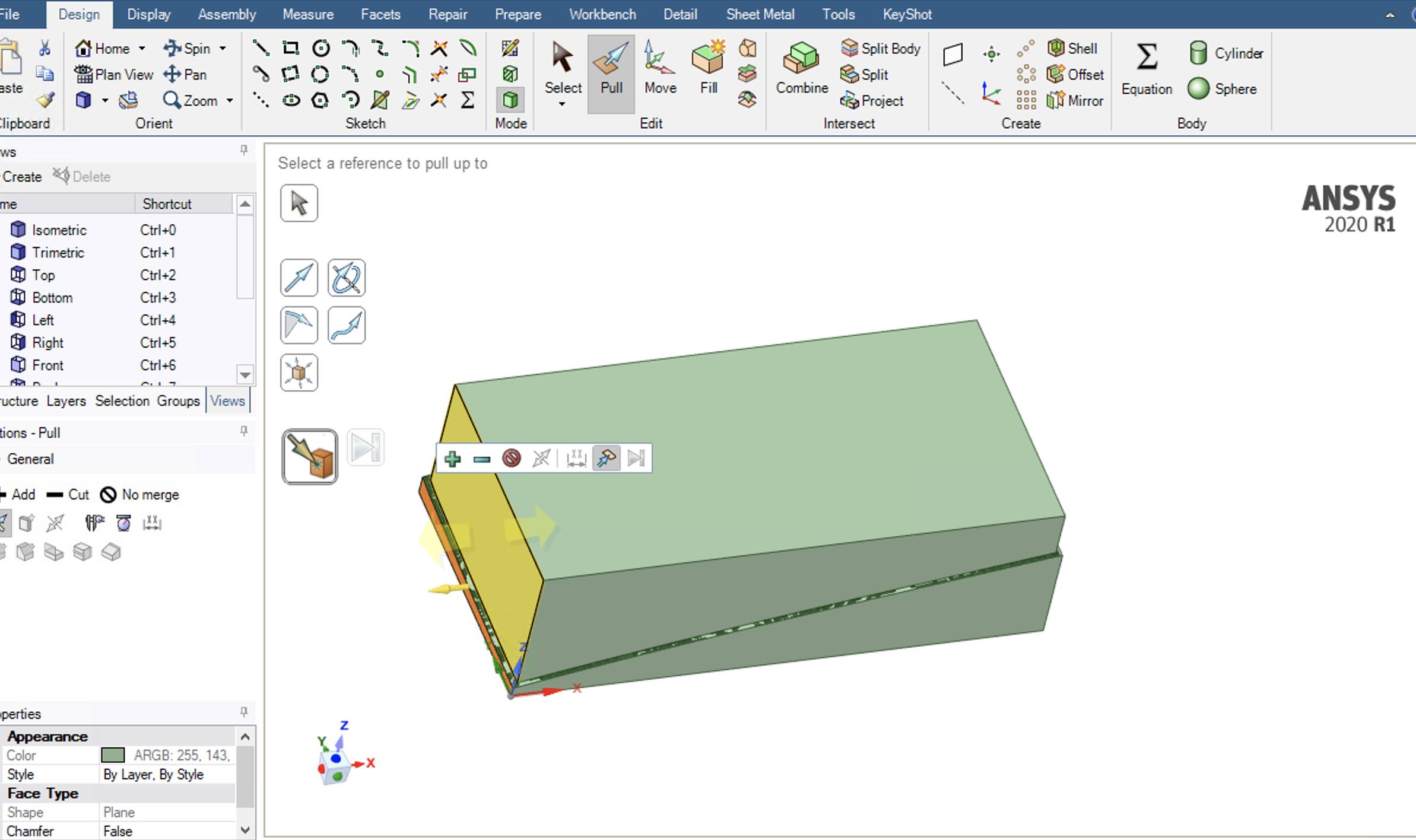
I have finally imported the STL into space claim. I transferred it from a faceted body to a solid. I am now trying to create a box above the uneven surface, but connected to it, that I will have fluid flow through. I am not familiar with space claim and usually use design modeler. What is the easiest way to do this? I attached a screenshot if it is helpful.
Thanks,
-
June 4, 2020 at 6:24 pm
soloviev
SubscriberI was able to add a box that overlaps the bottom piece from the STL. I then tried to use the merge tool to cut the box to the shape of the bottom piece, but got the error that the two cannot be merged. Is there a better way to do this?Â
Â
Thanks,
Alex
-
June 5, 2020 at 3:56 pm
Rob
Forum ModeratorI'd create a box that's slightly smaller than the face (and to the height you want) then slice the box. As it's an stl import you may need the Faceted menu.Â
-
June 5, 2020 at 4:01 pm
soloviev
SubscriberSo slice the box using the faceted body? I tried doing other operations with the bottom piece as a faceted body and it said I needed it as a solid to complete the operations.Â
-
June 8, 2020 at 4:26 pm
Rob
Forum ModeratorYes, make the box so the faceted face splits it in two.Â
-
June 8, 2020 at 8:06 pm
soloviev
SubscriberI will try this.Â
Â
Thanks,
Alex
-
June 10, 2020 at 1:40 pm
soloviev
SubscriberI was able to cut the solid with the faceted body (I first turned the box to a faceted body, cut it, then turned both back to solids. I am now trying to get the bottom (slightly larger) piece to match up with the box I cut. When I try to pull the face the program freezes for many hours (count right now is 12 hours) and doesn't complete. Is there a better way to do this? I'm using a very small model (100 mm) and on a 54 processor computer, so I don't know why it is not able to process the movement.Â
Â
Â
Thanks,
Alex -
June 10, 2020 at 2:48 pm
Rob
Forum ModeratorThe core count doesn't matter, it's RAM that tends to be the bottle neck. How many facets are there? Equally it's an operation that should take minutes at most.Â
-
June 10, 2020 at 3:51 pm
soloviev
SubscriberThe computer has 528 GB of RAM. I'm not sure how to check how many facets, but there is a large amount. When I convert to solids to pull the face, there are quite a few faces on the part of the geometry that is complex topography.Â
Â
Thanks,
Alex -
June 10, 2020 at 7:02 pm
soloviev
SubscriberSo I actually was able to accomplish this by splitting the bottom body using the plane from the face of the top body on each side. I'm still not sure why the program froze and could not handle the face pulls.Â
Last question: How important is sharing topography? I have these two separate boxes. One will be the sediment/bottom of the ocean, and the other will be water with a flow from an inlet/outlet.Â
Thanks,Â
Alex
-
June 12, 2020 at 10:23 am
Rob
Forum ModeratorWhat mechanism do you intend to use to move the sediment?Â
-
June 17, 2020 at 3:57 pm
soloviev
SubscriberWe have not decided on if we are planning to implement or move sediment within the model. It is more to study magnetics using realistic bottom topography. I do have another issue though. I am trying to mesh this domain and every method I use has errors. I tried meshing alone, then doing the fluent/meshing coupled watertight geometry and fault tolerant meshing in 2020R1. The most recent error was: Error: state/object/execute-command:Exception encountered in S_InitializeWorkflow
Error Object: ()
Â
Thanks,
Alex
-
June 18, 2020 at 10:59 am
Rob
Forum ModeratorIf you don't need the "solid" part won't you just have one volume? If so delete/suppress for physics that volume. Is the fluid region a volume in SpaceClaim?Â
-
June 22, 2020 at 5:47 pm
soloviev
SubscriberSo suppress the solid part for physics. Yes, the fluid region is a solid volume.
Â
Thanks,
Alex
-
- The topic ‘Implementing bottom topography into model’ is closed to new replies.
-
6144
-
1906
-
1442
-
1308
-
1022
© 2026 Copyright ANSYS, Inc. All rights reserved.