-
-
December 28, 2019 at 5:18 pm
HollyFart
SubscriberHello,
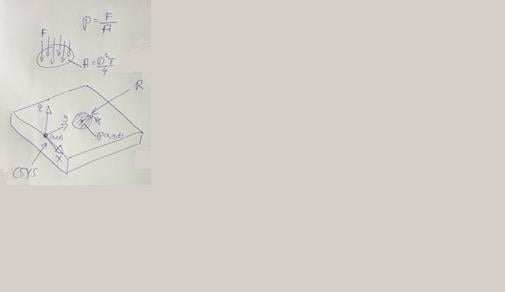
I'm trying to implement a moving pressure load with a circle shaped area, which is moving along the Y direction via do loop.
The pressure value is uniform and located within a circle shaped area.
The moving direction is the Y axis. It should start at the global CS (0,0,0) and heads towards the positive Y axis.
The load isn't moving, I don't have a clue why.
The script is posted below due to size restrictions in the post.
Best regards,
HF
-
December 28, 2019 at 5:19 pm
HollyFart
SubscriberAnd the used script:
total_time = 10 ! Total simulation time in seconds
time_steps = 100 ! Total amount of steps
time_inc = total_time/time_steps ! Time increment in seconds
V_p = 0.01 ! m/s Load velocity
Radius = 0.005 ! m Radius of the load area
PV = 1E07 ! Pa Load value
nsub,time_steps
*do,I,1,time_steps,1
time=I*time_inc
Y_Local=V_p*time
wpcs,-1,0 ! WP @ GLOBAL ORIGIN
wpof,,Y_Local ! OFFSET WP ALONG ITS Y AXIS (i.e. provide current position of center of circle along Y axis)
cswp,11,1 ! DEFINE Cylindrical COORDINATE SYSTEM @ WP ORIGIN
esel,s,ename,,154 ! Select SURF154 elements
sfed,all,,pres ! Delete old pressures if any
nsle ! Select nodes attached to selected SURF elements
nsel,r,loc,x,Radius ! Select nodes within radius of circle, 0.005m
csys,0 ! Set CSYS back to global
esln,r ! Select SURF elements attached to the nodes within the circle
sfe,all,,pres,,PV ! Apply pressure based on your calculation at the said time.
allsel,all
outres,all,all
*if,I,EQ,1,THEN
/prep7 ! Enter into /prep7 as ET and ESURF are valid only in /PREP7
et,100,154 ! Create a new element type for SURF154
cmsel,s,surface1 ! Select nodes on a face via Face named selection
type,100 ! Set the element type as 100
esurf ! Create surface effect elements on the selected nodes
allsel,all ! Select everything back
/solu
time=I*time_inc
Y_Local=V_p*time
wpcs,-1,0 ! WP @ GLOBAL ORIGIN
wpof,,Y_Local ! OFFSET WP ALONG ITS Y AXIS (i.e. provide current position of center of circle along Y axis)
cswp,11,1 ! DEFINE Cylindrical COORDINATE SYSTEM @ WP ORIGIN
esel,s,ename,,154 ! Select SURF154 elements
sfed,all,,pres ! Delete old pressures if any
nsle ! Select nodes attached to selected SURF elements
nsel,r,loc,x,Radius ! Select nodes within radius of circle, 0.005m
csys,0 ! Set CSYS back to global
esln,r ! Select SURF elements attached to the nodes within the circle
sfe,all,,pres,,PV ! Apply pressure based on your calculation at the said time.
allsel,all
outres,all,all
*else
time=I*time_inc
Y_Local=V_p*time
wpcs,-1,0 ! WP @ GLOBAL ORIGIN
wpof,,Y_Local ! OFFSET WP ALONG ITS Y AXIS (i.e. provide current position of center of circle along Y axis)
cswp,11,1 ! DEFINE Cylindrical COORDINATE SYSTEM @ WP ORIGIN
esel,s,ename,,154 ! Select SURF154 elements
sfed,all,,pres ! Delete old pressures if any
nsle ! Select nodes attached to selected SURF elements
nsel,r,loc,x,Radius ! Select nodes within radius of circle, 0.005m
csys,0 ! Set CSYS back to global
esln,r ! Select SURF elements attached to the nodes within the circle
sfe,all,,pres,,PV ! Apply pressure based on your calculation at the said time.
allsel,all
outres,all,all
*endif
*enddo
-
December 28, 2019 at 5:20 pm
-
January 1, 2020 at 5:03 am
BenjaminStarling
SubscriberDo you have an input file that you can provide such that I can investigate further? My advice is to step through your code line by line to see what is occuring. Are you using this in Workbench/Mechanical or MAPDL?
My first observations are so:
- You are creating surface elements after the first stage of the do loop, are there no surface elements in the model during the first stage?
- Your do loop isn't solving between steps, use the *get command to get the current step/substep to increment your do loops between steps.
- You are creating surface elements when a surface effect (SFE command) may be sufficient.
The logic overall seems sound though and you should be able to get this to work. Link below hints that this is more complicated in MAPDL than in Workbench. So if you aren't commited to MAPDL I would recommend switching to Workbench.
-
January 2, 2020 at 5:43 am
HollyFart
SubscriberHello,
thank you very much for your answer. Of course I can provide you the input file.
I’m working with Ansys Workbench 16 and use command snippets to implement APDL scripts.
Regarding your questions:
1.      There are no surface elements in my model before I initiate the load loop, because it’s not really possible to implement several different elements (2D +3D) via GUI in workbench.
2.      *Get command, okay sounds plausible
3.      I already use SFE to apply the load on all nodes in a moving circle shaped area.
Best regards
HF
-
January 2, 2020 at 9:57 am
BenjaminStarling
SubscriberHi Holly,
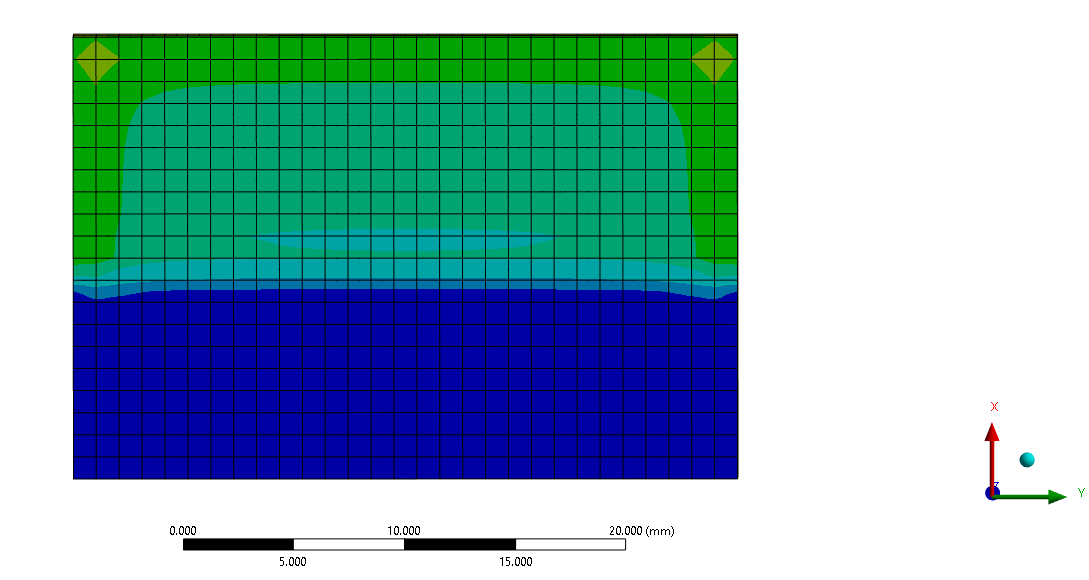
I created a mock shell model with a fixed support around the edges.
Please see attached images highlighting the following things.
- Considering you are in the workbench environment you do not need a do loop to acheive this (it may not have been required in MAPDL either)
- I have created a cylindrical CS in workbench which I have identified as CS12. I then move/redefine CS12 based on itself. No need to move the WPCS around and create more CS.
- Your intialising scripts to create the surface elements and define parameters should run at the first load step. The moving of the CS and applying the pressure needs to occur at each loadstep
- You should not be using substeps in this analysis. During a substep you cannot move the CSYS/Pressure load. Only use substeps if they are required for ramping the load/convergance issues. Even in that instance you may not get the desired effect of the rolling pressure.
- I have set up my analysis with an increment of 5mm across a 100mm plate, going from 25mm to 75mm across the width of a plate. I have input these numbers directly but these can all be parameterised. I moved the CSYS back from where I would like it to start such that the first load step moved it to the desired location.
If any of the features I have relied upon are not available in your academic version please let me know and I will find a work around. I am working on 2019 R3.
-
January 7, 2020 at 6:35 pm
HollyFart
SubscriberHi Benjamin,
Thank you for your answer. Your way is quite simple and effective.
Do you know how move the CSYS/Pressure without complex loop?
I would like to move the load with a high resolution and it’s very exhausting to implement 100 single steps and I’m still struggle to loop it.
I work with R16 at home and R19.1 at work.
Best regards Holly
-
January 7, 2020 at 11:36 pm
BenjaminStarling
SubscriberAs I mentioned above, if you are using workbench, set the APDL command snippet to run at each load step. This is an option in the details window of the APDL command snippet. You do not require a do loop, and you do not need to cdo any extra work to implement the command for many load steps.
If you are set on using a do loop you need to include the time command and the solve command in your loop. Increment the time command with a parameter that is linked to the do loop. i.e.
*do,I,1,total_time,1
!Insert commands to move and apply pressure load
TIME,I
SOLVE
*enddo
The time command tells the solve command which timestep should be solved.
-
January 8, 2020 at 5:03 pm
HollyFart
SubscriberHi Benjamin,
thank you very much for your answer. It’s an elegant solution and it’s working. Maybe I get rid of the loop idea, because it’s not really simple to get it work. I would like to transfer the results from pressure load to heat flux. For this I need to change the used elements from SURF154 to SURF152, and of course you the transient thermal module.
I use the following commands, similar to the pressure load:
-
January 8, 2020 at 5:04 pm
HollyFart
Subscriber
All steps:
H_Flux=1000
Radius=0.003
Â
Step 1:
/prep7Â Â Â Â Â Â Â Â Â Â Â Â Â Â Â Â Â ! Enter into /prep7 as ET and ESURF are valid only in /PREP7
et,101,152Â Â Â Â Â Â Â Â Â Â Â Â Â ! Create a new element type for SURF152Â Â Â Â Â Â Â Â Â
cmsel,s,surface1Â Â Â Â Â Â Â Â ! Select nodes on a face via Face named selection
type,101Â Â Â Â Â Â Â Â Â Â Â Â Â Â Â ! Set the element type as 101
esurf                  ! Create surface effect elements on the selected nodes
allsel,all               ! Select everything back Â
/solu                  ! Re-enter /SOLU
Â
wpcs,-1,0Â Â Â Â Â Â Â Â Â Â Â ! WP @ GLOBAL ORIGIN
wpof,,0Â Â Â Â Â Â Â Â Â Â Â Â Â Â ! OFFSET WP ALONG ITS Y AXIS (i.e. provide current position of center of circle along Y axis)
cswp,11,1Â Â Â Â Â Â Â Â Â Â Â ! DEFINE Cylindrical COORDINATE SYSTEM @ WP ORIGIN
esel,s,ename,,152Â Â Â Â Â ! Select SURF152 elementsÂ
sfed,all,,hflux        ! Delete old flux if any
nsle                ! Select nodes attached to selected SURF elements
nsel,r,loc,x,0,radius   ! Select nodes within radius of circle, 0.005m
csys,0Â Â Â Â Â Â Â Â Â Â Â Â Â Â Â ! Set CSYS back to global
esln,r                ! Select SURF elements attached to the nodes within the circle
sfe,all,,hflux,,H_flux    ! Apply hflux based on your calculation at the said time
allsel,all
outres,all,all

Â
Step 2:
Â
wpcs,-1,0Â Â Â Â Â Â Â Â Â Â ! WP @ GLOBAL ORIGIN
wpof,,0.01Â Â Â Â Â Â Â Â Â Â ! OFFSET WP ALONG ITS Y AXIS (i.e. provide current position of center of circle along Y axis)
cswp,11,1Â Â Â Â Â Â Â Â Â Â ! DEFINE Cylindrical COORDINATE SYSTEM @ WP ORIGIN
esel,s,ename,,152Â Â Â Â ! Select SURF152 elementsÂ
sfed,all,,hflux        ! Delete old flux if any
nsle               ! Select nodes attached to selected SURF elements
nsel,r,loc,x,0,radius   ! Select nodes within radius of circle, 0.005m
csys,0Â Â Â Â Â Â Â Â Â Â Â Â Â ! Set CSYS back to global
esln,r              ! Select SURF elements attached to the nodes within the circle
sfe,all,,hflux,,H_flux    ! Apply hflux based on your calculation at the said time
allsel,all
outres,all,all

-
January 8, 2020 at 5:04 pm
HollyFart
SubscriberBut it’s not working. Do you have an idea why?
Best regards Holly
-
July 8, 2020 at 7:43 am
SteBir
SubscriberHi you can find a helpful tutorial at YouTube
https://www.youtube.com/watch?v=dteRMtuXjdk
Â
-
June 27, 2023 at 12:51 pm
Noor Ur Rehman
Subscriber@BenjaminStarling
Hi Benjamin,
I have exactly the same Idea. i have simulated a moving load in the form of a circular area. Now i want to simulate it using square area. i have removed the cylindrical coordinate system.Â
when i run the simulation, I am not able to Move the load to the next step.
Your help is welcomed.
This is my codetotal_time = 10
time_step = 10
time_inc = 1
V_p = 2Â
Radius = 2
PV = 100/PREP7
et,100,154
cmsel,s,surface1
type,100
esurf
allsel,all               Â/solu  Â
*Do,I,1,total_time,1
Y_Local = V_p*TIMEwpcs,-1,0
wpof,,Y_LocalÂ
!cswp,11,1
esel,s,ename,,154
sfed,all,,pres
nsle
nsel,r,loc,X,0,10
nsel,r,loc,,Y,0,2
!csys,0
esln,r
sfe,all,,pres,,PV
allsel,all
outres,all,allTIME,I
SOLVE*enddo
Â
-
- The topic ‘Implement a do loop in Ansys Workbench 16 for uniform circle shaped pressure load’ is closed to new replies.
-
5824
-
1906
-
1420
-
1305
-
1021
© 2026 Copyright ANSYS, Inc. All rights reserved.