Ansys Products

Ansys Products

Discuss installation & licensing of our Ansys Teaching and Research products.

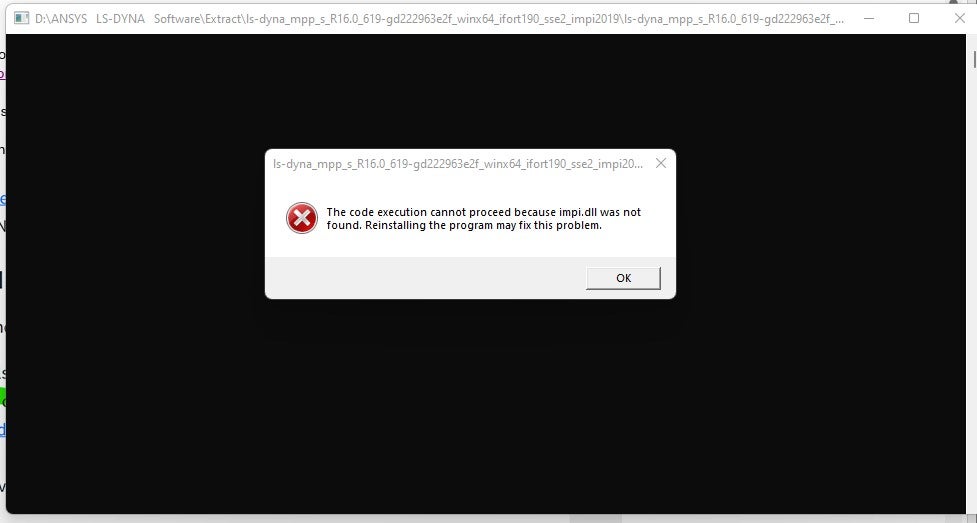
impi.dll was not found

TAGGED: 

    • hatefm
      Subscriber

      trying to install  LSTC-LS-DYNA  and the followin error:  " the code execution cacot proceed because  impi.dll was not found".  How can I get past this error message for installation?

    • hatefm
      Subscriber

      trying to install  LSTC-LS-DYNA  and the followin error:  " the code execution cacot proceed because  impi.dll was not found".  How can I get past this error message for installation? 


      What is causing this error?

    • Alex R.
      Ansys Employee

      Hello,

      LS-DYNA does not require installation. The version of LS-DYNA that is being executed is MPP. MPP LS-DYNA requires an MPI (Message Passing Interface) installation, such as Platform MPI, Open MPI, Intel MPI, or others, on your system. The version that you are trying to exectute was compiled to run with IntelMPI. Please make sure that IntelMPI is installed on your machine and that proper synax is used to call it. impi.dll is a part of IntelMPI. 

      " the code execution cacot proceed because  impi.dll was not found" - This error sugests that the intel MPI is not called/linked and ls-dyna mpp is being executed alone.

      The general syntax for running LS-DYNA MPP is mpirun –np ls-dyna.exe i=input.k memory=... .

      Please see: https://ftp.lstc.com/anonymous/outgoing/support/FAQ/mpp.getting_started ; https://ftp.lstc.com/anonymous/outgoing/support/OTRS/MPP_class_handout.pdf

      Please see Appendix O in LS-DYNA Manual: LS-DYNA MPP User Guide https://lsdyna.ansys.com/manuals/

      Thanks,
      Alex 

    • hatefm
      Subscriber

      Alex,


      Thank you for your response. 

      I installed Intel MPI  and was getting the same message when I ran the executable.

      I added the path to Intel MPI to the Windows path and rebooted the system.

      The O/S knows where the impi.dll  file is located.

      Now when I start the executable   file  "ls-dyna_mpp_s_R16.0_619-gd222963e2f_winx64_ifort190_sse2_impi2019.exe" to run the LS-DYNA  the command prompt screen flashes and nothing happens.

      The server is running; I also installed LS-Run.  What are the next steps?


Viewing 3 reply threads
  • You must be logged in to reply to this topic.