-
-
May 19, 2020 at 3:01 pm
mezkurra
SubscriberHello everybody,
I have a contact pair which is composed of several surfaces in the contact and target. I need to identify the contact element IDs of a certain surface.Â
I realized that the "select element" and "select mesh by ID" tools do not show CONTA174 elements. Neither these elements are displayed when the element type result is requested ("pnumtype"). However, CONTA174 element type is shown in the solver output, and contact elements can be identified if I transfer data to an Ansys APDL module.
Is there any tool to identify CONTA174 element IDs in Ansys Workbench?
Thank you,
Mikel
-
May 20, 2020 at 7:46 am
Aniket Chavan
Forum ModeratorInsert a user-defined result as follows:
Â
May 20, 2020 at 11:12 ammezkurra
SubscriberDear Aniket,
Thanks a lot. I managed to visualize the contact element IDs with your proposal.
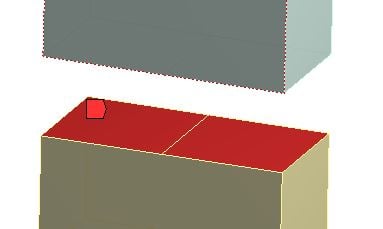
I have one more question. If the contact area is composed of more than one surface is there any way to identify the contact element ID of each surface, separately? As an example, in the following figure the contact area is divided into two surfaces. Is it possible to identify the contact element IDs of each surface?
Thanks in advance,
Mikel
Â
May 22, 2020 at 6:45 amAniket Chavan
Forum ModeratorPlease mark this as solution if your original query is solved. And even for the follow up query, wouldn't the original solution make sense? You can use probes to find individual ids of the elements, if the contour plot does not make it very clear.
-Aniket
How to access Ansys Online Help Document
How to show full resolution image
Guidelines on the Student Community
How to use Google to search within Ansys Student Community
Â
May 22, 2020 at 7:03 ammezkurra
SubscriberYou are right. Thank you very much!
Viewing 4 reply threads- The topic ‘Identifying contact elements in Ansys Mechanical’ is closed to new replies.
-
-
6465
-
1906
-
1458
-
1308
-
1022
© 2026 Copyright ANSYS, Inc. All rights reserved.