Ansys Assistant will be unavailable on the Learning Forum starting January 30. An upgraded version is coming soon. We apologize for any inconvenience and appreciate your patience. Stay tuned for updates.
General Mechanical

General Mechanical

Topics related to Mechanical Enterprise, Motion, Additive Print and more.

I cannot get Local Max Probes to display, where should I start?

    • Kyle_W
      Subscriber

      Sporadically, I have had several models that will not display Local Max Probes. I right click in the results window and select the relevant option but no tags are produced. I checked in Options>Graphics and set the number of probes to display to 10, but nothing. Has anyone had a similar experience and how di they resolve it?

    • Ashish Khemka
      Forum Moderator


      Are you not getting the probes as indicated below?
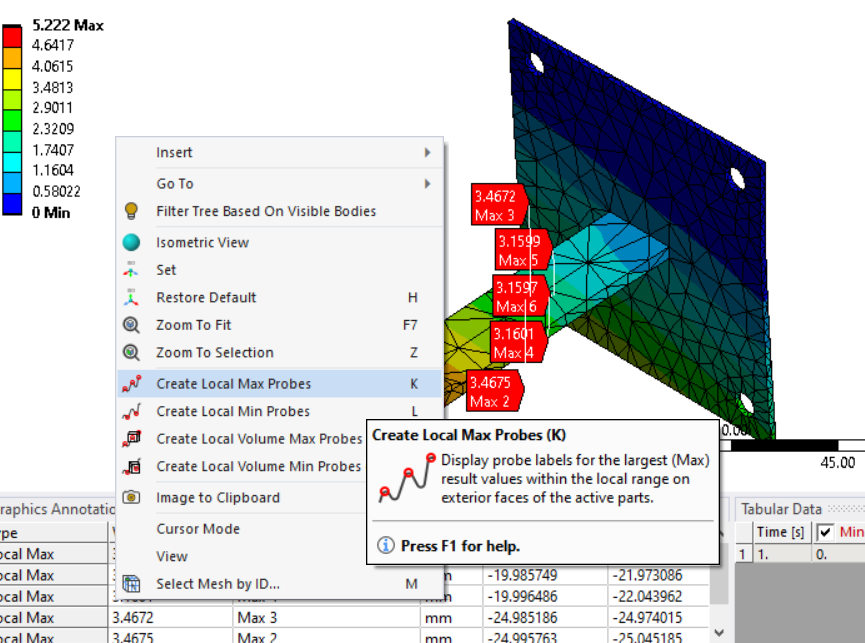
      You can try an app data reset. To do a APPDATA reset:
      a. Completely close out ANSYS (any and all open projects)
      b. Open a Windows Explorer window and in the bar at the top input: %APPDATA%
      c. Go into the Ansys folder
      d. Rename the v22.1 folder to v22.1_old (so that there isn't a folder named v22.1 - this is for v2022R1)
      e. Launch ANSYS and all your setting will be reset.
      Please see if this helps.

      Regards Ashish Khemka

Viewing 1 reply thread
  • The topic ‘I cannot get Local Max Probes to display, where should I start?’ is closed to new replies.
[bingo_chatbox]








