

TAGGED: fluent, velocity-profile
-
-
December 25, 2020 at 5:02 am
mutianzi1
SubscriberHello All,
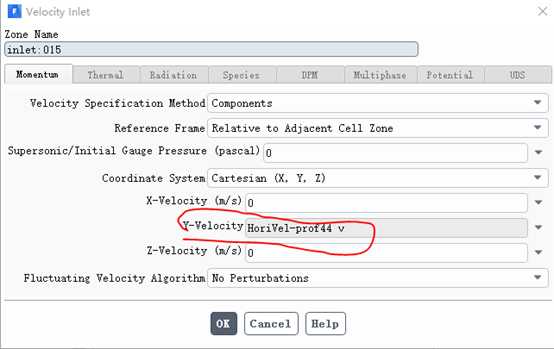
I was using Fluent to simulate a wind field associated with a complex terrain. At the velocity inlet, profile was used as the Y-velocity input, which is shown as below. In this case, the absolute coordinates are used in the velocity profile, and the velocities at the locations with the same absolute z-coordinates are the same, but different with equal distance from the curvy ground.
My question is how to define the velocity profile using coordinates in relative to the curvy ground, that is, z-coordinates is the height in relative to the curvy ground, not the absolute height. In this way, the velocity at equal distance from the ground would be the same. An illustration of absolute and relative coordinates are also presented below.
Thank you very much. Any help is appreciated.
Merry Christmas!
The definition of Y-velocity at velocity inlet
December 28, 2020 at 4:57 pmKonstantin
Ansys EmployeeFluent operates in global Cartesian coordinates, and the profile will need to be recast in global coordinates to correspond to the relative coordinate. Knowing the ground level, you should be able to calculate what absolute z should be for each point so that delta z between the ground and the pint is the same for all the points.nDecember 30, 2020 at 1:39 pmSubscriberFluent operates in global Cartesian coordinates, and the profile will need to be recast in global coordinates to correspond to the relative coordinate. Knowing the ground level, you should be able to calculate what absolute z should be for each point so that delta z between the ground and the pint is the same for all the points./forum/discussion/comment/101292#Comment_101292
Hello kkourbat,nnThank you for your clarification. Appreciated.nViewing 2 reply threads- The topic ‘How to use relative coordinates to define velocity profile?’ is closed to new replies.
Innovation Space Trending discussions
 Top Contributors
-
peteroznewman
 4613
4613 -
scabo
 1530
1530 -
Dennis Chen
 1386
1386 -
javat33489
 1209
1209 -
Shyam Prasad V Atri
1021
Top Rated Tags
© 2025 Copyright ANSYS, Inc. All rights reserved.
Ansys does not support the usage of unauthorized Ansys software. Please visit www.ansys.com to obtain an official distribution.
-


 You are navigating away from the AIS Discovery experience

