-
-
January 23, 2020 at 11:52 am
Michael104
Subscriber Hello!
I have a geometry with two layers and i have to use the value of the cell temperature of layer 1 in a source term in layer 2. I write a udf code but i am not able to pass the correct temperature to the source term.
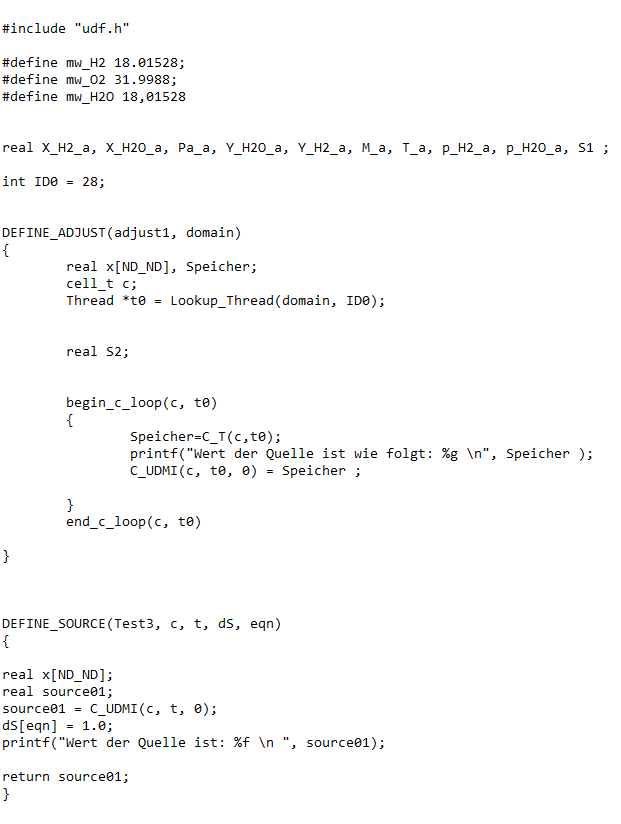
Below you can see a picture of my udf. I am looping over a specific thread and my udf calculates the temperature of the cells in the tread t0 (layer 1) and save it in a C_UDMI. Now i want to use this current calculated temperature in a source term (layer2). My Problem is that fluent calculates all the cell temperatures in the loop for layer 1 and and passes only the last calculated value to my source.
Has anyone an idea how to pass the current calculated temperature from the loop in a source term and only then calculate the next temperature and so on...
Â
Thanks for help
Â
-
January 23, 2020 at 11:52 am
-
January 23, 2020 at 4:24 pm
Rob
Forum ModeratorWhat do you expect to happen in the source term?Â
-
January 23, 2020 at 5:38 pm
Michael104
SubscriberHey rwoolho, thanks for the reply,
the source term should use the temperatures of each cell in the thread "t0". I try to explain it a bit more. Below is a picture which shows the workflow. Basically i want to use the cell temperature of zone 1 in the source term of zone 2.Â
In the code i calculated the temperature of each cell in zone 1 and saved it in: C_UDMI(c,t0,0), (see "loop" in the code). Now i want to use each cell temperature in the source term, therefore i set SOURCE 01=C_UDMI( c,t,o), (see "define source" in the code).
If i add the source term to the same Zone (Zone 1), the source term gives me the temperature of each cell, but when i add the source term to Zone 2, the source term gives me not the values of zone 1.Â
Do you have an idea how i can use the cell temperature of each cell from zone 1 in zone 2 ? Both zones are symmetric and have same number of cells and same dimensions.
Â
Thanks and best regards Michael
Â
Â
Â
-
January 23, 2020 at 5:53 pm
Amine Ben Hadj Ali
Ansys EmployeeIf different cell zones you will need to make another loop in the source UDF making it very expensive though. Moreover how identify the matching cells? Based on what? But what is the goal here? Is not sufficient to get an average in zone 1 and add it as source term in zone 2? -
January 23, 2020 at 5:54 pm
Amine Ben Hadj Ali
Ansys EmployeeBy the way we do not debug UDF and do not expect that we will try to elaborate on a way to resolve this here. -
January 24, 2020 at 8:48 am
Michael104
SubscriberThanks Amine,
the main goal is to get a source term in zone 2 which depends on the temperature of zone 1. Unfortunately it would be very inaccurate for me to take average, because the temperature changes over zone1 (but good idea). So it would be better to match specific cells based on x,y,z coordinates, but i don´t know if it is possible and how to do it. So it would be perfect if it is possible to say: Catch the temperature of a cell in zone 1 based on (x, y, z coordinate axes) and pass it to the source term of a cell in zone 2 based on (x, y, z coordinate axes). Thereby it would be possible to appropriate each cell source term of zone 2 a specific cell temperature of zone 1, so i would get a source term based on cell temperature. Â
Is this goal possible and is it possible to do it in this way or to expensive??
Best regards, Michael
Â
-
January 24, 2020 at 9:55 am
Amine Ben Hadj Ali
Ansys EmployeeYes but not as easy as you might think. It requires a lot of coding but is feasible. You need to allocate an array, to put the information there share with all nodes and then in the source udf you need to pass the information from that array based on cell coordinates.
-
January 24, 2020 at 10:21 am
-
January 24, 2020 at 12:28 pm
Amine Ben Hadj Ali
Ansys EmployeePlease mark this as "Is Solved" then.
-
- The topic ‘How to use each cell temperature from a loop over all cells in a thread in a written UDF?’ is closed to new replies.

-
4703
-
1565
-
1386
-
1242
-
1021
© 2025 Copyright ANSYS, Inc. All rights reserved.