Ansys Assistant will be unavailable on the Learning Forum starting January 30. An upgraded version is coming soon. We apologize for any inconvenience and appreciate your patience. Stay tuned for updates.
Fluids

Fluids

Topics related to Fluent, CFX, Turbogrid and more.

How to run a WB journal from external python script?

    • deadvermin97
      Subscriber

      Hi, I'm a student (using ANSYS on a student license).

      I have a Workbench Journal that I would like to run several times in a loop from an external python script, perhaps using subprocess. I've found this:

      https://stackoverflow.com/questions/34863574/how-to-run-an-ansys-workbench-journal-from-external-python-script

      but I would like to know how one would find the ANSYS path as the current one doesn't work for me.

      Thanks

    • RK
      Ansys Employee
      Hello,
      This I guess would be the temp folder ( C/ Users/ .....) where the WB files are saved. You can check this location by going to Tools tab in WB.
    • deadvermin97
      Subscriber
      Hello Thanks for the reply, I've actually managed to find the appropriate path. Also, I've found this quite useful in understanding the code I've referenced before:
      https://www.padtinc.com/blog/starting-ansys-products-from-the-command-line/
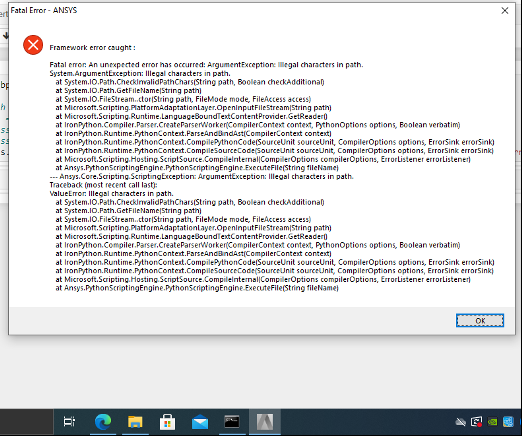
      However, I appear to be getting this error from ANSYS only when I try to run the journal from python (running it directly from WB works okay):
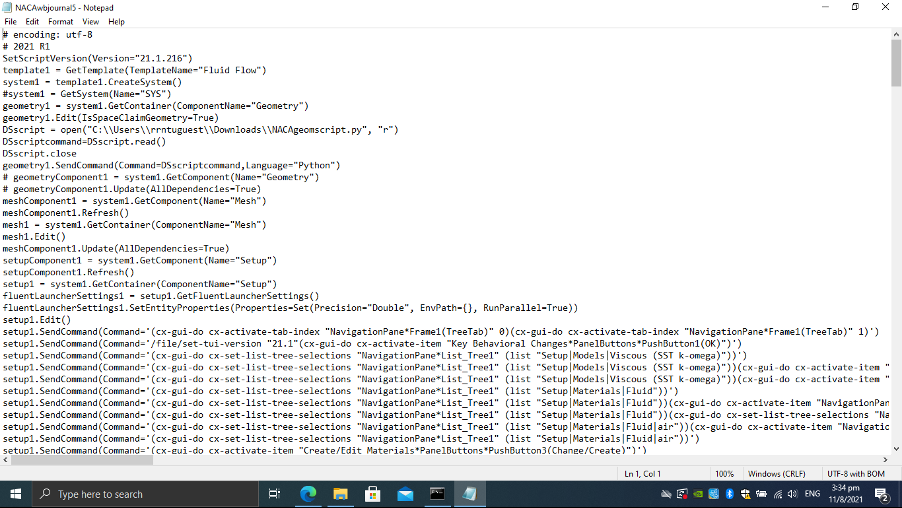
      Just in case, here's some of the journal script:

    • RK
      Ansys Employee
      The error says there are illegal entries in the path, please make sure the characters in the path are the ones allowed to be used.
    • deadvermin97
      Subscriber
      Okay, the problem has been resolved! While using subprocess.run() still results in the error, the subprocess.Popen() method works. Thanks.
Viewing 4 reply threads
  • The topic ‘How to run a WB journal from external python script?’ is closed to new replies.
[bingo_chatbox]