-
-
February 28, 2026 at 11:13 pm
Dennis Chen
SubscriberHello, in using define_SPH_Injection_(option), how can I properly define contact between generated SPH particle and the FEA body?
There's no clear indication of the set being generated, I tied using part ID but no luck/crash.I appreciate the advice
Thank you!Â
-
March 2, 2026 at 7:39 am
ErKo
Ansys EmployeeÂ
Â
Â
Â
Â
Â
Â
Â
Â
Hello Dennis
Â
Not sure exactly what you are after but if it is just the contact between SPH and solid Lagrange bodies then see this (sure you know this):
LSDYNA Bird — Welcome to LS-DYNA ExamplesThis is used also when using DEFINE_SPH_INJECTION -> in the contact use the PID defined in DEFINE_SPH_INJECTION (PID of new SPH) as SURFA and PART_SET or PART of solids in SURFB – see examples above.
example:
Â
*DEFINE_SPH_INJECTION
$#   pid    nsid    cid     vx     vy     vz    area    vmag
     1   Â*CONTACT_AUTOMATIC_NODES_TO_SURFACE_MPP_ID
$#   cid                                 title
     1                                   Â
$#  ignore    bckt   lcbckt   ns2trk  inititr   parmax   unused   cparm8
     0     1     0     0     0    0.0          0
$#  surfa   surfb  surfatyp  surfbtyp  saboxid  sbboxid    sapr    sbpr
     1     2     3     3     0     0     0     0---
Doubt this but to be complete:Â
If you refer to *DEFINE_ADAPTIVE_SOLID_TO_SPH
Say:CPL IOPT Bonding/Connection 0 Any Not bonded; acts as debris 1 0 Bonded from simulation start 1 1 Bonded after element failure Â
Now if you use the 1st 0 0 opt. above (debris) you can then set the debris interaction via a contact card (say node to surface) and use there SSID and SSTYP=3 to reference the SPH part defined by IPSPH in the *define_ada_solid_sph. So use perhaps a *CONTACT_AUTOMATIC_SINGLE_SURFACE might do the same here (between debris and other surfaces) or even better
Â
Â
Â
*CONTACT_AUTOMATIC_NODES_TO_SURFACE
Â
Â
Â
.
Hope this helpsSince I assume you are supported (saw a case from 2026), search in the ACSS Knowledge base for articles for anything else you would like to know – also AnsysGPT is a good place to search for any other questions –
finally if you are not getting any useful answers with any of those please create a ticket and we will be happy to help you.
ErkoÂ
Â
Â
Â
Â
Â
Â
Â
Â
-
March 3, 2026 at 4:52 am
Dennis Chen
SubscriberHello ErKo, thank you very much for your detailed answer.  I tried using the standard automatic_nodes_to_surface contact and using the pid of the define_SPH_injection but it didn't seem to work.  I will give this more try this weekend perhaps by starting with something simpler to see if I can get the contact to work. Â
I am trying to replicate the pouch injection paper outlined here - https://www.dynalook.com/conferences/14th-european-ls-dyna-conference-2023/simulation-methods/novozhilov_cadfem.pdf. Â
This method can also be extended to a sink damping problem where the we may want to model the fluid being dispensed from the faucet into the sink and measure vibration of the sink before and after a damping tape layer is applied to reduce noise from the sink.  That would be the real industry application for this.Â
Again, thank you! :)
-
March 3, 2026 at 7:29 am
ErKo
Ansys EmployeeÂ
Happy to help.
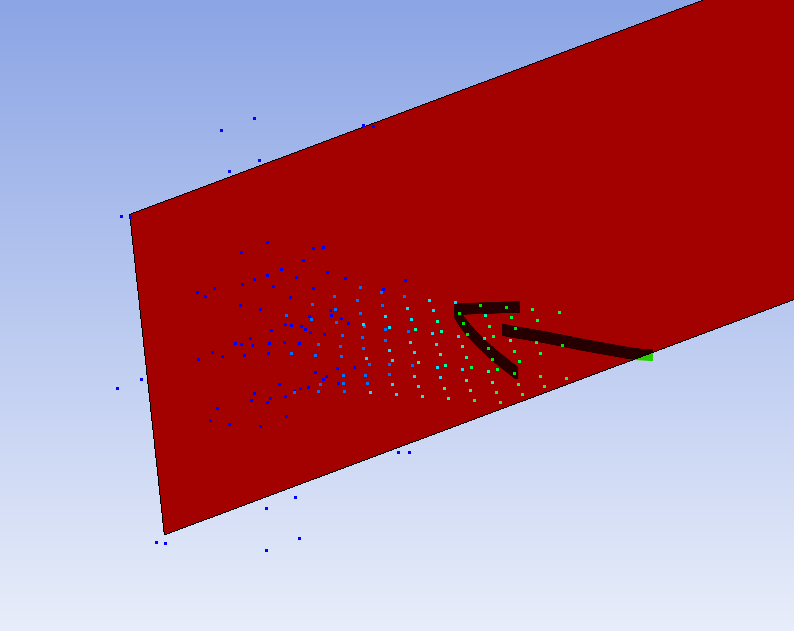
I did a simple example and it works as we discussed.
This is used also when using DEFINE_SPH_INJECTION -> in the contact use the PID defined in DEFINE_SPH_INJECTION (PID of new SPH) as SURFA and PART_SET or PART of solids in SURFB – see examples above.
example:
Â
*DEFINE_SPH_INJECTION
$#   pid    nsid    cid     vx     vy     vz    area    vmag
     1   Â*CONTACT_AUTOMATIC_NODES_TO_SURFACE_MPP_ID
$#   cid                                 title
     1                                   Â
$#  ignore    bckt   lcbckt   ns2trk  inititr   parmax   unused   cparm8
     0     1     0     0     0    0.0          0
$#  surfa   surfb  surfatyp  surfbtyp  saboxid  sbboxid    sapr    sbpr
     1     2     3     3     0     0     0     0
They interact with the plate as shown:
All the best
ErkoÂ
-
- You must be logged in to reply to this topic.
-
5874
-
1906
-
1420
-
1306
-
1021
© 2026 Copyright ANSYS, Inc. All rights reserved.