

TAGGED: fluent, journal-file, post-processing
-
-
April 29, 2022 at 5:12 pm
CMHR
SubscriberHi!
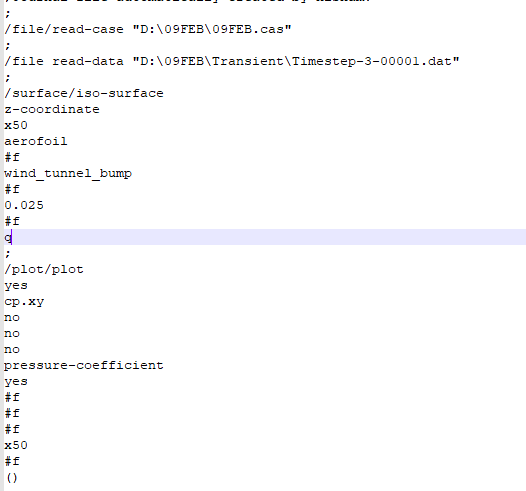
I am currently writing a journal file to extract the cp distribution on an aerofoil. Initially, I created an iso-surface to make a cut plane, than I wrote a command to extract the Cp distribution of that plane/surface. However, this seems to work fine in the command prompt (console) of the GUI but not really in the journal file.
The main reason to this is because i need to press enter whenever there is a selection of zone or surface in the gui but I can not do the same in the journal file. Is there any way to write or tell fluent to press enter?
I have attached some images that might help you understand my jou file and the same thing in the command prompt.
Thank you,
CMHR
Picture of the JOU file:
May 2, 2022 at 11:23 pmSubscriberHi!
I found out how to do it, it is just ().
Thanks
May 3, 2022 at 10:58 amRob
Forum Moderator() closes a list out. Most of the other commands should automatically trigger the next command.
Viewing 2 reply threads- The topic ‘How to press “Enter” in a Journal File’ is closed to new replies.
Innovation Space Trending discussions
 Top Contributors
-
peteroznewman
 6680
6680 -
scabo
 1906
1906 -
Dennis Chen
 1469
1469 -
javat33489
 1313
1313 -
Shyam Prasad V Atri
1022
Top Rated Tags
© 2026 Copyright ANSYS, Inc. All rights reserved.
Ansys does not support the usage of unauthorized Ansys software. Please visit www.ansys.com to obtain an official distribution.
-


 You are navigating away from the AIS Discovery experience