Ansys Assistant will be unavailable on the Learning Forum starting January 30. An upgraded version is coming soon. We apologize for any inconvenience and appreciate your patience. Stay tuned for updates.
General Mechanical

General Mechanical

Topics related to Mechanical Enterprise, Motion, Additive Print and more.

How to modify in Design modeler after solution

    • Md_Salem
      Subscriber

      Hello everyone,

      I used workbench to carry out a harmonic analysis on a C channel. I created a surface model of the C channel using Design Modeler. After the solution is finished, I need to edit the model such that I have square open in the web of the C channel as shown in the picture.

      I assigned the XY plan and drew the square, but I don't know how to make the opening in the body of the web ( surface body).

       Regards

    • Gary_S
      Ansys Employee

      From the Sketch of the square, do an Extrude with operation type of Cut material.

      Also, you may have to do a Freeze or Unfreeze other bodies prior to this operation. 

      • Md_Salem
        Subscriber


        Hello Gray,

        I appreciated your response.

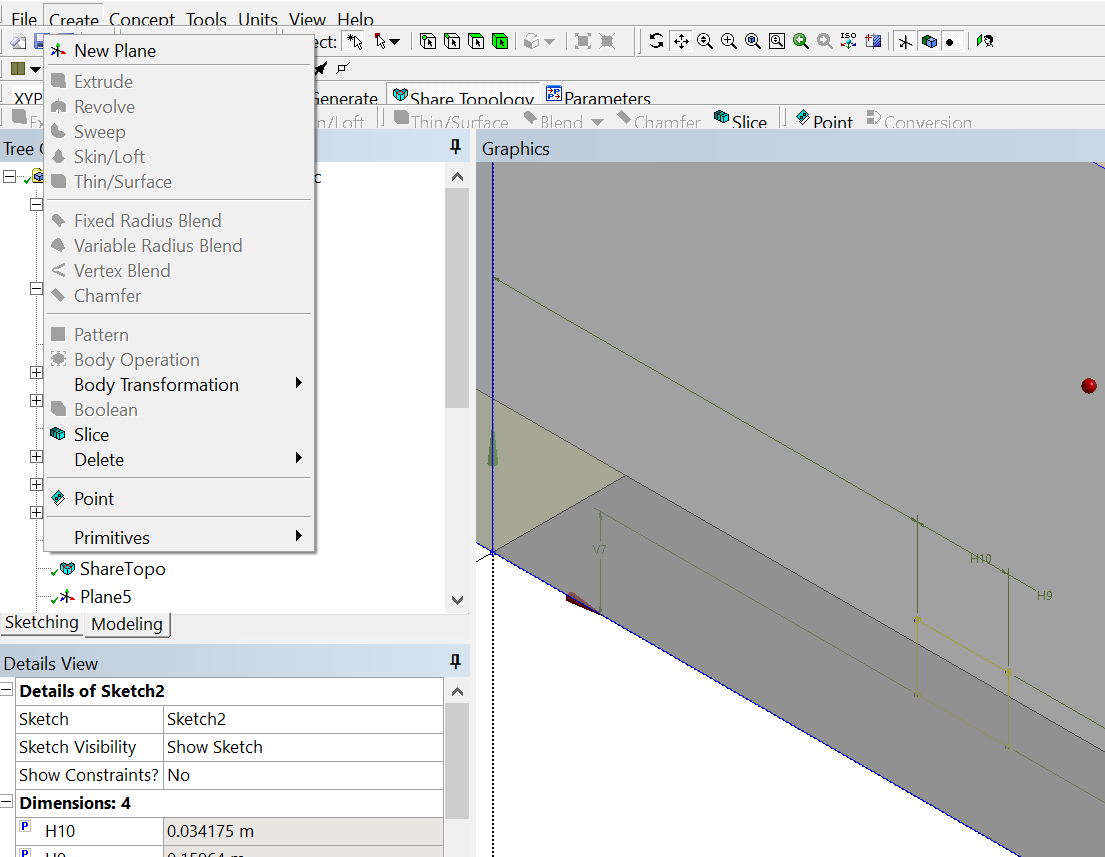
        The model shown here is carried out as a surface body (not extruded). Hence, I cannot extrude the drawn square (sketch) because it cannot be extruded (the sliding menu cannot utilize extrude order – as shown in the picture).

        It seems that the design modeler is locked after the solution is obtained 

        Regards

    • Gary_S
      Ansys Employee

      Press the "Share Topology" button in the toolbar.
      It will unlock. 

Viewing 2 reply threads
  • You must be logged in to reply to this topic.
[bingo_chatbox]