-
-
September 25, 2018 at 1:21 pm
sanju111
Subscriberi would like to study flow characteristics in this body but i can only mesh the solidpart, how do i mesh the hollow part for cfd analysis
-
September 25, 2018 at 1:23 pm
Keyur Kanade
Ansys EmployeeCan you please insert an image for explanation.
You will need body created for both solid and for hollow part. Then you need to mesh these two bodies.
Regards,
Keyur
-
September 25, 2018 at 1:27 pm
-
September 25, 2018 at 6:12 pm
peteroznewman
SubscriberI imported this file into a Geometry cell in Workbench, then I opened the Geometry in SpaceClaim.
The first step was to use the Stitch tool on the Repair tab because it came in as a collection of surfaces and not a solid body. After Stitch, it was a Solid.
The second step was to use Volume Extract on the Prepare tab. Select these faces...
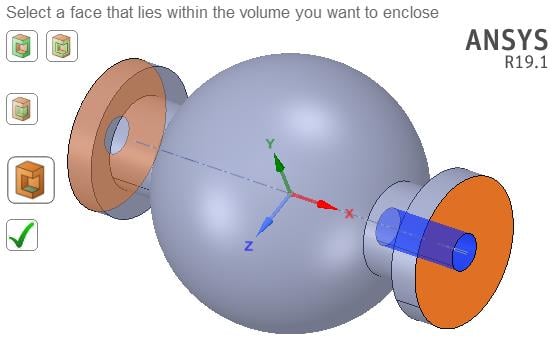
Then click the green check mark and hide the Solid to see the Volume inside.
Regards,
Peter
-
September 26, 2018 at 3:29 am
Keyur Kanade
Ansys EmployeeHere is video explaining volume extraction.
https://www.youtube.com/watch?v=1LBPLfs3QSo
Regards,
Keyur
-
September 26, 2018 at 5:02 am
sanju111
Subscriberis there any way in which I can do the same in design modeler ,as i am using solidworks 2018 files space claim is giving an error "unable to import geometry"
-
September 26, 2018 at 5:05 am
Keyur Kanade
Ansys EmployeeIn SpaceClaim you can use following. -
File -- SpaceClaim Options -- File options - Workbench - Always use SpaceClaim reader. This may allow you to import it in SpaceClaim.
For DM -
https://www.youtube.com/watch?v=HOjQen83H_o
Hope this helps.
Regards,
Keyur
-
September 26, 2018 at 11:00 am
Rob
Forum ModeratorOtherwise export a STP file and read that in. It's possible that the reader on the ANSYS version you're using isn't compatible with SolidWorks 2018.
-
- The topic ‘how to mesh hollow region’ is closed to new replies.
-
5824
-
1906
-
1420
-
1305
-
1021
© 2026 Copyright ANSYS, Inc. All rights reserved.










