-
-
October 15, 2018 at 4:49 pm
-
October 15, 2018 at 7:35 pm
Karthik Remella
AdministratorHello,
I am trying to understand your question better.
If this is a 2D geometry, could you please give us more details on your questions?
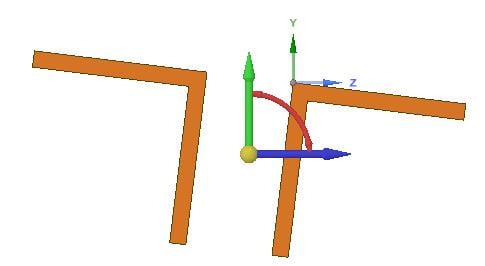
If this is 3D: would you like your geometry to rotate in the ZX plane? If I understand your question, you do not want this cross-section to rotate in the YZ plane. Is that correct? You should be able to 'Rotate' by selecting the two solid bodies and using the move tool. Please see the highlighted arrow indicating rotation in the ZX plane.
I hope this helps.
Best Regards,
Karthik
-
October 15, 2018 at 7:53 pm
Sam Fares
SubscriberHi Karthik,
if i look at this cross section in plane view, the section is rotated but i don't know how much it is rotated. i need to rotate it so it is level. In other words, the horizontal lines in the section need to be parallel with global x and vertical lines of the section need to be parallel with global y.
 The cross section needs to look like this. The section i send earlier is rotated by some angle. i am not sure how much. i need the rotation angle to be zero as shown below. Thanks!
Â
Â
Â
Thanks,
Sam
-
October 15, 2018 at 9:25 pm
Karthik Remella
AdministratorHello,
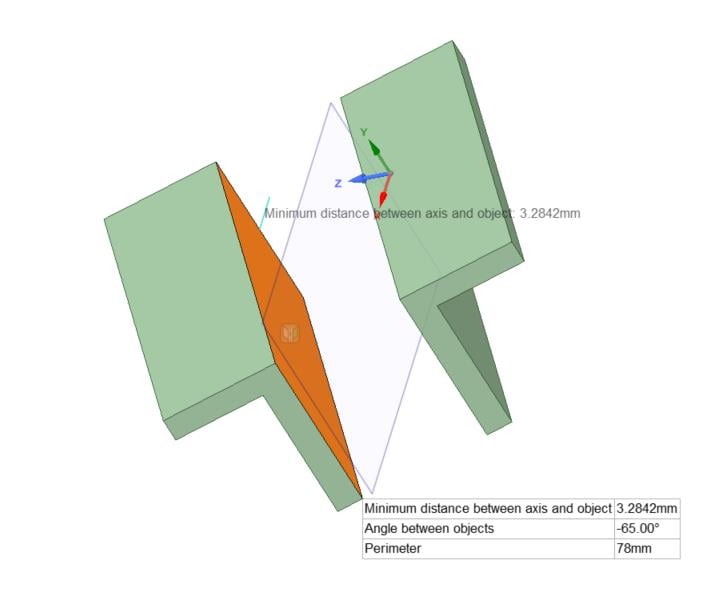
Switch back to 3D mode and use the measure tool to estimate the angle between a plane and any axis.Â
In my case, I am selecting the highlighted plane and Z axis and the measure tool estimates the angle (attached screenshot).
Then you can use the move tool to rotate your solid bodies based on the measured angle.
I hope this helps.
Best Regards,
Â
Karthik
-
October 16, 2018 at 5:57 am
Keyur Kanade
Ansys EmployeeHello,Â
Following videos may help you to understand the use of Move tool.Â
Couple of important things - you can move Handle of Move tool and place it anywhere.Â
Second is you can use 'Upto' option during rotate.Â
Â
Hope this helps.Â
Regards,
Keyur
https://www.youtube.com/watch?v=_f_Ug4Wcztg
https://www.youtube.com/watch?v=YttsLzGsBGY
Â
-
October 16, 2018 at 1:15 pm
Sam Fares
SubscriberMy issue is how to measure the angle needed to make the cross section level(without rotation). I know how to use the move tool.Â
Â
Regards,
Sam
-
October 16, 2018 at 1:18 pm
Karthik Remella
AdministratorHi Sam,
Are you looking for the measure tool? You can use the measure tool to get the angle between a surface and an axis of your choice. Please see my previous reply.
Thanks.
Best Regards,
Karthik
-
October 16, 2018 at 1:22 pm
Keyur Kanade
Ansys EmployeeHello,
Create planes at coordinate system.Â
Then you can measure angle by using Measure.Â
Move in 3D and then use cross section mode.Â
Regards,
Keyur
-
October 17, 2018 at 2:47 pm
FrankD
Ansys EmployeeSam
Using the angular ruler in the measure tool will get you what you need, with no measuring or estimating.
Steps are the following:
Select the components/bodies/or faces that you want to rotate. Anchor the move tool about some rotation reference. Align the move tool handles to some geometry (the edge or face to be aligned). Select a rotation direction on the Move tool and invoke the Rotational Ruler option to measure the rotation from. Change the dimension (usually to 0)
F
-
- The topic ‘How to measure the rotation of the cross section?’ is closed to new replies.

-
6129
-
1906
-
1442
-
1308
-
1022
© 2026 Copyright ANSYS, Inc. All rights reserved.