Ansys Assistant will be unavailable on the Learning Forum starting January 30. An upgraded version is coming soon. We apologize for any inconvenience and appreciate your patience. Stay tuned for updates.
3D Design

3D Design

Topics related to Ansys Discovery and Ansys SpaceClaim.

How to measure distance between faces in the section view of the body ?

    • parveensahni
      Subscriber

      How to take measurements between two faces of the body, once we are in section view of the body ?, I tried to measure distance between two face, but i'm unable to select inside faces in the section view ?

    • Charudatta Bandgar
      Subscriber

      Hello PARVEEN SAHNI

      In section view, you can select the edges instead of faces to measure the distance. Are the edges visible for the inside faces in the section view?

      Regards.

    • parveensahni
      Subscriber

      Hello Charudatta Bandgar

      Yes the edges are visible for the inside faces in the section view. However, i'm not able to select the edges as well to measure the distance.

      with regards

      Parveen sahni

      • Charudatta Bandgar
        Subscriber

        Will it be possible to share the files, PARVEEN SAHNI ?

        Regards.

      • parveensahni
        Subscriber

        Hello @Charudatta Bandgar   

        It won't be possible to share the files.

        Thank you

      • Ethan Geometry Rabinowitz
        Forum Moderator

        PARVEEN SAHNI You can only select things/faces in section mode that cross over the section plane.  if you are trying to measure something behind the section plane that doesn't cross over the section plane, you won't be able to select it
        You can either project to sketch (sketch group of tools) in sketch mode and measure that
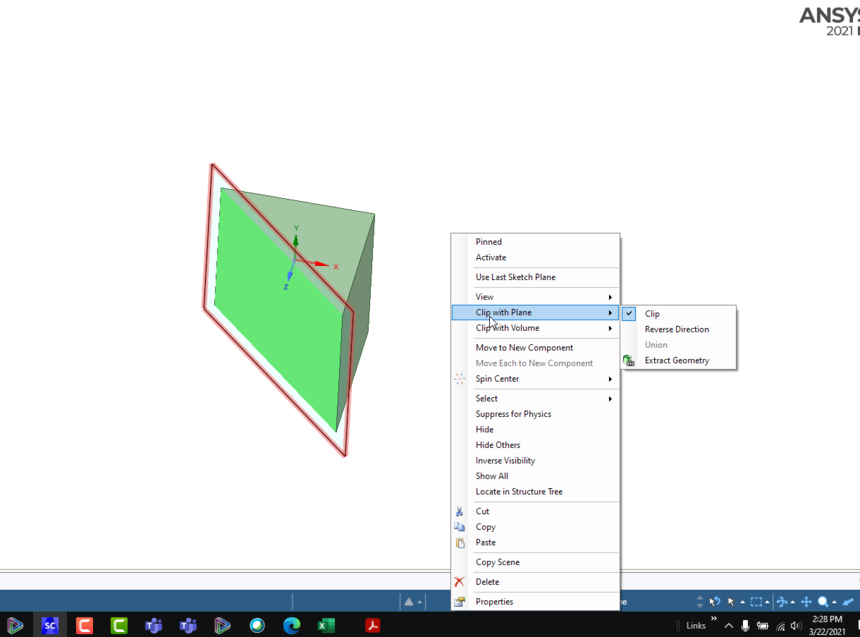
        Or stay in 3D mode and add a datum plane (design tab) where you want the section.  Right click on the plane and go to "clip with plane" and set it.  it will clip the view and you can select anything visible.  You can flip the clip direction from the same menu


    • parveensahni
      Subscriber

      Ethan Rabinowitz  Hey, Ethan Thanks a lot. This helps.

      I had one more question, Right now I see there is specific standard option to insert a datum plan for instance, insert a plane in middle of surface, insert a plane in middle of two points. However, is there any other option in which it is possible to move the datum plan parallel to screen as we move the plane in section mode ?

      • Ethan Geometry Rabinowitz
        Forum Moderator

        PARVEEN SAHNI great!

        The tricky part is the default way is to use the move gird button at the bottom of the screen, but that requires dragging and you can't drag perpendicularly to the screen

        you could click on the arrow, rotate the view normal and type in a value.

        Or you could use move to setup a parameter in the groups tab that moves the plane in that direction, then update the value in groups

Viewing 3 reply threads
  • The topic ‘How to measure distance between faces in the section view of the body ?’ is closed to new replies.

[bingo_chatbox]