Ansys Assistant will be unavailable on the Learning Forum starting January 30. An upgraded version is coming soon. We apologize for any inconvenience and appreciate your patience. Stay tuned for updates.
General Mechanical

General Mechanical

Topics related to Mechanical Enterprise, Motion, Additive Print and more.

How to load heat transfer capacity from an external table with dependent point?

    • Tim Fricke
      Subscriber

      Hello there,

      I have the following problem. 
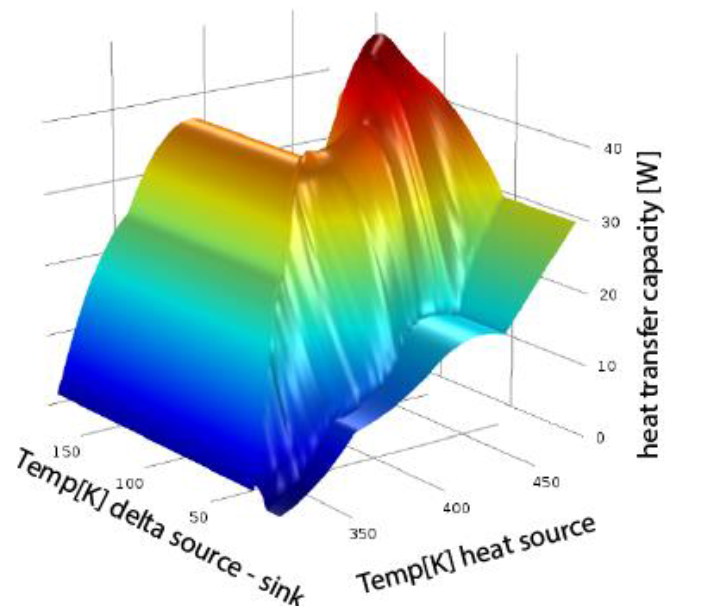
      In my simulation I have to apply a heat transfer capacity. This has been determined in a real test and depends on the temperature at two points on the model. 
      The following graph shows the measured data. 

      My question now is how can I load the measured values into Ansys?

      And when this is done, how can I assign the heat transfer capacity so that the correct value is retrieved for the respective temperature?

      Best regards,

      Tim

    • dlooman
      Ansys Employee

      Will you be solving for the temperature of both the heat source and the heat sink?  Typical thermal models would be 3D representations of the sink and source and the heat would be in the form of a flux, W/M^2, not just Watts.  What's a physical description of what you are modeling?  There won't be a simple way to load the temp-dependent heat source into Ansys.  If the sink or source temperature was constant a temperature dependent convection could be defined between the two bodies.

    • Tim Fricke
      Subscriber

      Hi Dave,

      thanks for the answer. I would like to simulate the time course of a cooling process.

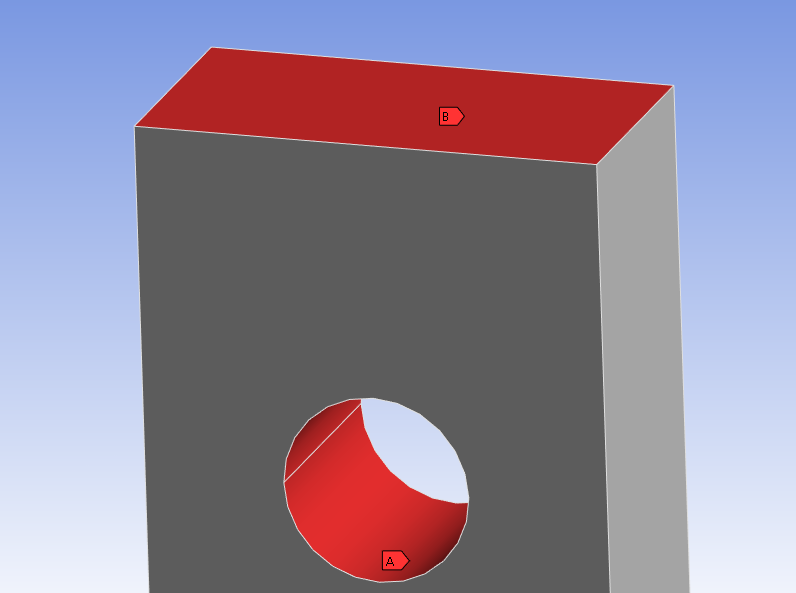
      A temperature load is applied to surface B. The temperature in the center of the surface should also be the source temperature. 
      The heat sink temperature is constant as you have already assumed.

      On the surface A the body is cooled and the temperature is extracted. For this I wanted to create a heat flow with the values from the graph.

      The heat flow is actually the output of a heat pipe and the values were determined experimentally.    

    • dlooman
      Ansys Employee

      You could specify a negative heat flow on surface A and a temperature at the center of surface B.  If the temperature is specified at the center of surface B that will limit the cooling.  Specify a heat flow as a function of the model temperature may be possible, but its not a standard capability of the gui.


    • Tim Fricke
      Subscriber

      Ok, I almost thought that it will not be so easy :/

      Unfortunately, I still have to simulate it anyway. My approach would be to add an APDL command to the loads. Then I read in the values and pass on the corresponding heat flow.   
      Would this be possible with this process ? I just want to be sure before I spend the time to learn the relevant apdl language.

    • dlooman
      Ansys Employee

      Yes, it's possible with APDL commands.  The general technique is to break the solution into many short time steps.  At the end of each time step you can query the model temperatures and apply a heat flux or flow based on a formula or table using a Commands Object that is to be executed every step (assuming you are in Workbench.)  For example:

      ...

      SOLVE

      temp_1 = temp(node(x,y,z))

      temp_2=temp(node(x,y,z))

      sf,named_selection,hflux,100*(temp_2 - temp_1)

    • Tim Fricke
      Subscriber

      Hey Dave,

      yes im using workbench with commands. Reading the temperature and adding the table worked.

      But now comes the real difficult part. 
      I have the two temperature values and need to read the corresponding heat flow from the table. 
      My idea is to compare the corresponding temperature with the column via a do loop. If the value matches, the column or row is remembered.  I then use this to determine the position of the correct heat flow in the table. 

      Is this possible ?

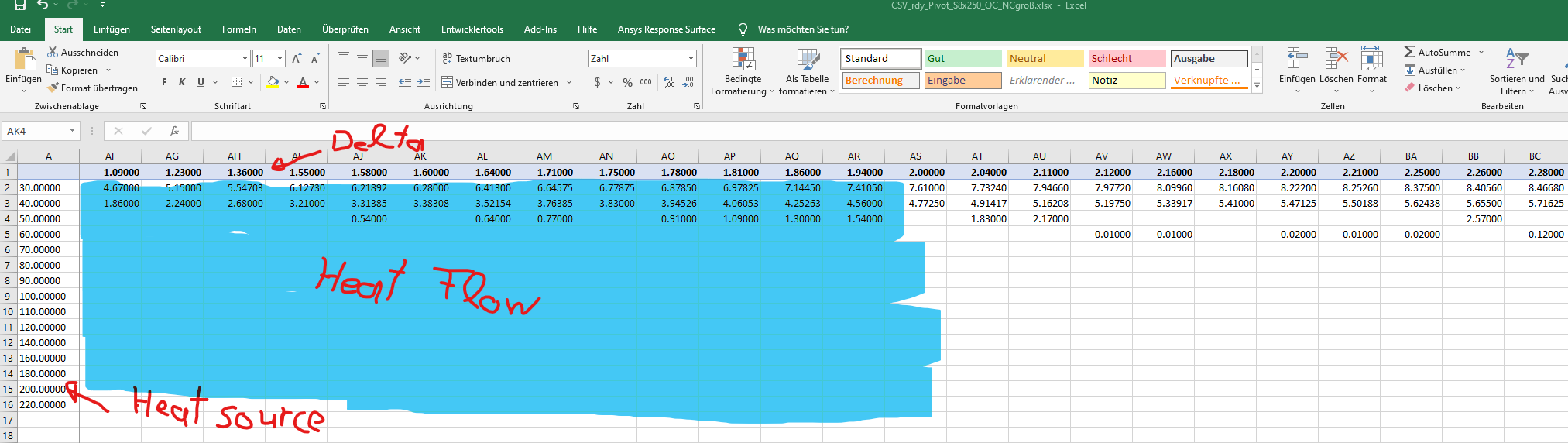
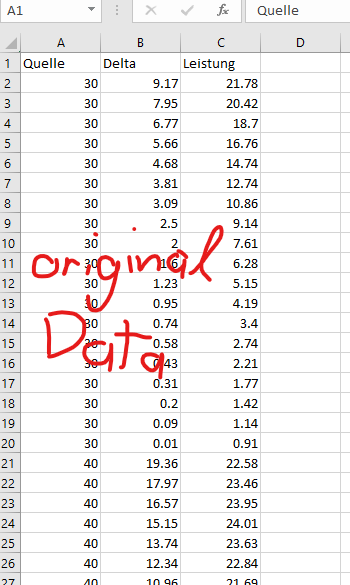
      For this I have prepared the data in excel as follows.
      I interpolate the gaps between the values in excel. The empty fields at the edge are filled with 0. 

      The original data are created in 3 columns. This means that there are duplicate values. I think ansys can't work well with this so I converted the values to the format above.

    • dlooman
      Ansys Employee

      Is the heat flow just a function of the delta or is it a function of the two temperature.  *TREAD creates an indexed array in which column 0 (column 1 of the file) and row 0 (row 1 of the file) are indices.  In your case the indices are the two temperatures.  So the first column of the file should be one of the temperatures and the first row (skipping column 1 since this is really column 0 should be the other temperature.  The data associated with each pair of indices is the heat flow.  It is possible to run many solves in a do-loop, and update the heat flow before each solve.  The heat flow would be retrieved based on the indices, heat_flow=table_name(temp1,temp2).

    • Tim Fricke
      Subscriber

      Hi Dave, 
      Thank you very much. You save my master thesis :)

      The heat flow depends on both temperatures. The heat flow was determined in an experiment. For this purpose, an electric heating element was connected to one side of the heat pipe. The electrical power of the electric heating element and the temperatures on both sides were measured. The electrical power should now represent the power of the heat pipe. (I have not done the experiment, so I can not explain it in detail). The next days get the area values and can convert the heat flow to the heat flux.

      To Ansys:
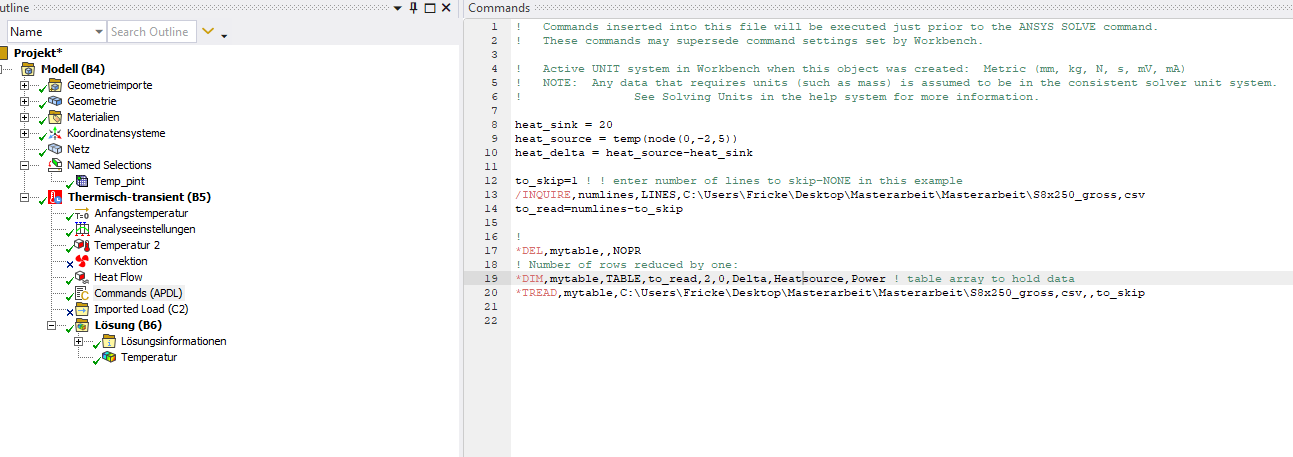
      Thanks to your help the apdl snippet works very well. I have implemented it as follows:

      heat_sink = 20

      to_skip = 0 ! enter number of lines to skip (if titel column or sth.)
      /INQUIRE,numlines,LINES,C:\Users\...,csv
      to_read=numlines-1    ! Number of rows reduced by one

      *DEL,mytable,,NOPR
      *DIM,mytable,TABLE,to_read,1196,1 ! table array to hold data
      *TREAD,mytable,C:\Users\...,csv,,to_skip

      *DO,i,1,3
      heat_source = temp(node(0,-2,5))
      heat_delta = heat_source-heat_sink

      heat_flow = mytable(heat_source,heat_delta)
      heat_flux = heat_flow / 250               ! Heat flow from table / 250mm area (for example, need to figured outt)
      sf,cooling_area,hflux,(- heat_flux)
      *ENDDO

      If I have set this up correctly, the do loop now works over the three load steps.
      But does it now also calculate the new values for each substep or do I have to run the do loop over all time steps and add

      Time,I

      before the enddo?  

    • dlooman
      Ansys Employee

      Typically you would do an initial solve before the do-loop to get an initial solution at TIME,initial_value.  Then just before *enddo you would have TIME,I and SOLVE.

    • Tim Fricke
      Subscriber

      Ah ok, good to know! 
      And maybe the last question, is there a way to show the heat flux value for every substep ? 

    • dlooman
      Ansys Employee

      If you are in the APDL gui and let's say you solved for 5 substeps:


      /post1

      /show,png

      *do,iii,1,5

      set,1,iii

      plve,tf,,,,vect     ! Vector display

      plns,tf,sum        ! Contour display

      *enddo

Viewing 11 reply threads
  • The topic ‘How to load heat transfer capacity from an external table with dependent point?’ is closed to new replies.
[bingo_chatbox]