Ansys Assistant will be unavailable on the Learning Forum starting January 30. An upgraded version is coming soon. We apologize for any inconvenience and appreciate your patience. Stay tuned for updates.
General Mechanical

General Mechanical

Topics related to Mechanical Enterprise, Motion, Additive Print and more.

How to increase beam element’s (BEAM188/189) section cells with SECDATA ?

    • Pirkka Ruotsalainen
      Subscriber

      Hello everyone,

      I know that it is possible to add more cells to beam element's (for example BEAM188 or BEAM189) cross-section with SECDATA command, but after using SECDATA the results of the calculation is nonsence. For example when using rectangular cross-section for beam element the default cell count along width and height is 2 ---> "SECDATA,50,100,2,2".

      I have added APDL commands object under static structural to increase cross-section's cell count from 4(2X2) to 36(6X6) and also taking account warping and shear stresses from transverse shearing with following content:

      ---

      FINISH

      /PREP7

      SECTYPE,1,BEAM,RECT
      SECDATA,50.,100.,6.,6.
      secoffset,cent

      KEYOPT,1,1,1
      KEYOPT,1,4,2


      allsel

      SAVE,file,db
      FINISH

      /SOLU

      ---

      I think that this command object adds the cross-sectional cells, but when post-processing for example the von Mises stress results, they are nonsense... What I'm doing wrong, should the beam be remeshed in some way to add the additional cell points ?

      Another interesting thing is that why beam188 and beam189 elements doesn't take in account flexure-related shear stresses in addition to shear stresses caused by torsion by default ---> KEYOPT,N,4,2 ? By default beam elements calculates only shear stresses caused by torsion --->KEYOPT,N,4,0. I think that this kind of default setting might be quite dangerous in some scenarios.

      Best regards,

      Pirelli93

    • mrife
      Ansys Employee

      Hi Pirelli93

      It does not help to just state that some result is "nonsense" without showing why.  Also it would help to understand the boundary conditions and loading.  

    • wrbulat
      Ansys Employee

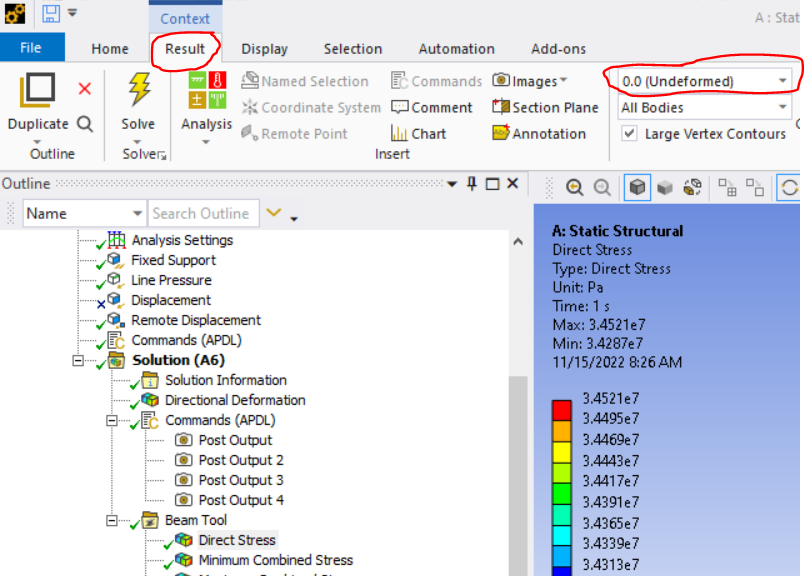
      I tested adjusting number of cells used in the beam cross section with the SECDATA command in a command object under the line body and, like you see improper results displays. I think Mechanical expects 2 X 2 cell beam cross section, and it isn't written in such a way as to accomodate other possibilities.  One thing that might help is to set the display displacement scaling to zero:

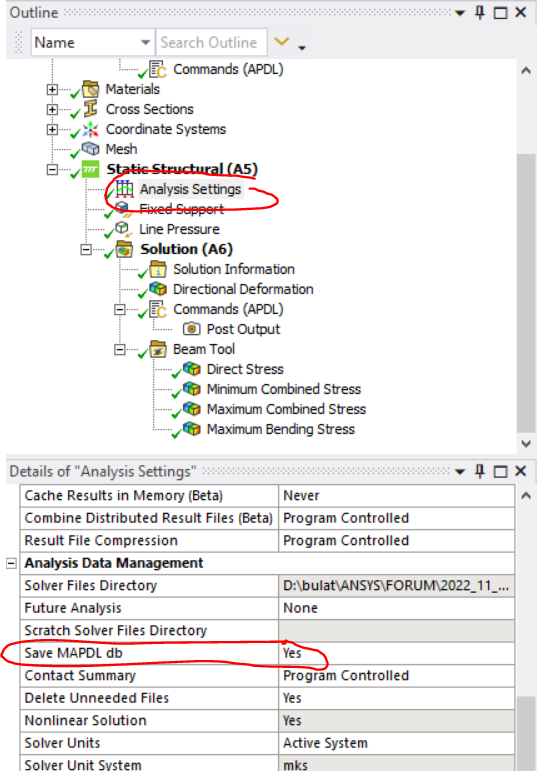
      You could also try a post processing command object - have MAPDL solver create static images of the beam results. First, before solving, request that the MAPDL db file be saved:


      Next, insert a command object under the solution branch such as this one:

      finish 
      /clear 
      resume 
       
      /view,1,3,1,3
      /graphics,power
      /eshape,1
       
      /post1 
      set,last 
       
      /show,png 
      plns,s,x 
      /show,close
       
       
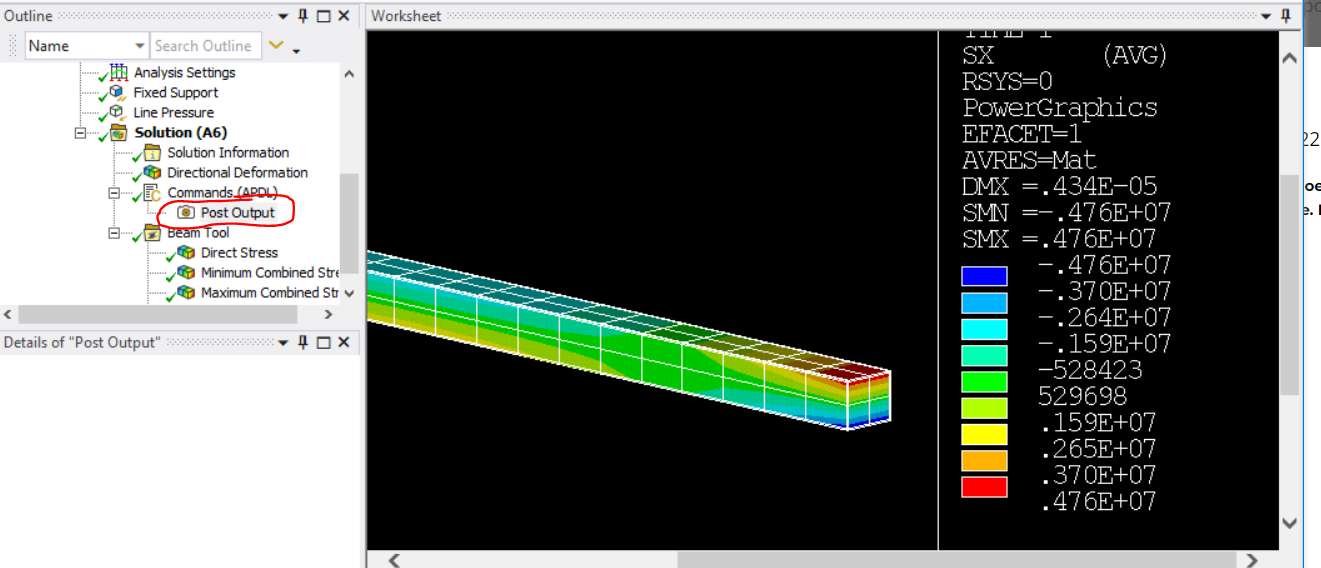
      You can access the image by clicking on "Post Output" under the command object in the tree:
       
       
      Note that SX is the stress in the direction of the axis of the element (direct + bending stress) - even if the beam axis is not aligned with the global x axis. The appearance of the displayed stress distribution will be much like that you'd see if you were using solid elements.
       
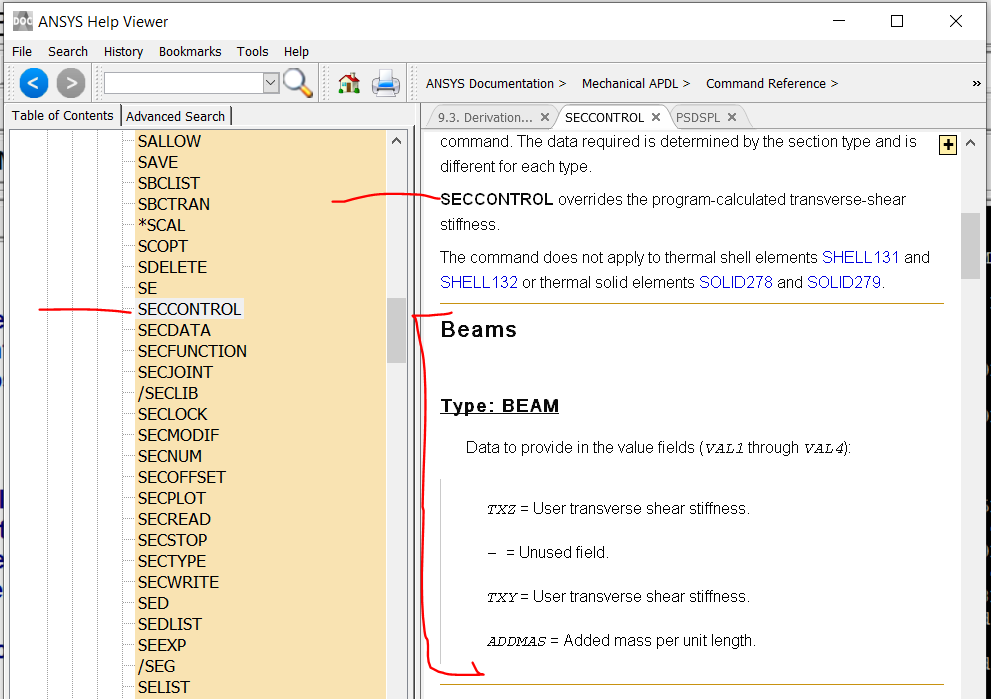
      Related to (though admittedly not directly addressing)  your question about shear stress output... one way to specify transverse shear stiffness is with the SECCONTROL command:
       
       
      I hope this helps,
      Bill
    • mrife
      Ansys Employee

      Hi Pirelli93 et al

      What is happening is that WB Mechanical is not 'aware' of what a Commands Object is doing with respect to the FEM.  Mechanical is writing out the FEM based on its model tree, but the Commands Object is changing the FEM but only when the model is being solved.  So you can imagine when Mechanical is post-processing beams from their sections nodes (in order to plot seqv) the numbering on the result file does not match what Mechanical expects.

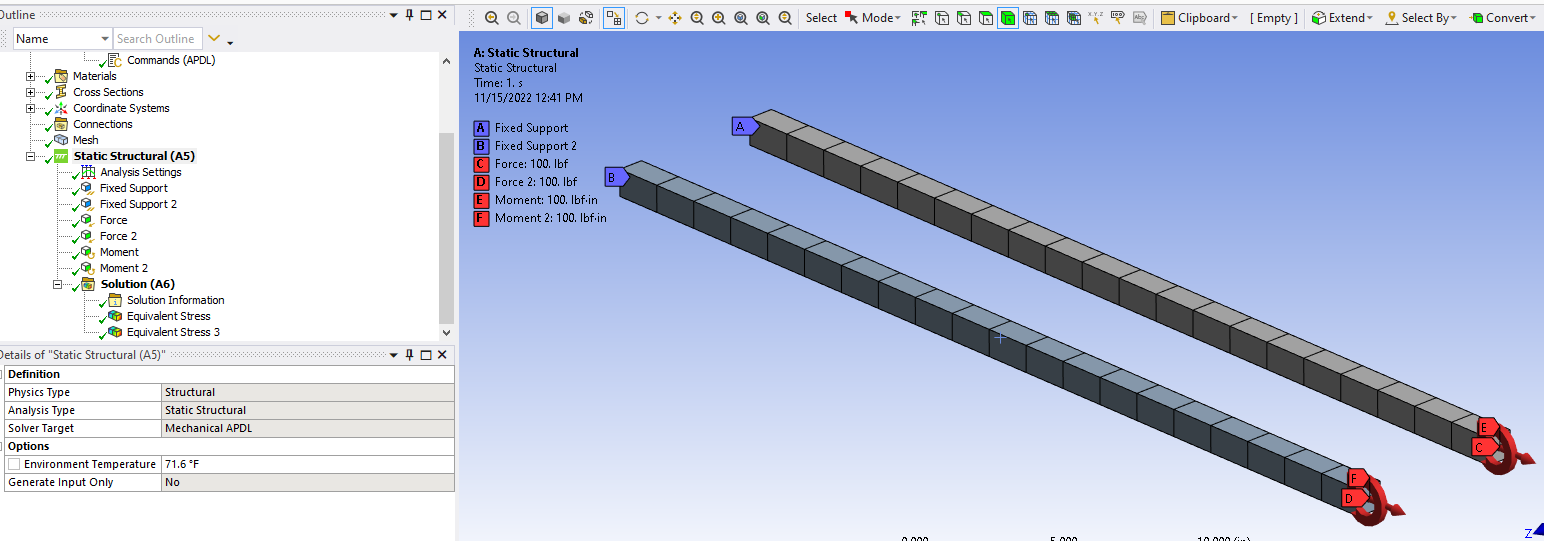
      Let's say the model was two cantilever beams 36 inches long and 1x1 inch square cross section aligned with global X.  The default mesh is kept on beam one, so it has 4 section "elements" and 9 nodes.  Whereas beam two has 6x6 section mesh so 49 section nodes.

      Fixed one end of the beams and load the other with 100lb axial and 250 in-lb moment about global z.

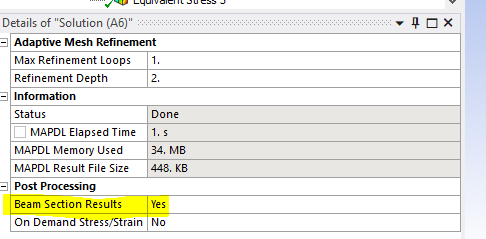
      Change to post process beam section results:

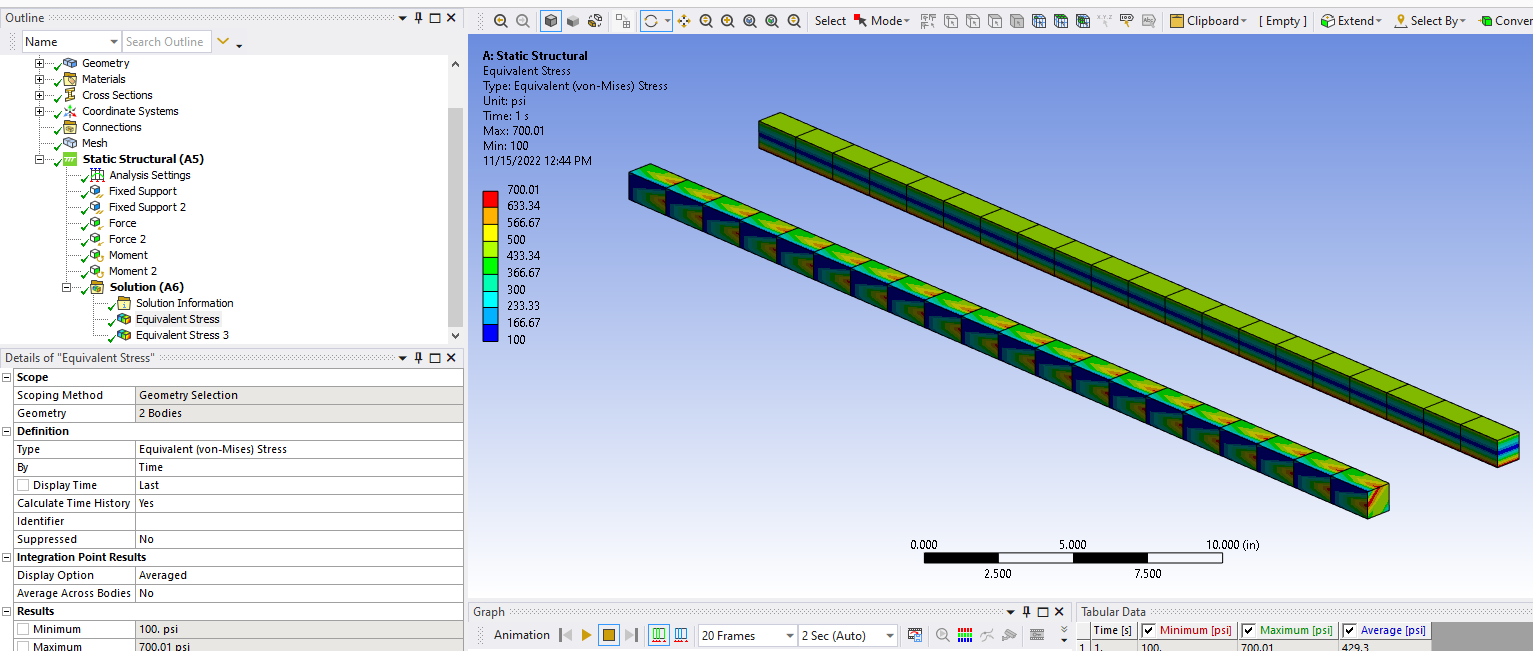
      And post process SEQV

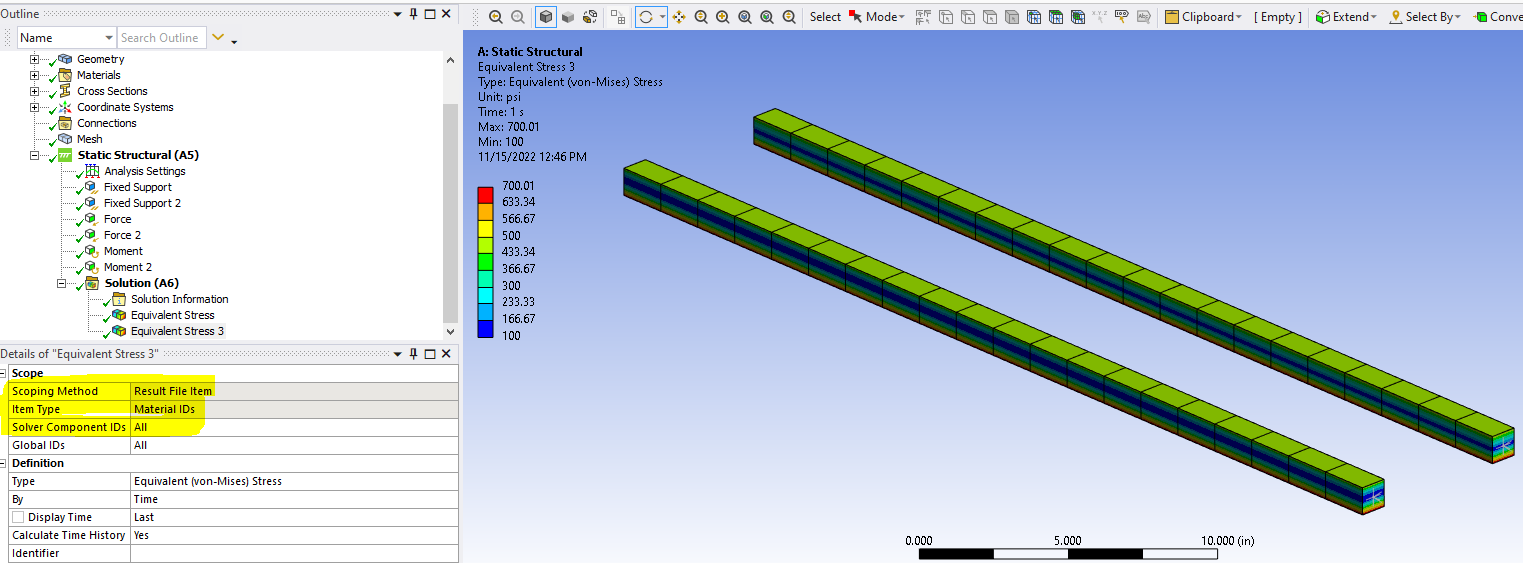
      We can see that the beam in the upper right is correct (default section mesh) and the one in the lower left is not (CO to change section mesh).  This is expected as Mechanical thinks beam 2 has 9 section nodes whereas it has 49.  Instead post-process by Material ID so it's a more direct read/presentation of the results:


      And the results are as expected.

      Mike


    • Pirkka Ruotsalainen
      Subscriber


      Hello Mike & Bill,

      Thank you for your clear answers ! Sorry for a slightly unclear presentation of the problem, but you still understood the problem. I tested your recommended post-processing styles and they both work, and now the results looks like they should be ! I think that post-processing results by Material ID is better style, because you can still rotate geometry and use other Mechanical’s handy post-processing tools like animation, probe etc.

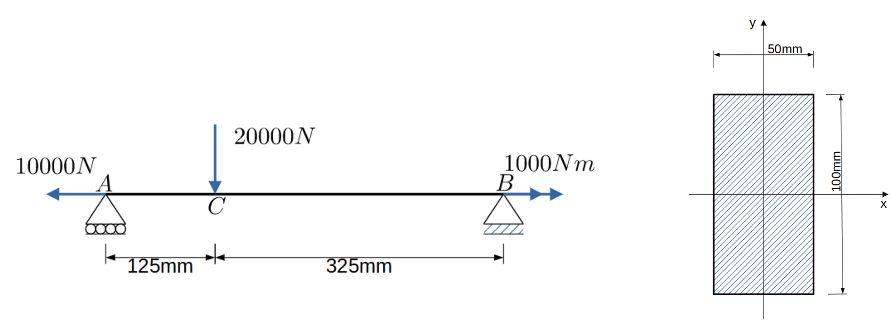
      Here was the simple problem that I used for this test:

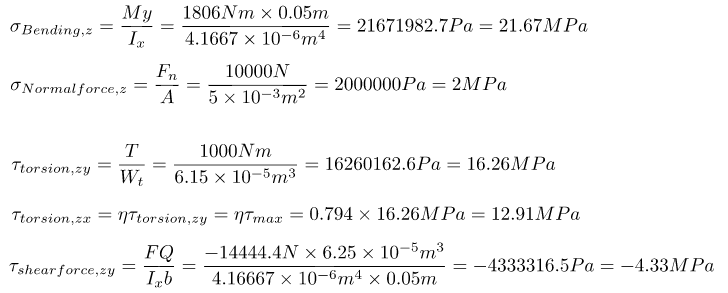
      Hand calculated stresses at point C:

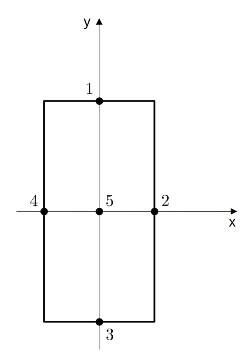
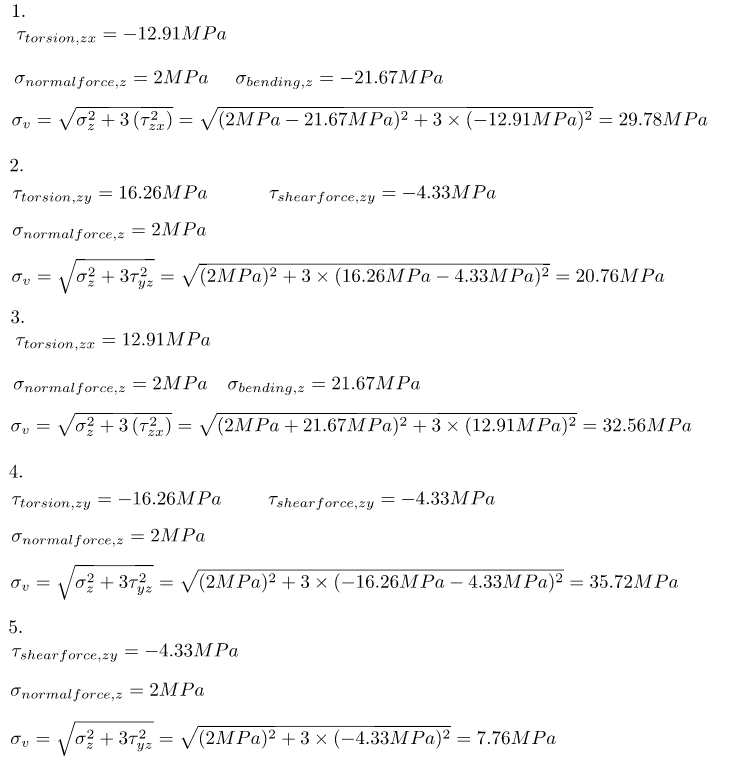
      Hand calculated beam’s cross section’s von Mises stresses at point C at cross section’s 5 different locations:

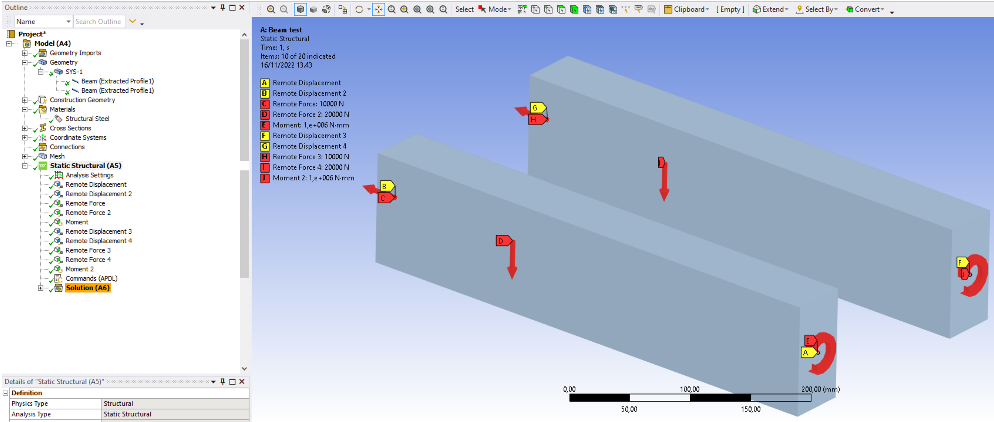
      Here are the boudandary conditions in Ansys:

      Here are the von Mises stress results at point C with default Ansys Mechanical’s settings for BEAM189 without any APDL command object:

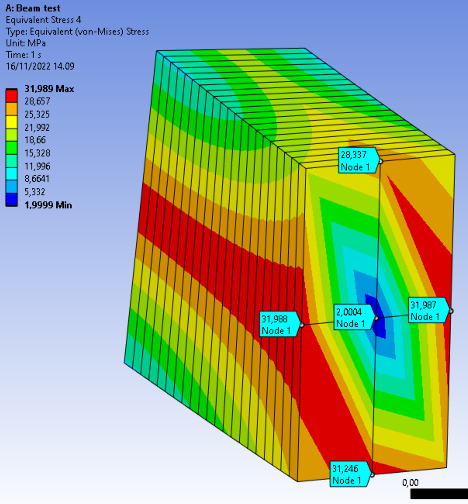
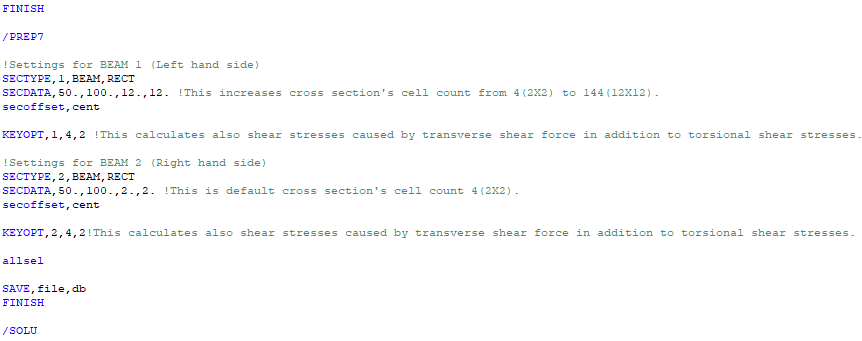
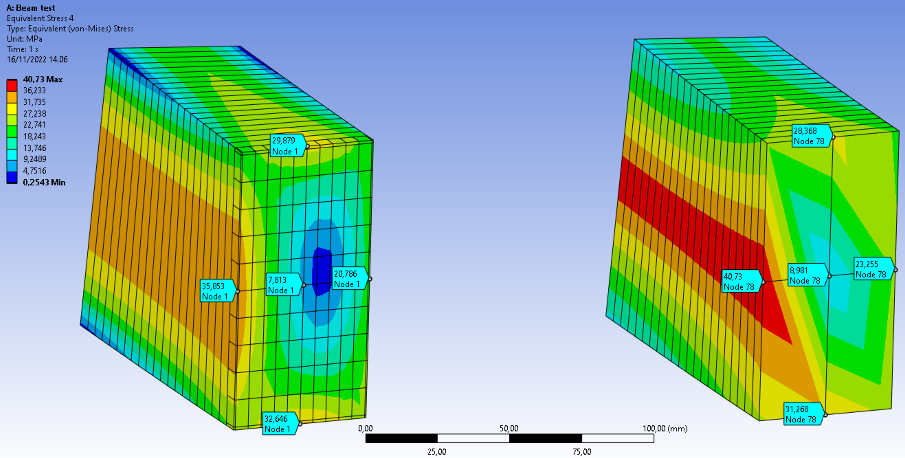
      Here are the von Mises stress results at point C with APDL command object for BEAM189. Beam 1 is the left hand side beam and Beam 2 is the right hand side beam:

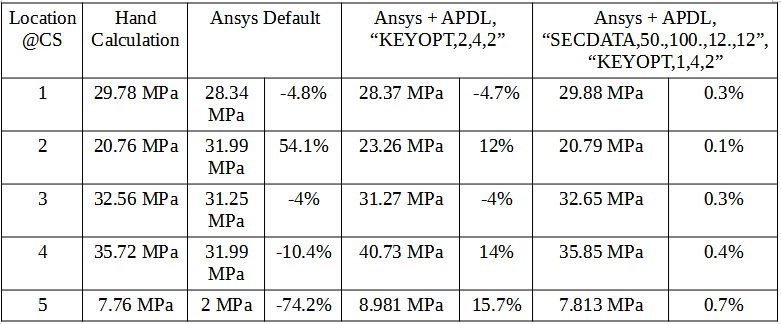
      So we can see from the left hand side beam that it was necessary to add this APDL command object to achieve more accurate results by increasing cells in cross section and taking in account transverse shear stresses caused by shear force in addition to torsional shear stresses.

      Here is a summary for the von Mises stress results and Mechanical’s results difference to hand calculation:

      However post-processing results by Material ID naturally removes ability to post-process results by vertex, which could be useful in some scenarios. My workaround was to create section planes to post-process cross sections at certain locations, but it might be time consuming process in large assemblies.

      Best regards,

      Pirkka Ruotsalainen


Viewing 4 reply threads
  • The topic ‘How to increase beam element’s (BEAM188/189) section cells with SECDATA ?’ is closed to new replies.
[bingo_chatbox]