Ansys Assistant will be unavailable on the Learning Forum starting January 30. An upgraded version is coming soon. We apologize for any inconvenience and appreciate your patience. Stay tuned for updates.
General Mechanical

General Mechanical

Topics related to Mechanical Enterprise, Motion, Additive Print and more.

How to give connections between line bodies

    • Manoj55
      Subscriber

      Hello


      1. This is model of Single lap joint. How can I give connection between these bodies as a bonded connection.


      2. How can I select middle nodes through out individually.

    • peteroznewman
      Subscriber

      Right mouse click on the Connections folder and Insert > Manual Contact Region.


      Select the middle line body as the Target.


      Select the two other bodies as Contact.

    • Manoj55
      Subscriber

      Yes I got it.  Thank you Peter.


      But how to add stresses like shear stress and normal stress in solution ? ??

    • peteroznewman
      Subscriber

      Right click on the Solution branch. Insert Beam Results and pick something.


      Insert a Beam Tool.  Right click on the Beam Tool, Insert something on that list.
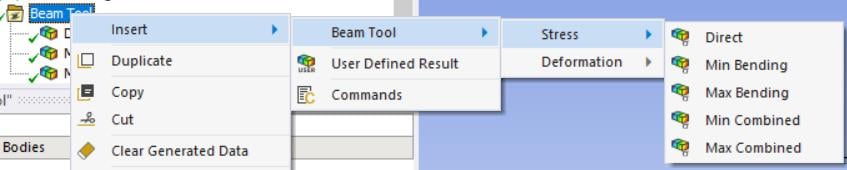


      Direct stress is stress caused by Axial Forces.


      You can plot Shear Force, but you have to calculate Shear Stress by dividing by the cross-sectional area of the beam.

Viewing 3 reply threads
  • The topic ‘How to give connections between line bodies’ is closed to new replies.
[bingo_chatbox]








