-
-
April 16, 2024 at 5:08 pm
Muhammad Akbar
SubscriberHello,
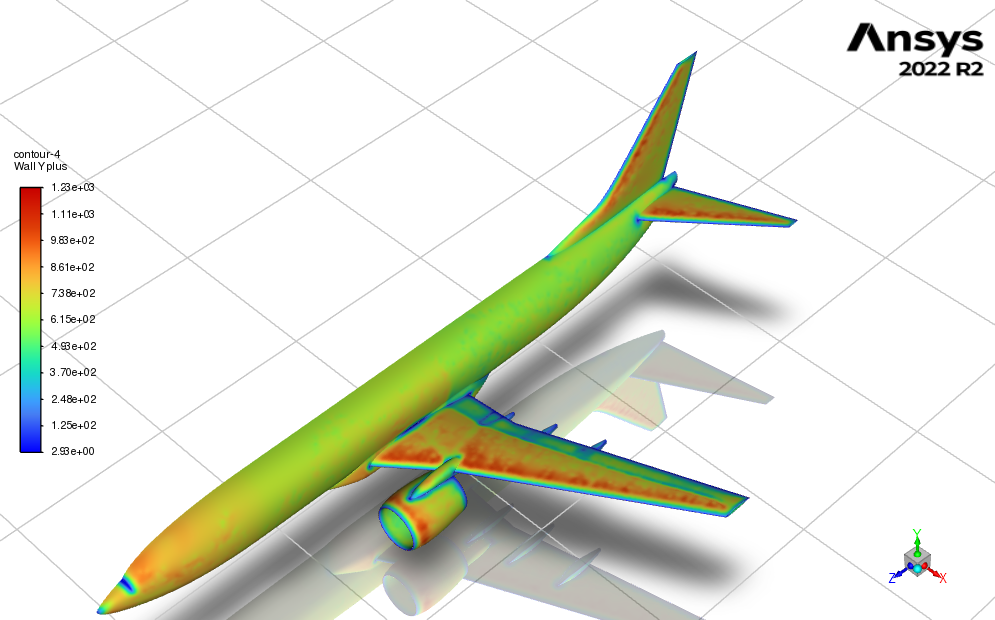
I have created a mesh around the body of the Boeing 737 aircraft using the ANSYS FLUENT meshing tool. I have used the curvature sizing options: min 0.005m and max 0.075m. I also have a local refinement box option around the aircraft with a mesh sizing of 0.2 m. I am using the smooth transition option for the BL: 7 layers, transition ratio 0.272, and growth rate 1.25. With these options, I can create a mesh. When I run a compressible flow case with mach number 0.77, my yPlus is as high as 1230. How do I mesh with yPlus close to 10? How do I change the BL setup to have a small yPlus?
I also found out that if I change the curvature sizing option to a higher or lower value, the meshing fails due to highly skewed elements. If I increase the BL value to 10, it also fails for the same skewed element reasons.
Thank you.
-
April 17, 2024 at 10:24 am
Rob
Forum ModeratorYou'll need to further reduce the cell size and potentially change the inflation options: that's going to be a very big mesh.
-
April 17, 2024 at 11:17 am
Murari Iyengar
Ansys EmployeeYou can also use Local Sizing to ensure cell size is appropriate in small surfaces/regions rather than only reducing cell size through global sizing. This will keep a check on your cell count. You can refer to this tutorial for more information: How to Add Local Sizing in Ansys Fluent Meshing — Lesson 1, Part-1 (youtube.com)
-
- The topic ‘How to get yPlus less than 30 around an aircraft geometry?’ is closed to new replies.

- JACOBI Convergence Issue in ANSYS AQWA
- Is it able to solve turbomachinery using density-based solver in Fluent?
- Two-way FSI simulation
- Ensight Force_per_unit area_EV
- RIBBON WINDOW DISAPPEARED
- Fluent Meshing Error when .dsco not .stp
- Ansys Fluent for modelling Ocean Wave reactions to Wave Barriers
- Battery Pack cooling
- ISAT ABORT error
- UNASSIGNED INTERFACE ZONE DETECTED FOR INTERFACE…
-
4597
-
1495
-
1386
-
1209
-
1021
© 2025 Copyright ANSYS, Inc. All rights reserved.