Ansys Assistant will be unavailable on the Learning Forum starting January 30. An upgraded version is coming soon. We apologize for any inconvenience and appreciate your patience. Stay tuned for updates.
Preprocessing

Preprocessing

Topics related to geometry, meshing, and CAD.

How to get mesh figure

    • Jimmyhan
      Subscriber

      HI, I am Jimmy. I want to get a mesh photo with black lines and white background. As you know in ANSYS mesh generator I can set the line as black colour line and the background is always blue, All I can do is just copy image from it. I need some suggestion for this, thank you so much. 

    • peteroznewman
      Subscriber

      Hi Jimmy, 


      This is an easy question. There is an icon in Mechanical with a pull down. Use the Image to File selection and you get the dialog shown below, where you can say you want a white background.
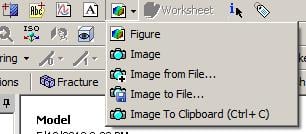


      I use this sometimes, but I prefer to configure Mechanical to always have a white background.


      To do that, in Workbench, Tools, Options..., Appearance, change Background Style from Graduated to Uniform and choose white as Background Color.
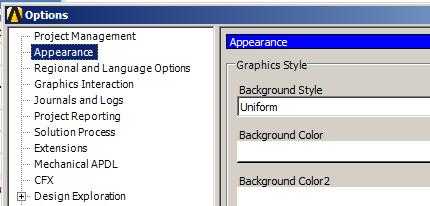


    • Jimmyhan
      Subscriber

      Thank you very much, your suggestion is great! I would like to use your way.

Viewing 2 reply threads
  • The topic ‘How to get mesh figure’ is closed to new replies.
[bingo_chatbox]







