Ansys Assistant will be unavailable on the Learning Forum starting January 30. An upgraded version is coming soon. We apologize for any inconvenience and appreciate your patience. Stay tuned for updates.
General Mechanical

General Mechanical

Topics related to Mechanical Enterprise, Motion, Additive Print and more.

How to Exclude Mid Nodes in ANSYS DPF Scripting

    • gokbayrak
      Subscriber

      I am trying to get stress values from nodes on a named selection by using DPF script below and it gives values also for mid nodes.

      Do you know how to exclude mid nodes ? Thanks in advance.

      import mech_dpf

      import Ans.DataProcessing as dpf

      import Ans.DataProcessing.operators as ops

      mech_dpf.setExtAPI(ExtAPI)

      my_data_source = mech_dpf.GetDataSources()


      ns = ops.scoping.on_named_selection()

      ns.inputs.data_sources.Connect(my_data_source)

      ns.inputs.requested_location.Connect("Nodal")

      ns.inputs.named_selection_name.Connect("MY_NS")


      stress_op = ops.result.stress_X()

      stress_op.inputs.data_sources.Connect(my_data_source)

      stress_op.inputs.mesh_scoping.Connect(ns.outputs.mesh_scoping)

      my_stress = stress_op.outputs.fields_container.GetData()

      my_stress[0].Data

    • ErKo
      Ansys Employee
      Hi

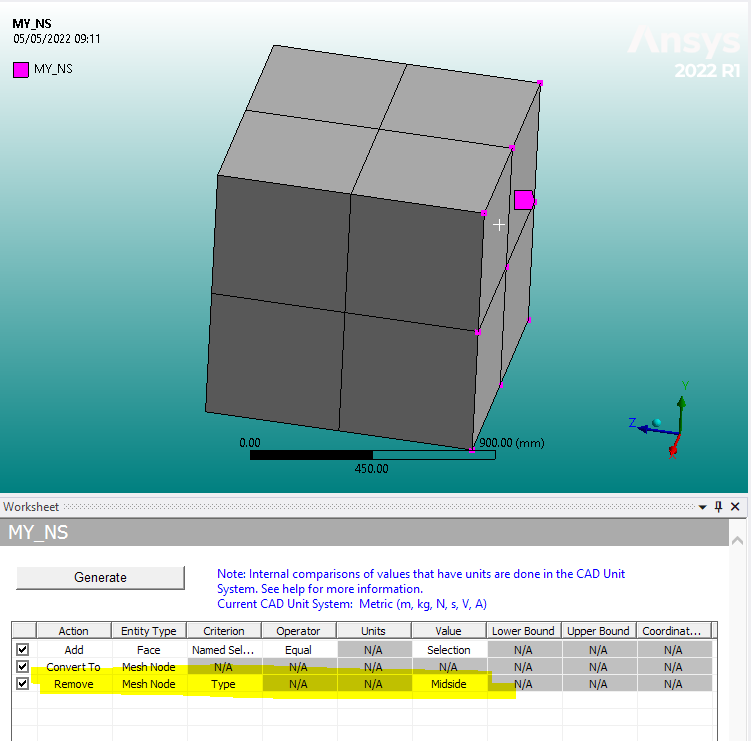
      They way now using Nodal results is to exclude them (mid-side nodes) from the MY_NS named selection.
      This is easily done within the worksheet (say that face had all nodes, but mid-side where removed):
      All the best

      Erik

    • gokbayrak
      Subscriber
      Thanks for the reply ekostson
      This manual selection is not an option for me because i have lots of face named selections and somehow i need to do that in scripting window.
      I searched DPF docs but could not find a solution
    • ErKo
      Ansys Employee
      Hi - no worries - glad to be of help.

      There is no other way I believe since as we said you are using ns.inputs.requested_location.Connect("Nodal")
      so nodal results and it will look at every node in your named selection, thus it will get stresses for these nodes in the NS, and hence why we need to remove them (mid-side) which is easily done as shown from the NS.

      One can automate this (above removal of mid-side using the named selection worksheet) using the act api call for the worksheet for adding rows and remove nodes in the worksheet of the named selection (below is a sample code)model = ExtAPI.DataModel.Project.Model # reference model
      nsall=ExtAPI.DataModel.Project.Model.NamedSelections.Children
      for ns in nsall:
      objId = ns.ObjectId # reference ID of named selection object for future use
      DataModel.GetObjectById(objId).ScopingMethod=GeometryDefineByType.Worksheet
      DataModel.GetObjectById(objId).GenerationCriteria.Add(None)

Viewing 3 reply threads
  • The topic ‘How to Exclude Mid Nodes in ANSYS DPF Scripting’ is closed to new replies.
[bingo_chatbox]