

TAGGED: areas, mechanical-apdl
-
-
December 5, 2020 at 7:44 pm
ebone2god
SubscriberHello,
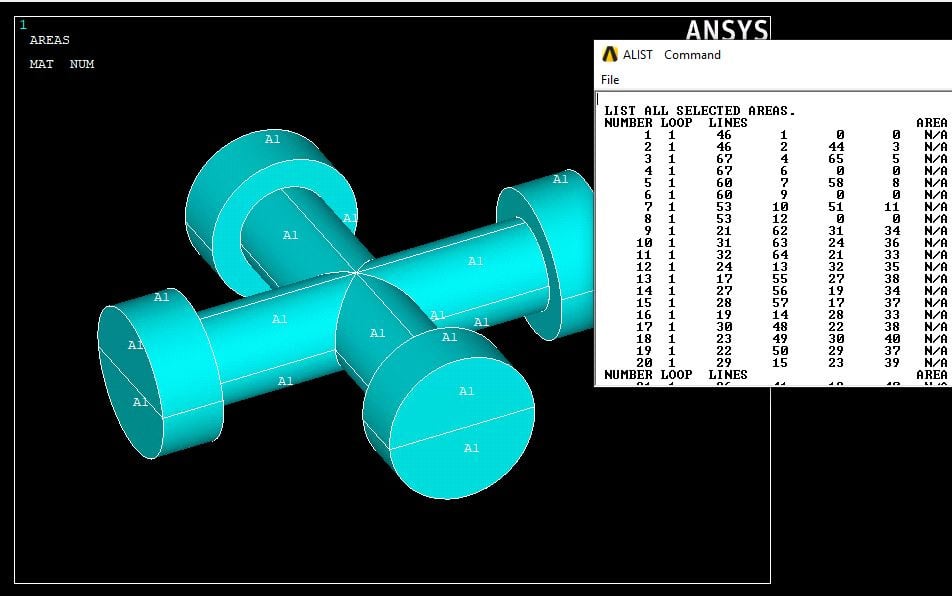
I'm working with a 3D geometry in APDL. I have imported this geometry from NX and am trying to assign contact properties to some of the surfaces. The issue I am having is that, when I select the areas associated with any volume, then do a /REPLOT on the areas, everything shows up as A1. I am using the following commands to select these areas:
VSEL,S,VOLU,,1
ASLV,S,ALL
I then go through the menu and select "Plot -> Areas". I have attached an image below for your reference, showing the GUI and the ALIST associated with my selection. In addition, I have turned area numbering on within plot controls.
December 5, 2020 at 9:04 pmpeteroznewman
SubscribernIf you have to assign a lot of contact properties to an assembly, I wonder why you would do that in APDL when the automation available in Mechanical Workbench is so powerful. It will automatically create contacts between bodies on all faces that touch. If you want more control, there are selection tools to put bodies into groups and automatically generate contacts between groups.nDecember 6, 2020 at 1:48 amSubscribernIt's a great question. The issue is that the model I received was built in APDL. I wanted to make the shift a few days ago, but couldn't figure it out, so ended up making some progress with the APDL model. Ultimately, I believe the end user will continue to use APDL. I guess a follow on question would be - if I go the route of transferring this into Workbench, assign contacts, then back to APDL, would all of the properties built and assigned within APDL, including element type number assignments, real constants, etc., remain the same? If so, Workbench is absolutely the way to go. nDecember 6, 2020 at 2:08 amSubscribernThe geometry exported from NX (a Parasolid file?), was imported into APDL and the problem is how to define all the contacts. How much other model building was done in APDL?nImport the same file into Workbench and build the model there. It is a more productive environment. All kinds of things have good defaults so no time is spent defining element types or real constants. Meshing is also going to be easier in Workbench.nAPDL is great if you want to write code, if you need to build geometrically complex assemblies with lots of contact, you want to use Workbench.nViewing 3 reply threads- The topic ‘How to display areas in APDL?’ is closed to new replies.
Innovation Space Trending discussions
 Top Contributors
-
peteroznewman
 6535
6535 -
scabo
 1906
1906 -
Dennis Chen
 1463
1463 -
javat33489
 1311
1311 -
Shyam Prasad V Atri
1022
Top Rated Tags
© 2026 Copyright ANSYS, Inc. All rights reserved.
Ansys does not support the usage of unauthorized Ansys software. Please visit www.ansys.com to obtain an official distribution.
-


The Ansys Learning Forum is a public forum. You are prohibited from providing (i) information that is confidential to You, your employer, or any third party, (ii) Personal Data or individually identifiable health information, (iii) any information that is U.S. Government Classified, Controlled Unclassified Information, International Traffic in Arms Regulators (ITAR) or Export Administration Regulators (EAR) controlled or otherwise have been determined by the United States Government or by a foreign government to require protection against unauthorized disclosure for reasons of national security, or (iv) topics or information restricted by the People's Republic of China data protection and privacy laws.

 You are navigating away from the AIS Discovery experience