Ansys Assistant will be unavailable on the Learning Forum starting January 30. An upgraded version is coming soon. We apologize for any inconvenience and appreciate your patience. Stay tuned for updates.
3D Design

3D Design

Topics related to Ansys Discovery and Ansys SpaceClaim.

How to define self-weight for the steel member

    • wh05
      Subscriber

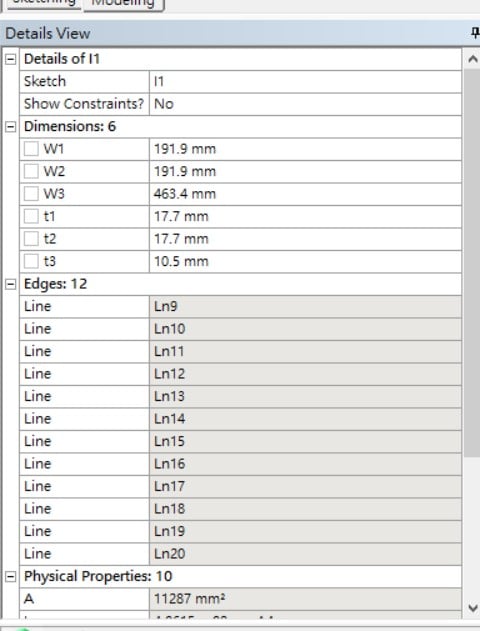
      Hi, I created two different I section steel beam & column and inputted the size of members in the Design Modeler as below picture. However, I cannot find where should I input the self-weight of the members, what should I do?


      Also, does it finish the steel members section model once I input the size only (part of Dimension 6 in the picture) ? Do I need to extrude it or do anything to make it become 3D?


      Thanks.

    • peteroznewman
      Subscriber

      You have only defined a Cross-Section.


      To make a 3D Beam model in DM, you have to make a sketch and draw a line.


      Then you have to use Tools > Lines from Sketches and pick the sketch, then Generate.


      It will show 1 Part, 1 Body.  Expand that last line and click on the Line Body. Now in the Details View, you can assign the Cross Section.


      All bodies are assigned a material in Mechanical and the default is Structural Steel, but you can create your own material and assign it to the Line Body if you want a different weight.


      Then you have to add an Inertial Load, Standard Earth Gravity for the beam to have the weight used in the Static Structural model.


Viewing 1 reply thread
  • The topic ‘How to define self-weight for the steel member’ is closed to new replies.

[bingo_chatbox]