

-
-
August 5, 2020 at 6:26 pm
Abdulelah
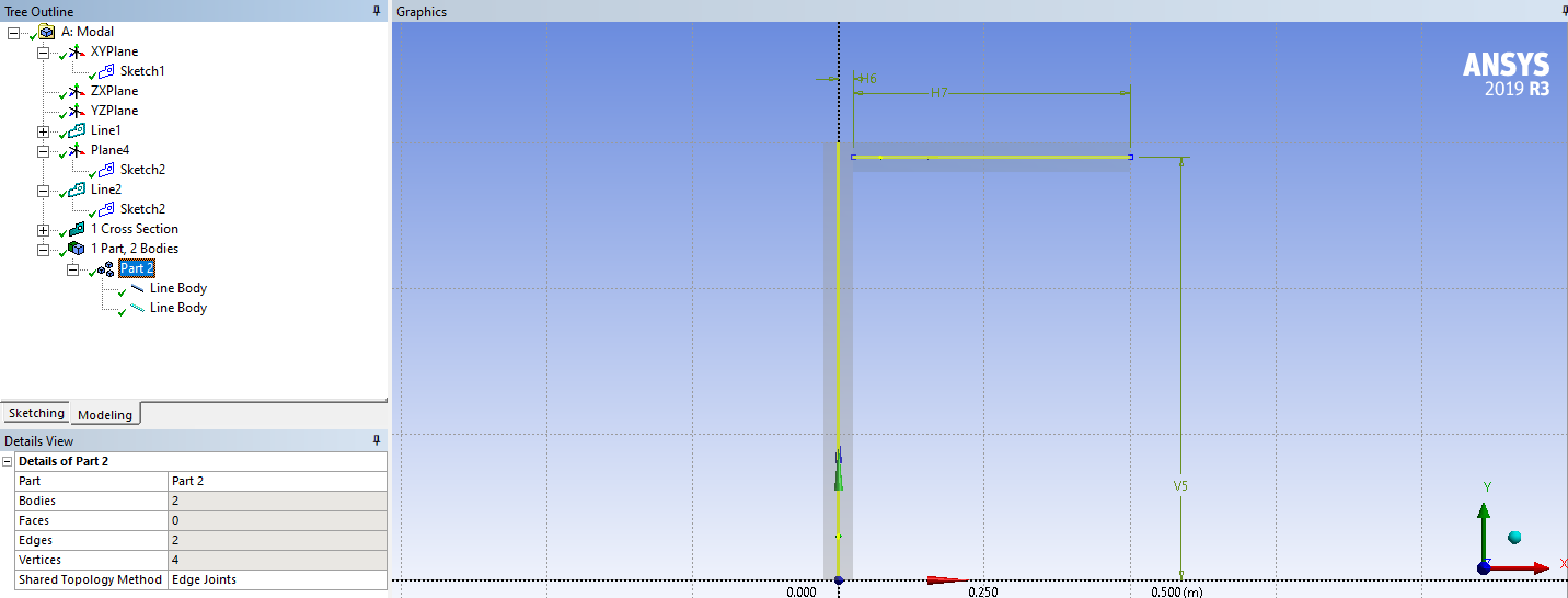
SubscriberHi. I'm trying to design L-shaped beam as shown in this picture:
August 6, 2020 at 2:42 pmSai Deogekar
Ansys EmployeeHi,nIs there a reason that you need to define the L-shaped body using 2 distinct line bodies? I would suggest using Shared Topology i.e. the two line bodies would have no gap between them and would share a node where they meet. That should do the trick!nHope this helps,nSai nAugust 6, 2020 at 5:36 pmSubscriberThanks for your reply. I already tried to do what you suggested but I had this problem with the connection: n Any idea on how to avoid this problem? n
September 12, 2020 at 10:59 am
Any idea on how to avoid this problem? n
September 12, 2020 at 10:59 amFrancesca_Pistorio
SubscriberDear @Abdulelah ,nI have the same problem. Did you just sort it out? nSeptember 12, 2020 at 3:10 pmpeteroznewman
SubscribernWhat is the problem? Is it that the beam profiles are at right angles to each other where the beams connect? Did you want the profiles trimmed to 45 degrees at the connection point, the way two I-beams would be cut before welding together? ANSYS won't show that.nThe simple solution is to turn off the beam profile. The two lines are the geometry.nThe profiles are just a visualization. Mathematically, the two lines are connected and their bending properties are defined by the beam profile.nViewing 4 reply threads- The topic ‘How to connect two line bodies?’ is closed to new replies.
Innovation Space Trending discussions
 Top Contributors
-
peteroznewman
 6515
6515 -
scabo
 1906
1906 -
Dennis Chen
 1463
1463 -
javat33489
 1308
1308 -
Shyam Prasad V Atri
1022
Top Rated Tags
© 2026 Copyright ANSYS, Inc. All rights reserved.
Ansys does not support the usage of unauthorized Ansys software. Please visit www.ansys.com to obtain an official distribution.
-


The Ansys Learning Forum is a public forum. You are prohibited from providing (i) information that is confidential to You, your employer, or any third party, (ii) Personal Data or individually identifiable health information, (iii) any information that is U.S. Government Classified, Controlled Unclassified Information, International Traffic in Arms Regulators (ITAR) or Export Administration Regulators (EAR) controlled or otherwise have been determined by the United States Government or by a foreign government to require protection against unauthorized disclosure for reasons of national security, or (iv) topics or information restricted by the People's Republic of China data protection and privacy laws.

 You are navigating away from the AIS Discovery experience