-
-
May 26, 2020 at 10:59 am
Katala
SubscriberHello all,Â
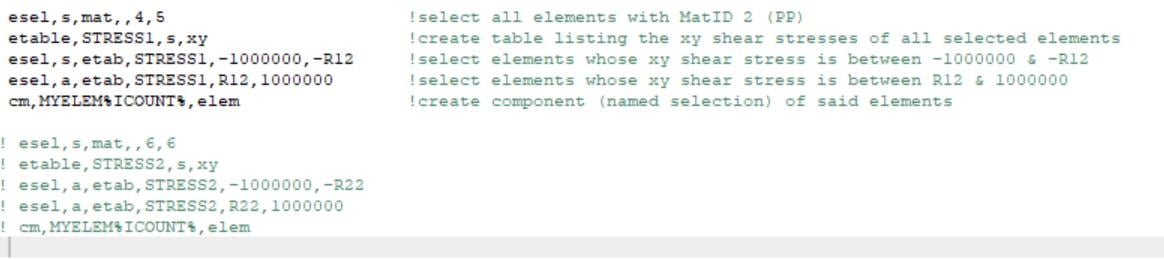
im trying to assign two element groups in one named selection. You can see the code below. The elements from Material 4 and 5 i put in named selection but after that if i try to put addiotionally the elements from Material 6, it only compute with elements from Material 6. How can i assign both element groups. Can anyone please help me.Â
-
May 26, 2020 at 4:00 pm
Wenlong
Ansys EmployeeHi Katala,
Can you try this:
esel, s, mat, , 4, 5 Â Â Â ! select elements with mat 4 & 5
cm, mat_4_5, elem   ! Create a name selection with name mat_4_5
esel, a, mat, , 6,6 Â Â Â ! Add element with mat 6
cm, mat_4_5_6, elem   ! Create a name selection with name mat_4_5_6
Regards,
Â
Wenlong
Â
-
Viewing 1 reply thread
- The topic ‘HOW TO ASSIGN ELEMENTS TO NAMED sELECTION IN APDL?’ is closed to new replies.

Innovation Space
Trending discussions
Top Contributors
-
5874
-
1906
-
1420
-
1306
-
1021
Top Rated Tags
© 2026 Copyright ANSYS, Inc. All rights reserved.
Ansys does not support the usage of unauthorized Ansys software. Please visit www.ansys.com to obtain an official distribution.