

-
-
May 15, 2021 at 5:37 am
juan_arb
SubscriberHey there!
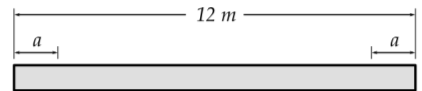
I am new to simulation with ANSYS WorkBench. Currently, I am trying to simulate the effect of standard earth gravity on a concrete cylindrical post (like a light post). For that, I want to add two boundary conditions each at the same distance (a) from the edge, as shown in the image:
May 15, 2021 at 11:49 ampeteroznewman
SubscriberHey John Delete the surfaces and curves.
Select Split on the Design tab and split the face of the cylinder with the plane.
That will create an edge on that face that will be available in mechanical for applying boundary conditions.
May 15, 2021 at 5:22 pmSubscriberThanks a lot . Do you know any way I can parameterize the distance where the cut (split) is made?
May 15, 2021 at 5:36 pmSubscriberUse the Move tool and click the split edge. Click a single axis, use a pop-up menu to measure the distance from the end and click the parameter button.
Viewing 3 reply threads- The topic ‘How to add boundary conditions to a cylinder in ansys mechanical?’ is closed to new replies.
Innovation Space Trending discussions
 Top Contributors
-
peteroznewman
 6625
6625 -
scabo
 1906
1906 -
Dennis Chen
 1469
1469 -
javat33489
 1311
1311 -
Shyam Prasad V Atri
1022
Top Rated Tags
© 2026 Copyright ANSYS, Inc. All rights reserved.
Ansys does not support the usage of unauthorized Ansys software. Please visit www.ansys.com to obtain an official distribution.
-


The Ansys Learning Forum is a public forum. You are prohibited from providing (i) information that is confidential to You, your employer, or any third party, (ii) Personal Data or individually identifiable health information, (iii) any information that is U.S. Government Classified, Controlled Unclassified Information, International Traffic in Arms Regulators (ITAR) or Export Administration Regulators (EAR) controlled or otherwise have been determined by the United States Government or by a foreign government to require protection against unauthorized disclosure for reasons of national security, or (iv) topics or information restricted by the People's Republic of China data protection and privacy laws.

 You are navigating away from the AIS Discovery experience