-
-
April 6, 2020 at 6:29 am
senior2020design
SubscriberDear Ansys Student Community Helpers,
I am using the Ansys 2019 R1 scripting API's for capturing my model in Mechanical and saving it in the user_files of my project. But is there a way to access this folder with python scripting itself?
I have tried using the normal os.mkdir python coding but that only accesses the directory in which the Ansys software was installed in my operating system. Which is the C drive.Â
I have utilized the dataModel.WorkingDir to access my current directory in Ansys, but it seems that the Ansys API commands does not play well with the normal python mkdir coding.
Please let me know what I possibilities I have with my idea.
And please point me in the direction that may help me as well.Â
Thank you, DL
-
April 6, 2020 at 10:14 am
Aniket Chavan
Forum ModeratorWouldn't the following be useful:
Â
Model.Analyses[0].AnalysisSettings.SolverFilesDirectoryÂ
Â
-Aniket
Guidelines on the Student Community
-
April 13, 2020 at 3:28 am
senior2020design
SubscriberI am sorry I believe my title is misleading. Thank you for your help but it seems this also leads me into the Mechanical directory.Â
by using both:
Model.Analyses[0].AnalysisSettings.SolverFilesDirectoryÂ
AND
ExportScreenToImage.WorkingDir
I am trying to access the User_files directory in the project name. because I want to automatically create a folder in that directory.Â
The before methods get me into the Project_filesdp0globalMECH
Thank you
Â
-
April 14, 2020 at 1:03 am
Aniket Chavan
Forum Moderatorplease check:
https://ansyshelp.ansys.com/account/Secured?returnurl=/Views/Secured/corp/v195/act_dev/InstalledFunctionLibraries.html
You should be able to use GetUserFilesDirectory() which works at the workbench level. You should be able to call that function from Mechanical by importing wbjn as explained in the above help link.
Â
-Aniket
How to access Ansys Online Help Document
How to show full resolution image
Guidelines on the Student Community
How to use Google to search within Ansys Student Community
Â
-
April 16, 2020 at 9:59 am
senior2020design
SubscriberI am currently trying different solutions with your insight.Â
Once I am able to access the working directory I am going to save images from Mechanical. I am using the Graphics.ModelViewManager.CaptureModelView(int index, "PNG") to capture and save my geometry into the working directory. The problem I am running into is that the API automatically saves it as the name created to the view inside Mechanical's Model View Window.Â
Is there any way to append to the name saved from using the CaptureModelView.Â
For example, the view name is "Open View" and when I use the Graphics.ModelViewManager.CaptureModelView(int index, "PNG") I get the file named
Open View.PNG in my directory. It there a way to append onto this filename while still using the CaptureModelView()?Â
-
April 20, 2020 at 2:58 pm
Aniket Chavan
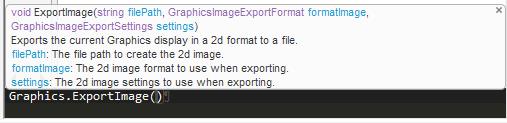
Forum Moderatorsenior2020design, Is there any specific reason to use "Graphics.ModelViewManager.CaptureModelView" ? Can you use "Graphics.ExportImage" instead?
-Aniket
How to access Ansys Online Help Document
How to show full resolution image
Guidelines on the Student Community
How to use Google to search within Ansys Student Community
Â
Â
-
April 20, 2020 at 6:23 pm
senior2020design
SubscriberThe issue I am running into with using API Methods that takes in a string filepath such as "Graphics.ExportImage(filePath)" is that the user can save their created Project anywhere on the hard drive. So I do not want to specify a specific filepath to save images because that would confuse users that have saved their Project into a different directory in their hard drive. The "Graphics.ModelViewManager.CaptureModelView" some how finds where the Project was saved and saves the image files into the user_files directory in the Project folder.
I have Version 2019 R1 and I could not seem to identify the existence of the GetUserFilesDirectory() in the reference guide.Â
Thank you for all the help, please let me know what other options are possible.Â
-
April 21, 2020 at 9:14 am
Aniket Chavan
Forum Moderatorbut you can always get the filepath string using GetUserFilesDirectory() from the workbench page right? Did you check the link that I gave?
GetUserFilesDirectory() is a workbench level command so you will be able to execute it from ACT console on Workbench page (not from ACT console in Mechanical).
The link I gave shows how to run workbench level commands from Mechanical. And "filepath" is literally a string, there should not be any issue to manipulate it and force it to the output of command GetUserFilesDirectory() using basic python commands.Â
-Aniket
How to access Ansys Online Help Document
How to show full resolution image
Guidelines on the Student Community
How to use Google to search within Ansys Student Community
Â
-
- The topic ‘How to access the Working Directory of Ansys Mechanical via Python?’ is closed to new replies.

-
6750
-
1906
-
1484
-
1324
-
1087
© 2026 Copyright ANSYS, Inc. All rights reserved.