Ansys Assistant will be unavailable on the Learning Forum starting January 30. An upgraded version is coming soon. We apologize for any inconvenience and appreciate your patience. Stay tuned for updates.
Fluids

Fluids

Topics related to Fluent, CFX, Turbogrid and more.

Hide mesh outline in FLUENT contour plots via TUI

    • jindrich.hala
      Subscriber

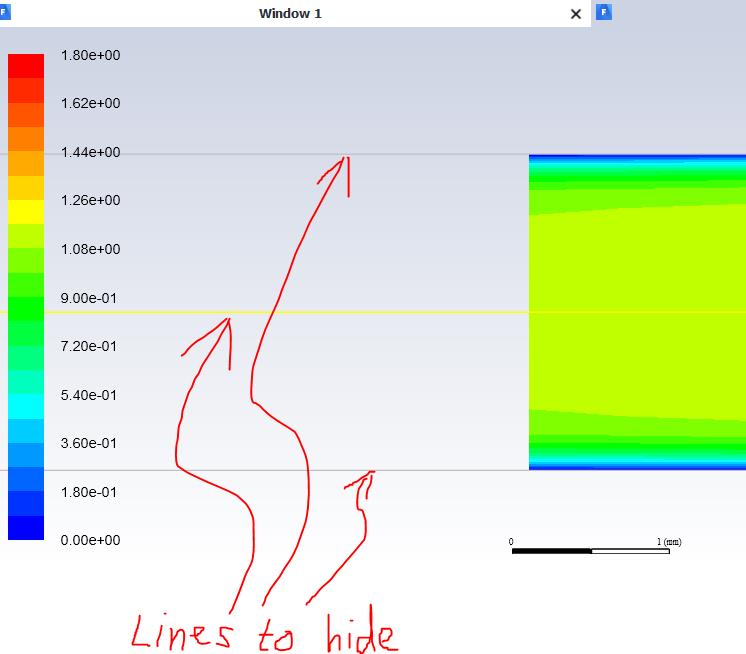
      Hi, I am struggling with the generation of the contour plot from the batch 2D computation running on a cluster using FLUENT 19.3. I could not find the way to hide the mesh outlines which always display on top of the contours I want to display on the clipped surface even when I use /display/set/contours/render-mesh no TUI command. I can get rid of it in GUI but I would like to make it via TUI.


      The relevant part of the journal file code I am using is:


      /display/set-window 2
      /display/set/render-mesh no
      /display/set/contours/render-mesh no
      /display/set/contours/surfaces iso-xy ()
      /display/set/contours/filled-contours yes


      /display/contour/mach-number 0 1.8


      Thank you for any advice!


    • Rob
      Forum Moderator

      Use the new (at 2019) objects then you can choose to show just contours, contours + mesh etc. 

    • jindrich.hala
      Subscriber

      Hi, thank you for the reply, but it seems it does not make what I need. In the object menu there are only entities which appear under the graphics or plots section of the Outline View if there are any defined. The problem is that I want to define all the stuff which display in the current window using the TUI but it is somewhat tricky to get rid of those lines.

    • Keyur Kanade
      Ansys Employee

      i am not sure which are these lines. 


      are these lines from mesh?


      please try commands under /display


      please check surface-edge-visibility


      Regards,


      Keyur


      If this helps, please mark this post as 'Is Solution' to help others.


      Guidelines on the Student Community


      How to access ANSYS help links


    • jindrich.hala
      Subscriber

      Hi, yes these are lines from mesh.


      I solved it finally by selecting /display/update-scene/select-geometry, selecting unwanted geometry and then applying /display/update-scene/display no.

Viewing 4 reply threads
  • The topic ‘Hide mesh outline in FLUENT contour plots via TUI’ is closed to new replies.

[bingo_chatbox]