Ansys Assistant will be unavailable on the Learning Forum starting January 30. An upgraded version is coming soon. We apologize for any inconvenience and appreciate your patience. Stay tuned for updates.
General Mechanical

General Mechanical

Topics related to Mechanical Enterprise, Motion, Additive Print and more.

Having problem with launching embedded Mechanical instance in Python

TAGGED: 

    • Smit Kapadia
      Subscriber
    • ErKo
      Ansys Employee

      Hi

      There is not much description given.

      We assume your refer to pyAnsys and pyMechanical?

      See here for tutorials:

      https://mechanical.docs.pyansys.com/version/0.8/getting_started/index.html

      https://embedding.examples.mechanical.docs.pyansys.com/examples/basic/valve.html#sphx-glr-examples-basic-valve-py

      Hope this helps

      All the best

      Erik


      • Smit Kapadia
        Subscriber

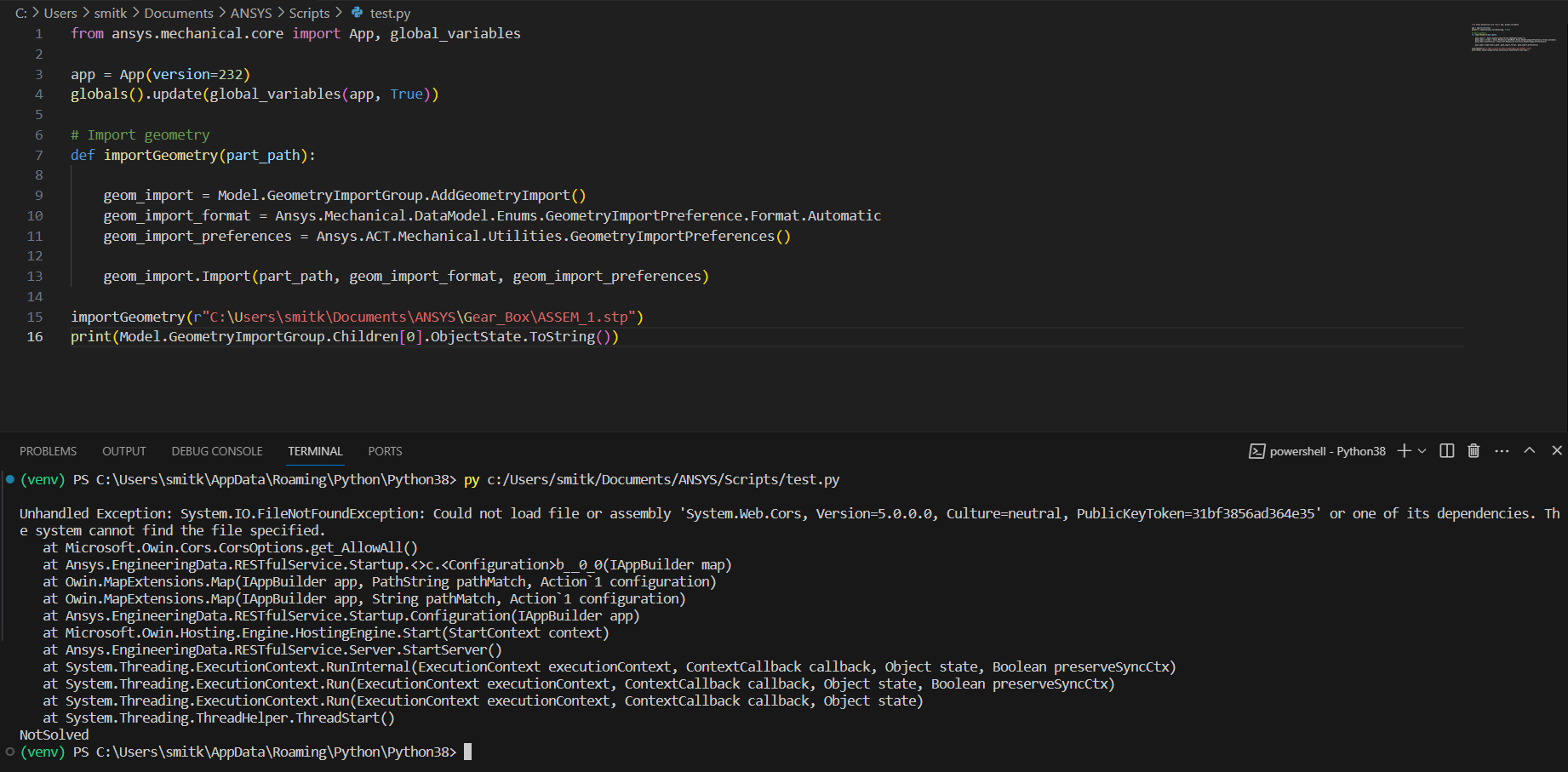
        Hello, I was trying to launch Mechanical 2022 R1 with PyMechanical, which is not supported, so I installed 2023 R1, and the previous error is resolved.

        However, I am having an issue with geometry import. I checked the geometry file path, it is correct and works when I run my code in Mechanical Scripting module. When I print the state of geometry import group, I get "NotSolved". Would anyone know why this happens?

        Following is the error I get, with an embedded instance of Mechanical in Python:-

    • ErKo
      Ansys Employee

      Hi

      Please install 2023 R2 and try this code (which works of course if all is set up ok):

      import os
      import smtplib
      import ansys.mechanical.core as mech

      work_dir = r'D:\PyAnsys\PyMechanical\demo'
      path_to_232 = r'C:\Program Files\ANSYS Inc\v232'
      app = mech.App(version=232) # starts a non-graphical Mechanical session within the python.exe
      globals().update(mech.global_variables(app)) # update global variables to get access to the same Model, DataModel, etc variables as in the Mechanical scripting consoleâ€
      # Add static analysis
      analysis = Model.AddStaticStructuralAnalysis()

      # Import geometry
      geometry_file = os.path.join(work_dir,'Valve.scdoc')
      geometry_import = Model.GeometryImportGroup.AddGeometryImport()
      geometry_import_format = Ansys.Mechanical.DataModel.Enums.GeometryImportPreference.Format.Automatic
      geometry_import_preferences = Ansys.ACT.Mechanical.Utilities.GeometryImportPreferences()
      geometry_import_preferences.ProcessNamedSelections = True
      geometry_import.Import(geometry_file, geometry_import_format, geometry_import_preferences)
      If you have any issues post your questions here:
       
      https://discuss.ansys.com/
       
      If any bugs/issues are found then publish here:
       
      https://github.com/ansys/pymechanical/issues
       
      All the best
      Erik


Viewing 2 reply threads
  • The topic ‘Having problem with launching embedded Mechanical instance in Python’ is closed to new replies.

[bingo_chatbox]