Ansys Assistant will be unavailable on the Learning Forum starting January 30. An upgraded version is coming soon. We apologize for any inconvenience and appreciate your patience. Stay tuned for updates.
Fluids

Fluids

Topics related to Fluent, CFX, Turbogrid and more.

Geometry not found in Rocky while opened from workbench.

    • farazi2005081
      Subscriber

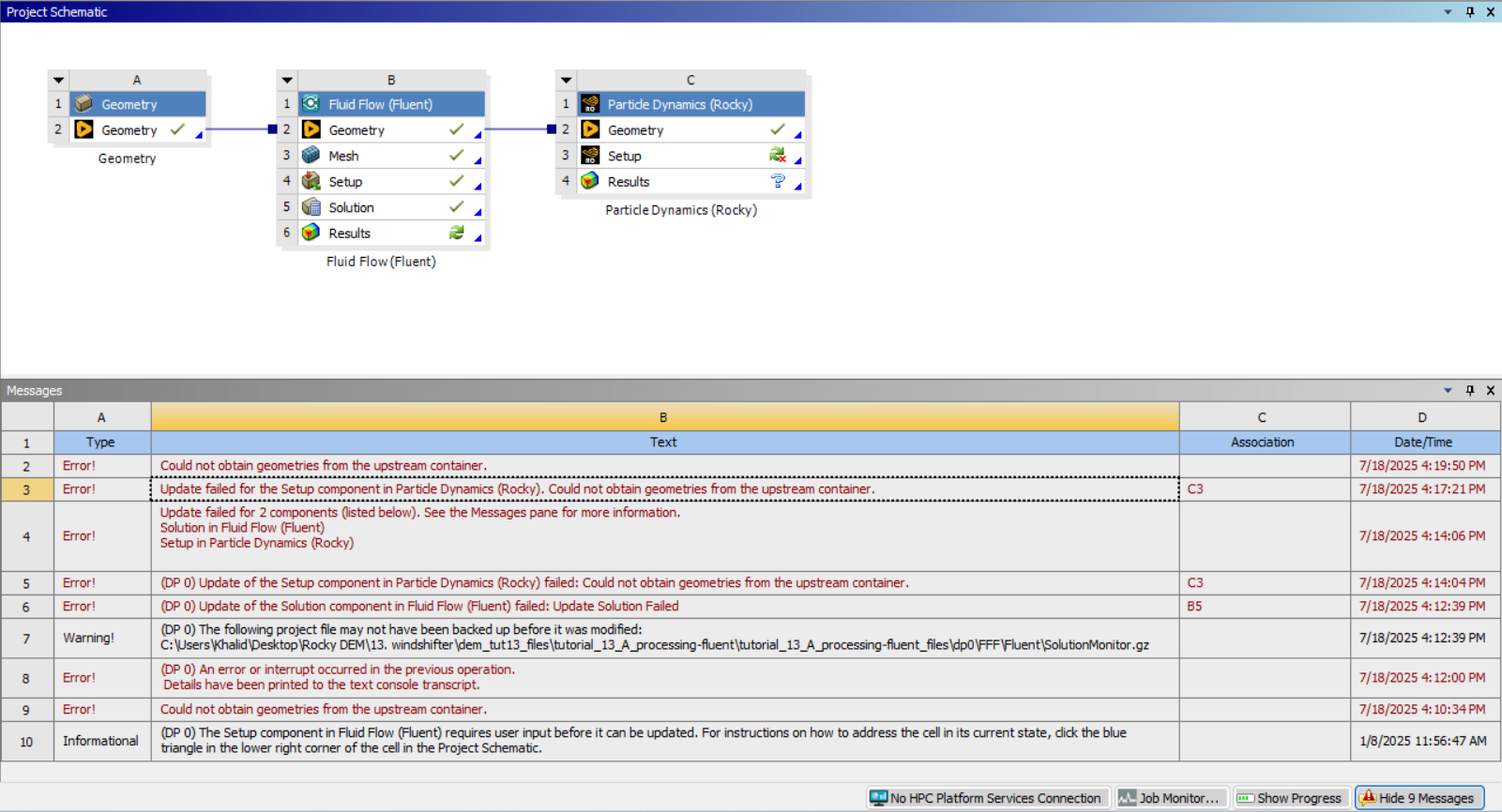
      I was following the tutorial no. 13 from the tutorials provided by Ansys. It was a fluent, rocky, coupled simulation. In Workbench, I imported a .dsco file in geometry. Connected it with Fluent through Workbench. solved it in Fluent. Then connected the geometry of Fluent with Rocky. A line that indicates a link in the workbench was shown between rocky geometry and fluent geometry. There was a green tick beside all the geometries. But after double-clicking setup, when Rocky opened, I couldn't find anything under geometry. Though a message was shown that geometry was being imported from upstream, nothing was finally shown.

    • Lucas Bertollo Baggio
      Ansys Employee

      Hello,

      Could you try it again? After defining your fluent setup, drag and drop the "Rocky" block in workbench onto the Geometry component of the Fluid Flow block.

      Please attach some screenshots here if it does not solve.

    • gedstreet4
      Subscriber

      Hi, I'm having a similar issue with rocky geometry being imported from a .dsco file in workbench. Did a solution get found for this one?

    • farazi2005081
      Subscriber

      Failure to import  geometry from Discovery to Rocky.

    • Lucas Bertollo Baggio
      Ansys Employee

      We are working to fix the tutorial file for 2025 R2.

    • farazi2005081
      Subscriber

      I have found that my rocky is not failing with that specific file only. Any model I am doing in Ansys Discovery is not being imported to Rocky. I was trying one of my own  model using Discovery, to perform parametric optimization through rocky.

      • Lucas Bertollo Baggio
        Ansys Employee

        Which error are you getting? 

        It is working here. Make sure your products are compatible (all 2025 R2).

        • gedstreet4
          Subscriber

          Hello Lucas. Jumping in here with a similar issue. Doing this with tute 12 in rocky. Just downloaded 2025 R2 Student version. 

        • farazi2005081
          Subscriber

          All 2025 R2. But not working with Rocy. Though working with fluent and mechanical. I have tried by uninstalling and reinstalling. This problem was also in R1.


    • alpkostak
      Subscriber

      I'm experiencing this problem on both R1 and R2, and I've been trying to solve it for a long time, but I haven't found a solution. Have you found any solution?

      • Lucas Bertollo Baggio
        Ansys Employee

        Hello, 

        are you using Rocky Student also?

    • alpkostak
      Subscriber

      Yes, I am also using Rocky Student.

Viewing 7 reply threads
  • You must be logged in to reply to this topic.
[bingo_chatbox]