TAGGED: #fluent-#cfd-#ansys
-
-
August 24, 2023 at 2:07 am
Yuanyuan Xiao
Ansys Employee可以采用如下方法把创建好的材料保存下来并重复使用。
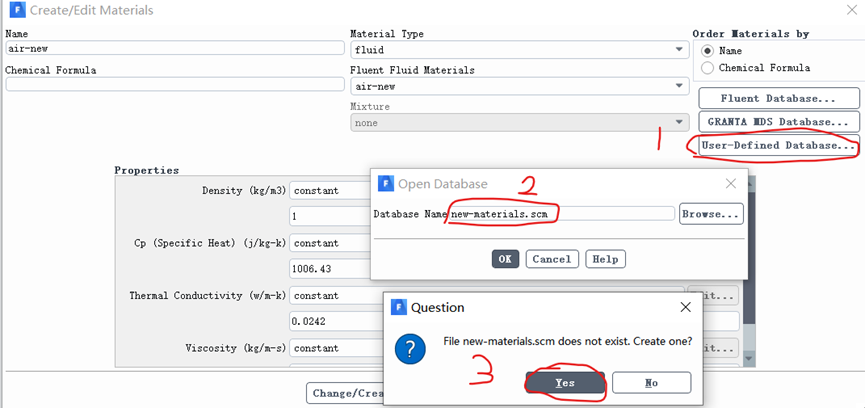
(1) 首先,保存新创建的材料,比如air-new是我新创建的。保存方法如下:
a) 点击Create/Edit Materials对话框的“User-Defined Database”按钮,打开“Open Database”对话框。
b) 在“Open Database”对话框输入要保存的文件名(即创建的材料要保存在这个被命名的文件里,比如输入new-materials.scm)后,点击OK。
c) 在弹出的对话框里点击“Yes”,这样就在工作路径下创建了一个包含新材料的名为new-materials.scm的scheme文件。
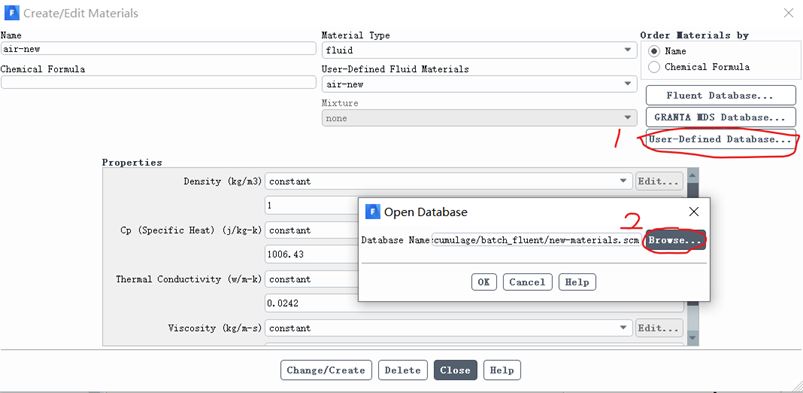
(2) 其次,使用已保存的材料。步骤如下:
a) 点击Create/Edit Materials对话框的“User-Defined Database”按钮,打开“Open Database”对话框。
b) 在“Open Database”对话框点击“browse”打开上一步保存的文件,并点击OK。
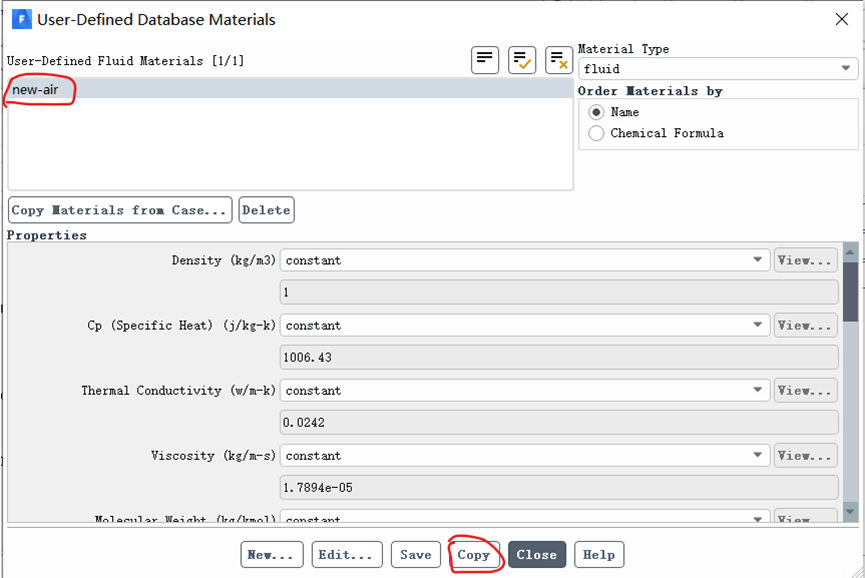
c) 在弹出的“User-Defined Database Materials”里选中新创建的材料,然后点击“Copy”。这样新创建的材料就被导进来了。
-
August 24, 2023 at 2:29 am
Yuanyuan Xiao
Ansys Employee已回答,见上文。
-
Viewing 1 reply thread
- 主题 ‘Fluent创建好的材料如何保存下来?’ 已关闭新回复.
Innovation Space
Trending discussions
- Application of EDC occurs flame extinguishing
- Please help me check if there are any issues with the UDF.
- Difficulty in Complex Source Term Linearization
- Must EDC model need an initial flow field?
- Negative droplet growth rate in Fluent wet steam model
- Please help me analyze the multiphase flow model for the phase change of liquid
- Energy Source Term formulation for multi-component condensation
- Compile the UDF code and apply it to the DPM.
Top Contributors
-
5834
-
1906
-
1420
-
1305
-
1021
Top Rated Tags
© 2026 Copyright ANSYS, Inc. All rights reserved.
Ansys does not support the usage of unauthorized Ansys software. Please visit www.ansys.com to obtain an official distribution.