

TAGGED: convergence, fluent, residuals, workbench
-
-
January 8, 2021 at 7:25 pm
hnorthrup
SubscriberFrom my very basic understanding of CFD and Fluent, I thought that if I set my residual absolute criteria that once the residuals hit that criteria the simulation would proceed to the next time step. Is that correct? All of my previous simulations working in Fluent have worked that way.
The reason I ask is that I set up my simulation (transient, laminar) with a absolute criteria of 1e-05 with max iterations/times step of 200. However it always goes to 200 iterations even though it goes below 1e-05. This is using Fluent from Workbench (I am trying to figure out why my FSI is going really slow).
However when use the exact same simulation parameters in the stand alone program of Fluent, it moves to the next time step when it reaches the absolute criteria (around 100 iterations).
Is there a setting in workbench that is telling Fluent to always go to the maximum iterations regardless of the absolute criteria?
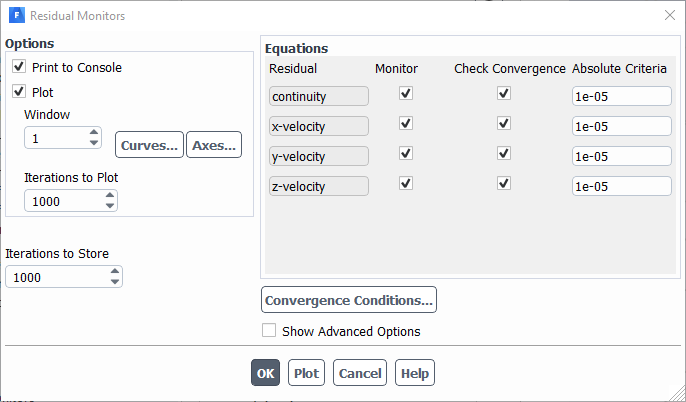
Below are some screenshots of my Fluent simulations from Workbench just in case.
January 9, 2021 at 6:23 pmYasserSelima
Subscriberhit convergence conditions and check if there is another condition therenJanuary 11, 2021 at 5:20 pmSubscriberI looked at the convergence conditions and there weren't any other conditions. All the settings were the same as in the stand alone version of Fluent. I did try changing under Choose Condition from All Conditions are Met to Any Condition is Met but that did not change anything. It still always ran until the 200 iterations per time step were complete.nn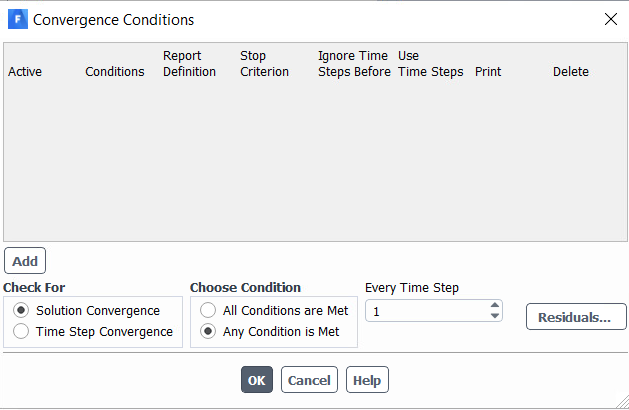 n
January 11, 2021 at 5:38 pm
n
January 11, 2021 at 5:38 pmRob
Forum ModeratorAssuming you're hitting the 1e-5 criterion (check in the TUI) it must be system coupling related. The panel above is as expected for a transient run but all conditions are met is the default. See if that has an effect as there are no other conditions to check so (using programmer logic) convergence isn't reached. Array knows more about FSI runs. nJanuary 11, 2021 at 8:25 pmSubscribercheck time step convergence box and press oknJanuary 14, 2021 at 10:24 pmStephen Orlando
Ansys EmployeeArray, as Arraysuggested, check that the residuals are actually lower than 1e-5 in the TUI output. It looks like in the screenshot z-velocity is actually above 1e-5. You may need to run in double precision to hit this convergence target. Also, why do you need to hit 1e-5? This is a pretty tight convergence target. If you're just getting started with System Coupling I recommend going over all of the following.nnThis tutorial in the Ansys documentation that shows a 2-way FSI simulation with Fluent and Mechanical. https://ansyshelp.ansys.com/account/secured?returnurl=/Views/Secured/corp/v202/en/sysc_tut/sysc_tut_oscplate_wb_fluent.htmlnSystem Coupling Tutorials \\ Tutorials with Workbench-Setup Workflows \\ Tutorials with Workbench Setup and Execution \\ Oscillating Plate FSI with Fluent and MechanicalnnYou can also look at the following for the same tutorial but run with the System Coupling GUI or Command Line Interface that is run outside of Workbench. The new System Coupling GUI (run outside of Workbench) is available by searching for System Coupling 2019R3 (or newer) in the Start menu. https://ansyshelp.ansys.com/account/secured?returnurl=/Views/Secured/corp/v202/en/sysc_tut/sysc_tut_oscplate_cli_fluent.htmlnSystem Coupling Tutorials \\ Tutorials with Command-Line Interface (CLI) Workflows \\ Oscillating Plate FSI with Fluent and MechanicalnnFSI simulations with very soft materials or membranes are prone to numerical instabilities. In 2020R1 we have introduced a stabilization method in System Coupling called the Quasi-Newton Stabilization Algorithm. Note that this has to be used with the new System Coupling GUI or Command Line Interface that is run outside of Workbench. More information here: https://ansyshelp.ansys.com/account/secured?returnurl=/Views/Secured/corp/v202/en/sysc_ug/sysc_gen_scservice_dt_supplemental_iqnils.htmlnSystem Coupling User's Guide \\ System Coupling Data Transfers \\ Supplemental Processing Algorithms \\ Quasi-Newton Stabilization AlgorithmnnIt is very important to build up the FSI simulation in stages as opposed to setting up the 2-way FSI right at the start. This document Best Practices for Coupled Fluid-Structure Interaction (FSI) describes this process and is available here: https://ansyshelp.ansys.com/account/secured?returnurl=/Views/Secured/corp/v202/en/sysc_ug/sysc_bestpractices_fsi.htmlnSystem Coupling User's Guide \\ Best Practices for System Coupling \\ Best Practices for Coupled Fluid-Structure Interaction (FSI)nJanuary 21, 2021 at 4:41 pmSubscriberThanks for the help. I was using 1e-5 because that is what we use for our CFD simulations. I was also running it with double precision. I have been following one of your suggestions for FSI with the new System Coupling GUI to see if that helps and have run into some snags but I will start a new thread on that since it is a somewhat unrelated to this topic. nJanuary 21, 2021 at 5:17 pmSubscriberI also did just check and you are correct, it is barely not hitting convergence for the z-velocity. It is around 1.5e-5. Thanks again!nViewing 7 reply threads- The topic ‘Fluent not moving on to next time step after reaching absolute criteria in Workbench’ is closed to new replies.
Innovation Space Trending discussions
 Top Contributors
-
peteroznewman
 4838
4838 -
scabo
 1587
1587 -
Dennis Chen
 1386
1386 -
javat33489
 1242
1242 -
Shyam Prasad V Atri
1021
Top Rated Tags
© 2026 Copyright ANSYS, Inc. All rights reserved.
Ansys does not support the usage of unauthorized Ansys software. Please visit www.ansys.com to obtain an official distribution.
-


 You are navigating away from the AIS Discovery experience

