

TAGGED: mesh-fluent
-
-
May 20, 2021 at 11:10 am
smraniaki
SubscriberI have a CAD model made of a patterned structure (STL) + enclosure around it and it fails opening when I try to import it to fluent for meshing. the error says "CAD model not compatible"
When I reduce the dimension (number of patterns) in my CAD model, it imports without any problem.
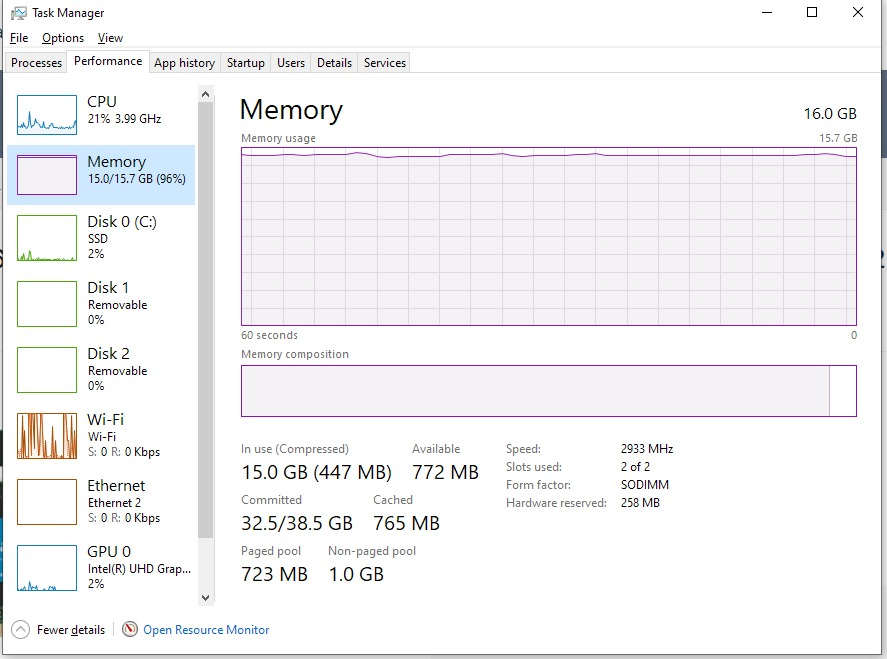
I suspected the available memory is not sufficient to handle so many facets (surfaces merged to form a solid body), and the snapshot below shows the utilized memory during the importation process.
May 20, 2021 at 12:38 pmRob
Forum ModeratorCan you rebuild the unit in NURBS based CAD and import that? Or mesh the domain in sections and stitch them together later? It may be RAM related but could also be linked to the shear number of surfaces/facets in the import; when you break list limits it may be the importer that fails rather than Fluent Meshing so you get an import error rather than memory.
May 22, 2021 at 5:20 pmSubscriberThank you Rob for your comment.
I'm afraid I can't split the body and stitch them later. It's one object. However, I sometimes get the error from the importer, during the importation process, sometimes during the surface mesh process. For example, below is the log I get until it crashes during the importation process after almost 8 hours of processing. Please let me know if you have any tip or advise.
--------------------------------------------------------------
This is an academic version of ANSYS FLUENT. Usage of this product
license is limited to the terms and conditions specified in your ANSYS
license form, additional terms section.
--------------------------------------------------------------
Host spawning Node 0 on machine "KET21002" (win64).
-------------------------------------------------------------------------------
ID Hostname Core O.S. PID Vendor
-------------------------------------------------------------------------------
n10 KET21002 11/12 Windows-x64 3828 Intel(R) Core(TM) i7-10750H
n9 KET21002 10/12 Windows-x64 17316 Intel(R) Core(TM) i7-10750H
n8 KET21002 9/12 Windows-x64 17240 Intel(R) Core(TM) i7-10750H
n7 KET21002 8/12 Windows-x64 18048 Intel(R) Core(TM) i7-10750H
n6 KET21002 7/12 Windows-x64 5020 Intel(R) Core(TM) i7-10750H
n5 KET21002 6/12 Windows-x64 19412 Intel(R) Core(TM) i7-10750H
n4 KET21002 5/12 Windows-x64 20384 Intel(R) Core(TM) i7-10750H
n3 KET21002 4/12 Windows-x64 18760 Intel(R) Core(TM) i7-10750H
n2 KET21002 3/12 Windows-x64 12216 Intel(R) Core(TM) i7-10750H
n1 KET21002 2/12 Windows-x64 7352 Intel(R) Core(TM) i7-10750H
n0* KET21002 1/12 Windows-x64 16580 Intel(R) Core(TM) i7-10750H
host KET21002 Windows-x64 8832 Intel(R) Core(TM) i7-10750H
MPI Option Selected: intel
Selected system interconnect: default
-------------------------------------------------------------------------------
Cleanup script file is C:\Users\smran\AppData\Local\Temp\cleanup-fluent-KET21002-8832.bat
Meshing>
Importing one geom object per program-controlled and one zone per body ...
C:\Program Files\ANSYS Inc\v202\commonfiles\CPython\3_7\winx64\Release\python\..\Ansys\TGrid\CADReaders.py started by smran on KET21002 winx64 on Sat May 22 11:33:44 2021
using Python 3.7.6 (heads/python_3.7.6-dirty:49ba8e4, Mar 19 2020, 15:03:34) [MSC v.1910 64 bit (AMD64)]
using Ansys.Meshing.FieldMesher build May 29 2020 12:06:46 including TGLib build Nov 12 2019 13:13:16
running ANSYS TGrid CADToTGridConverter ...
setting up parameters ...
setting up parameters done.
running conversion ...
converting 1 file(s) from Workbench to FLTG using output path 'C:\Users\smran\AppData\Local\Temp/out162167602318916.tgf'
converting file 'Geom-2.scdoc' (1 of 1) from Workbench to FLTG using output path 'C:\Users\smran\AppData\Local\Temp'
importing data ...
importing meshing model from PartMgr from file 'C:\Users\smran\AppData\Local\Temp\WB_KET21002_smran_17224_2\unsaved_project_files\dp0\Geom-2\DM\Geom-2.scdoc' ...
setting enclosure and symmetry processing to False
setting transfer named selections to True
setting named selection prefixes to ''
setting mixed import resolution type to 'SolidAndSurface'
setting target application to 'FluentMeshing'
attaching to assembly ...
attaching to assembly failed after 27549.234 [s]
running ANSYS TGrid CADToTGridConverter FAILED! (pIPartMgr->AttachAssembly() failed!
Attach failed.
importing meshing model from PartMgr from file 'C:\Users\smran\AppData\Local\Temp\WB_KET21002_smran_17224_2\unsaved_project_files\dp0\Geom-2\DM\Geom-2.scdoc' failed.)
ran ANSYS TGrid CADToTGridConverter in 27549.279 [s]
======== Command Execution Log Manager ========
Number of execution logs: 2
MeshingModelImportPartMgrExecLog
Label = 'ANSYS_MESH_FM_WARNING_ID_MESHINGMODEL_IMPORT_PARTMGR_ERROR'
DataTranslatorCommandExecLog
Label = 'ANSYS_MESH_FM_ERROR_ID_CONVERT_WORKBENCH_TO_FLTG_ERROR'
Error: Error in CAD Import
Error Object: #f
Error: Error occurred during import.
Error Object: #f
Error: Importing the selected file could not be completed. Check to make sure that the selected file format is supported. In addition, check to make sure the CAD Readers are properly configured for the format using the CAD Configuration Manager utility.
May 24, 2021 at 8:41 amForum ModeratorIt may be linked to the facet count in the stl. Can you use a bigger computer at Uni? Similarly can you split the surface up and bring in a few stls to stitch together later? For terrain models we used to bring in squares and connect in the older pre-proc tools as we ran out of memory allocation on 32-bit hardware. Once each face was meshed they could be added to a single session, connected, remeshed and then transferred to Fluent.
May 26, 2021 at 10:51 amSubscriberThanks Rob! I managed to find a better system to try it on a workstation with 64GB of ram (instead of my 16GB RAM) but no significant changes. I even tried the faceting tool to reduce the number of facets and smooth them before creating the solid body (merged faces) but it seems like despite the less number of facets this time, it added to the pre-processing time. I tried this on a small test-case just for the sake of comparison. I'm so confused!Viewing 4 reply threads- The topic ‘Fluent meshing fails when opening a geometry from space claim’ is closed to new replies.
Innovation Space Trending discussions
 Top Contributors
-
peteroznewman
 4708
4708 -
scabo
 1565
1565 -
Dennis Chen
 1386
1386 -
javat33489
 1242
1242 -
Shyam Prasad V Atri
1021
Top Rated Tags
© 2026 Copyright ANSYS, Inc. All rights reserved.
Ansys does not support the usage of unauthorized Ansys software. Please visit www.ansys.com to obtain an official distribution.
-


The Ansys Learning Forum is a public forum. You are prohibited from providing (i) information that is confidential to You, your employer, or any third party, (ii) Personal Data or individually identifiable health information, (iii) any information that is U.S. Government Classified, Controlled Unclassified Information, International Traffic in Arms Regulators (ITAR) or Export Administration Regulators (EAR) controlled or otherwise have been determined by the United States Government or by a foreign government to require protection against unauthorized disclosure for reasons of national security, or (iv) topics or information restricted by the People's Republic of China data protection and privacy laws.

 You are navigating away from the AIS Discovery experience

