-
-
December 3, 2018 at 8:49 pm
kmkb21
SubscriberHi there
Â
I am currently trying to run a grid convergence study using the pressure-based coupled transient method and can't seem to get the case to run with a fixed time step. Does the Courant number in the "methods" section definition override the fixed time step?
Â
Cheers!
-
December 3, 2018 at 9:14 pm
DrAmine
Ansys EmployeeNo: iThis CFL number has nothing to do with the temporal evolution of the solution. It just adds an implicit relaxation for the solution matrix (increase stability).
Â
-
December 3, 2018 at 9:17 pm
kmkb21
SubscriberHi there
Thank you. I have selected the fixed time stepping in the "run calculation" section but the output says that it is updating the solution at time N and N-1 using variable time stepping method. Should I try to start the case from scratch? -
December 3, 2018 at 9:25 pm
DrAmine
Ansys EmployeeVariable time stepping is an adaptive approach used for multiphase modeling. This will adapt the time step based on global CFL number near the free surface cells.
-
December 3, 2018 at 9:28 pm
kmkb21
SubscriberThank you! I am doing single phase flow and have not selected variable time stepping so I'm wondering where it is specified in the gui or if I can select it in the text user interface?
Regards
Kai -
December 3, 2018 at 9:34 pm
DrAmine
Ansys EmployeeFor single phase, variable time stepping is not available. The alternative is adaptive time stepping method which can be selected under Run calculation panel. Details in the help.
-
December 4, 2018 at 1:43 am
-
December 4, 2018 at 6:57 am
DrAmine
Ansys EmployeeRestart from scratch and tell us if it disappears. Just to clarify: Are you using / Have you used a density based solver?
-
December 4, 2018 at 2:52 pm
kmkb21
SubscriberI've done it again from scratch and it is still using the variable time stepping method despite saying fixed time stepping method in the run calculation panel. I am using the pressure based solver
-
December 4, 2018 at 4:06 pm
DrAmine
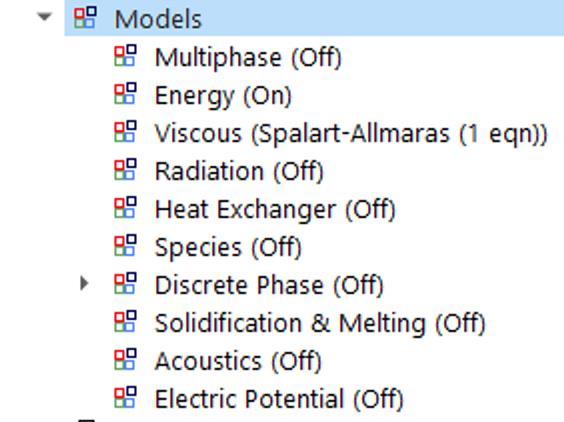
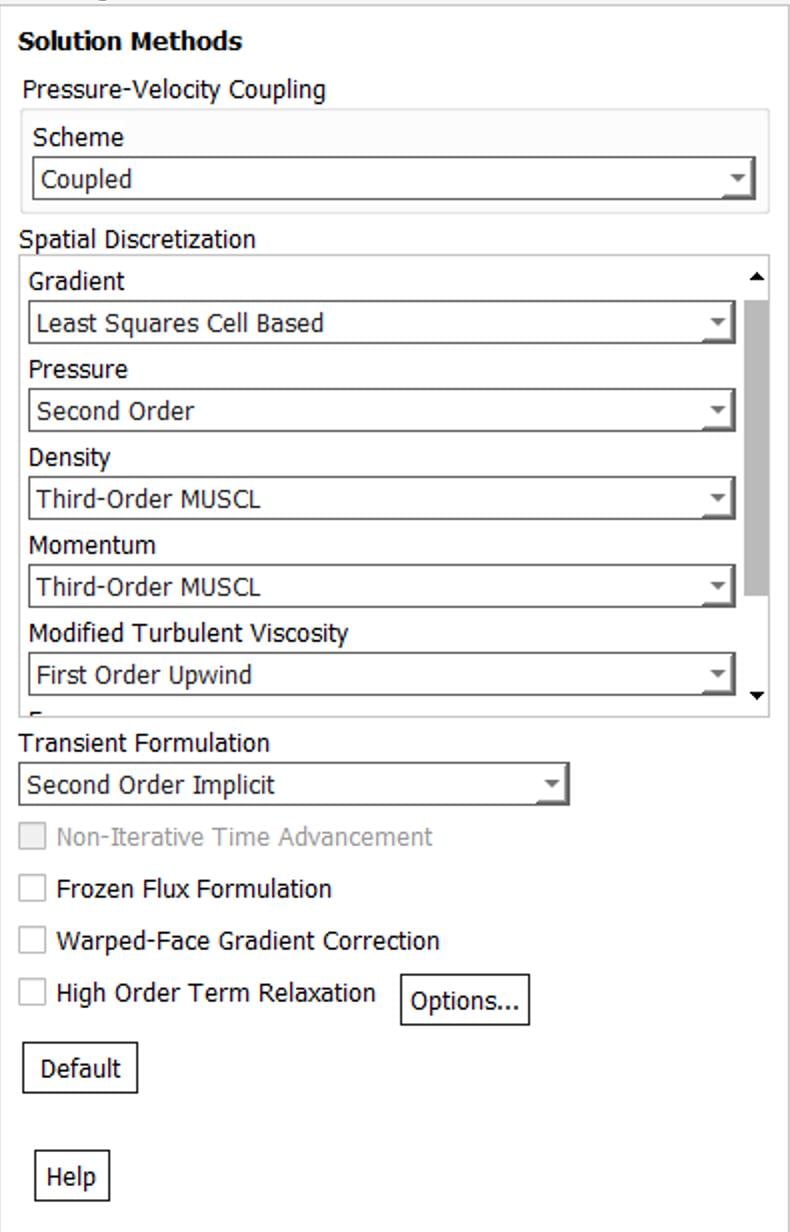
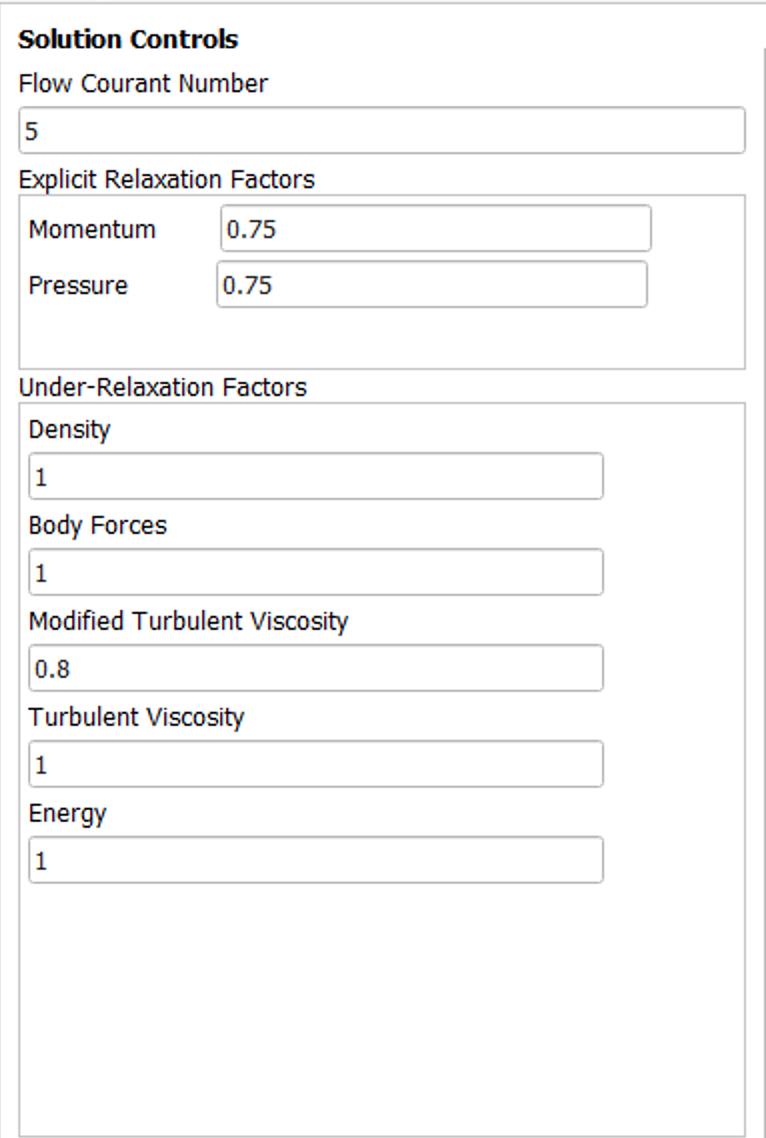
Ansys EmployeeShare screenshot of Solution Methods and Controls. Which version are you using? What do you mean from scratch?
-
December 4, 2018 at 4:13 pm
kmkb21
SubscriberThank you.
I am using version 19.2 (Installed a couple weeks ago). I reimported the grid, set the turbulence model, chose the transient option, pressure-based solver, then edited the materials, cell zone conditions and boundary conditions, changed the methods and controls, intialized the flow (standard initialization computed from the farfield values), and ran the calculation. I can share the case if desired, as well as a case which is the same but with twice as coarse a grid.
Thanks and kind regards
Kai
Â
-
December 4, 2018 at 5:47 pm
DrAmine
Ansys EmployeeCan you report the time step and plot it to see if it is really changing. I guess it is already available to be plotted as report definition or any other report definition written into file -
December 4, 2018 at 6:37 pm
kmkb21
SubscriberIt appears as though the time step doesn't change from the specified step when it is reported, though there is some error (0.004500000000000001 instead of 0.0045) in places. Is it possible that this is just the reporting interval and that the time step being computed is something else? It is reported as "flow time" in the report file.
-
December 4, 2018 at 6:53 pm
DrAmine
Ansys EmployeeI am pretty sure that the time step is not changing there. There is flow time and time step size. If you mow report volume average of whatever you have the option to write in a File and you can add into that file the time step size. Here you can check everything in a glance.
Â
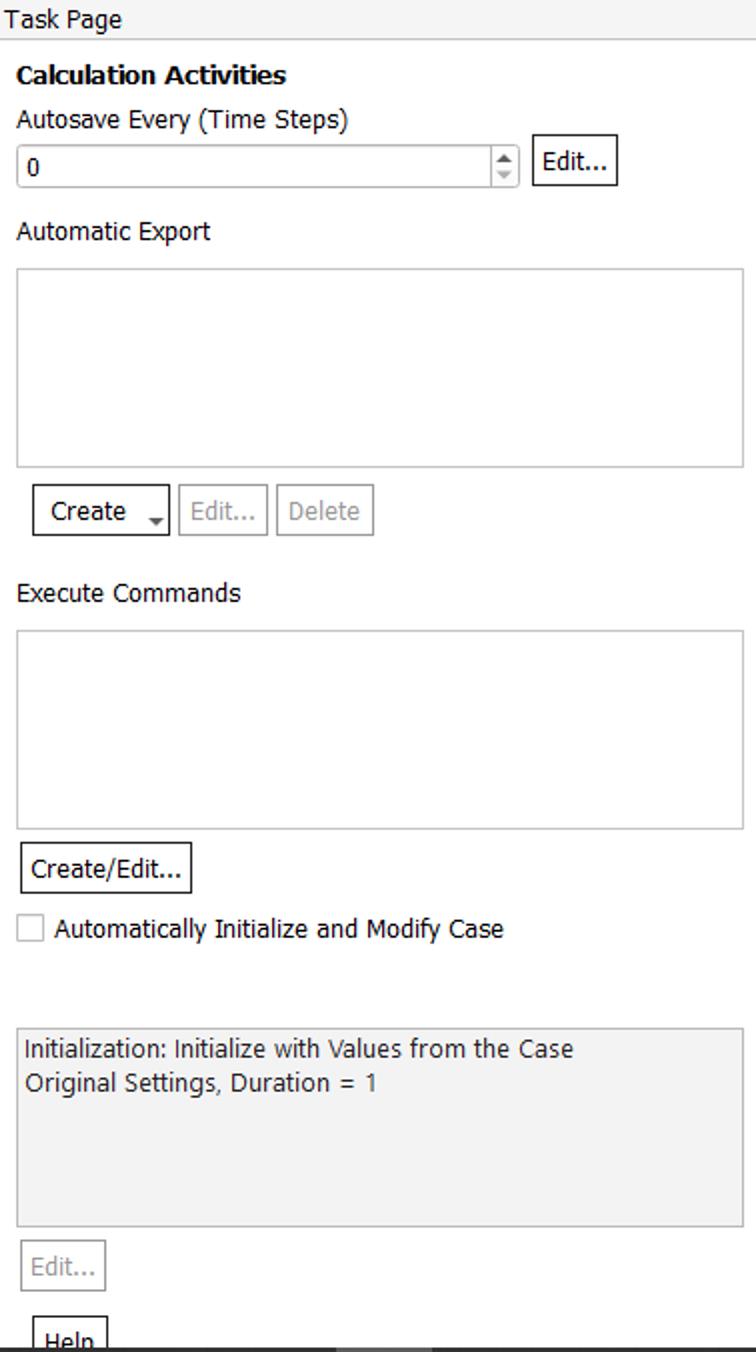
Please add a screenshot of the Task page where Calculation activities are listed. Are you using any scheme command? If you now save the case file into .cas and open it in Notepad++ and search for "variable" and "variable time" where do you find them?
-
December 4, 2018 at 7:09 pm
kmkb21
SubscriberPlease see the screenshot attached. In the initial .cas file, the model was set to laminar, though once I extracted a new cas.gz that I saved, these were the results for searching for variable:
Â
(dpm/variable-interpolation/kernel-gaussian 1.)
(dpm/variable-interpolation/stencil 1)
(dpm/variable-interpolation/nci-node-correction-algorithm 1)
(dpm/variable-interpolation/kernel 2)
(dpm/variable-interpolation/nodes? #f)
(dpm/variable-interpolation/in-time? #f)
(dpm/variable-interpolation/velocity-wall-interpolation? #f)
(dpm/variable-interpolation/barycentric? #f)
(dpm/variable-interpolation? #t)
(variable-time-step/verbosity 0)
(variable-time-step/undo-time-step? #t)
(variable-time-step? #f)
Â
I am not sure what you mean by "If you mow report volume average of whatever you have the option to write in a File and you can add into that file the time step size"
Â
Kind regards
Â
Kai
Â
Â
Â
-
December 4, 2018 at 8:50 pm
DrAmine
Ansys EmployeeVariable time step is not activated according to the settings. I cannot say now why the message is written.
Regarding the report: You create a report definition as volume average of any variable and write into a file. In that file you add the time step size.
-
December 5, 2018 at 3:39 pm
kmkb21
SubscriberI have added the report for the time step size and it is constant. However, a physical phenomenon which is observed on every coarser grid does not appear in this simulation, with none of the parameters changed except the finer grid, and the now "variable time step".
Is there a reason for this?
-
December 5, 2018 at 3:47 pm
DrAmine
Ansys EmployeeI do not know. Please create a new thread for that but here my comments
As you refine grid you need to refine the time step to keep constant CFL. But again by refining the grid you will require eventually high end turbulence models to capture length scales and time scales properly as RANS methods might fail here.
Â
Regarding your question here: I can reproduce the message and it is just referring to the method deployed for discretization. You do not worry about that. Your time step is fixed.
-
- The topic ‘Fixed vs Variable Time Stepping’ is closed to new replies.
-
5849
-
1906
-
1420
-
1305
-
1021
© 2026 Copyright ANSYS, Inc. All rights reserved.