-
-
April 9, 2023 at 9:44 pm
Jared McFadden
SubscriberHello,
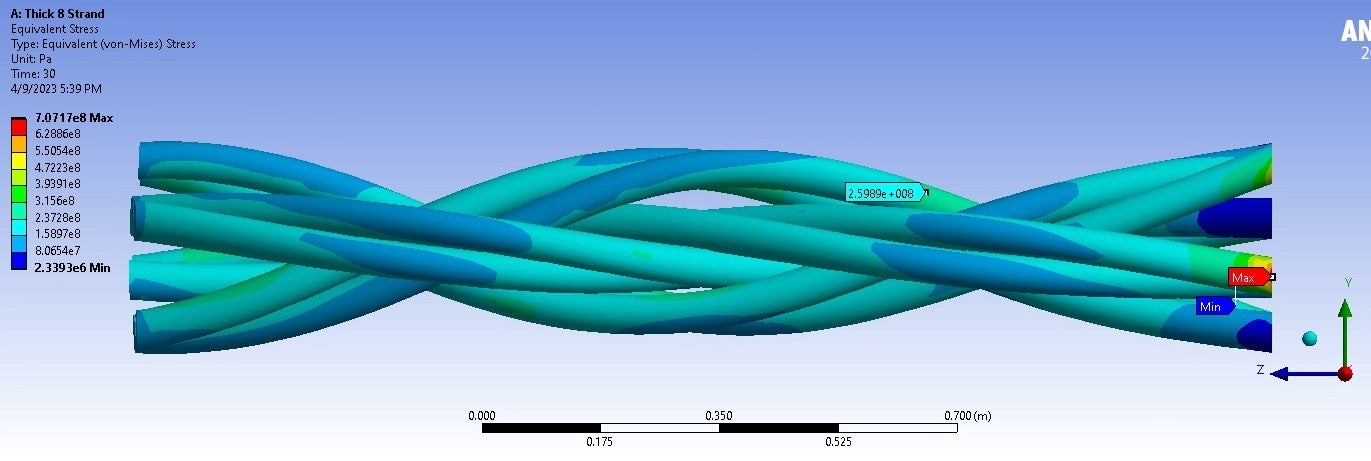
I am modeling a small section of an 8-strand mooring line with a force applied at one end and a fixed support at the other. The issue I am having is a high, unrealistic stress value near the face where the fixed support is applied, I think because of the fixed support. In the real application, there is not a fixed support at this end because it is just a small section of a much bigger line. I have tried both a fixed support and a displacement but both yield the same results ( I now realize that the two constraints do the same thing). The expected stress result should be similar to the probed value. Is there a better way to more accurately constrain this end?
-
April 9, 2023 at 10:18 pm
peteroznewman
SubscriberThe simple solution is to not plot the stress close to the fixed constraint. St. Venant's principle is that the stress far from a disturbance will be the same as the stress if there was no disturbance. There are two ways to only plot stress far from the distubance of the Fixed Support.
1. In Geometry
Use SpaceClaim to create a plane at the fixed end, then use the Move tool to offset it from the fixed end about 1-2 diameters of the line. Use Split Body to cut all the strands. On the Workbench tab, use the Share button to create Shared Topology so when the geometry is meshed, the elements share nodes at the cut boundary and no bonded contact is needed. Plot the stress on the bodies to the left and don't include bodies near the Fixed Support.
2. In Mechanical using Named Selections of Nodes
Create a Named Selection in the Worksheet of Nodes that have a Z coordinate > whatever value is needed, which will exclude all the nodes that have the artificially high stress. Plot the Stress using that Nodal Named Selection.

-
April 9, 2023 at 10:46 pm
Jared McFadden
SubscriberThank you very much for the response! I am using method 2 and have created a named selection that selected all nodes outisde of the artificially high stress. Is my next step to solve again and plot the stress? If so, the artificially high stress will be excluded?
I am also performing a fatigue analysis using the fatigue tool. Will this named selection method also exclude the high stress from the fatigue analysis?
-
-
April 9, 2023 at 11:18 pm
peteroznewman
SubscriberYou don't need to solve again. The artificially high stress is localized to the nodes near the fixed support but you ignore them and don't plot them and the values don't show up on the Legend of the plot using a Named Selection.
The same method should work on a Life plot using the Fatigue tool.
-
April 10, 2023 at 12:56 pm
Jared McFadden
SubscriberI got it to work, thank you so much! Your comments to my post and many others' have helped me out immensely.
-
-
- The topic ‘Fixed support is causing unrealistic stress’ is closed to new replies.
-
5969
-
1906
-
1420
-
1307
-
1021
© 2026 Copyright ANSYS, Inc. All rights reserved.