-
-
December 12, 2022 at 5:11 pm
Marco Alborghetti
SubscriberGood Morning,
I've performed a simulation with a pipe in Ansys fluent by using the workbench. When i go to the "results" section, i try to make some plot with the chart function. In doing this i've defined some line along axial direction of the pipe and 4 line in corrispondence of certain section (inlet,outlet, 0.33 from inlet, 0.66 from inlet). The problem is that when i go to make the chart and export the data i obtain a sharp graph with only ten points in terms of data. Is there any way to increase the number of data exported ? Kind regards
-
December 13, 2022 at 6:04 am
-
December 13, 2022 at 7:21 pm
Marco Alborghetti
SubscriberHi,
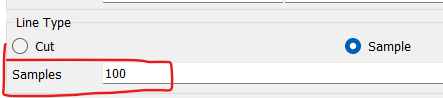
Yeah you are right i'm using the cfd-post present in the workbench tree of ansys fluent...can you please tell me where can i find this sample command? Becuase in my chart by selecting the different folder (General, Data Series, X axis, Y axis, Line Display, Chart Display) I cannot find the sample,
Kind regards
-
December 14, 2022 at 7:22 am
DrAmine
Ansys EmployeeThat option to be found directly under Line. If you have a good mesh then stick to Cut. Sample with increased number can help in case your mesh is not having enough grid points along the line.
-
-
December 14, 2022 at 11:55 am
Marco Alborghetti
Subscriberthank you co muchÂ
-
- The topic ‘Extract more data from fluent post-processing’ is closed to new replies.

-
6680
-
1906
-
1469
-
1313
-
1022
© 2026 Copyright ANSYS, Inc. All rights reserved.