Ansys Assistant will be unavailable on the Learning Forum starting January 30. An upgraded version is coming soon. We apologize for any inconvenience and appreciate your patience. Stay tuned for updates.
Fluids

Fluids

Topics related to Fluent, CFX, Turbogrid and more.

Expression for Particle Modeling in CFX

    • A.Azimi
      Subscriber

      Hello,


      If anybody knows how to write an expression to calculate total particle mass in outlet boundary for a range of particle size. not all sizes of the particles. For example, the range of the modelled particles is 2 to 50 micron. It is easy to write an expression to calculate the total mass for all particles; however, my question is how to calculate total mass for the range of 2 to 20 micron as an example. I know we may use the histogram. But I need an expression because histogram saves your results in an excel file. I want to have the results as an output parameter in CFX for the next step of optimization.

    • raul.raghav
      Subscriber

      I don't think you would be able to evaluate what you're looking at as an output parameter in CFX. Since the particle tracking is done at the end of the continuous phase calculations, I doubt if there would be any way for you to use an expression and optimize the whole simulation. You could probably use User Fortran but it would require quite a bit of work from you.


      Histograms are the only option which would save particle size and track information into a csv file. Attached is a ccl file for an expert parameter which might be of help to you. It does the same job as the histogram but it will output the data at the end of every simulation (in the .out file). You have the option to set the minimum and maximum particle diameters (just like the histogram settings) and see them at the end of simulation or in the .out file.


      If you're using Ansys v18.0 and above, another setting that might help you (in general for particle tracking simulations), is the expert parameter "pt force export massflow". Its set to "f" as default. Setting it to "t" ensures that particle mass flow variable is available in CFD-Post.

    • A.Azimi
      Subscriber

      Hello Raul,


      Thank you for your advice.


      Can we write a ccl and define a variable to store the histogram results in that variable instead of saving in scv file. Similar to UDF in Fluent. 


      Regards,

    • raul.raghav
      Subscriber

      Shazimy, you don't have to define the variables using a ccl as they are available already in CFX-Pre. You might want to read the link below:


      Ansys CFX: Particle Track Variables


      Ansys CFX: Particle Field Variables


      Particle track variables are particle variables that are defined directly on each track. These variables are defined on the particle positions for which track information is written to the results file. Direct access to the particle track variables outside of CFD-Post is possible only if the raw track file is kept after a particle run.


      You can do the following with particle track variables:


      • Export them from particle tracks in CFD-Post

      • Use them to color particle tracks in CFD-Post

      • Use them in particle histograms

      • Use them as input to Particle User Fortran


      Particle track variables are not available for use in CEL expressions and general User Fortran. In addition, they cannot be monitored during a simulation.


      There are tables listing the variables that are available for CFD-Post, User Fortran and Histogram. Make sure you identify the variables of interest in the list. 


      In CFX-Pre, you output extra variables which are not usually available for CFD-Post. See the image below:
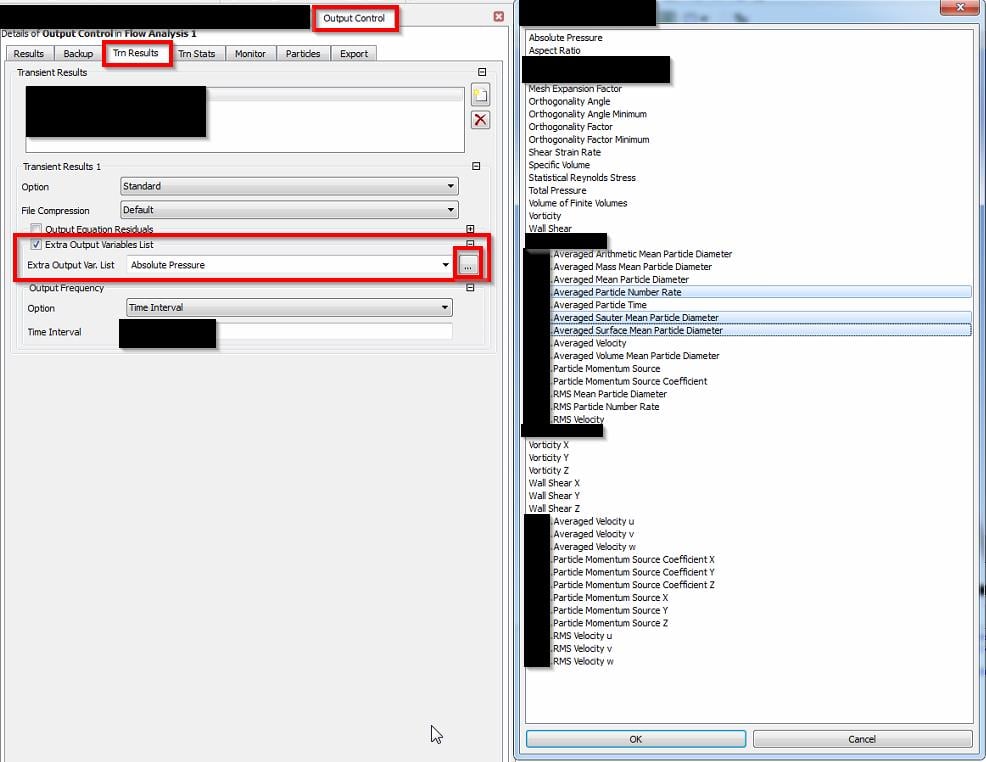


      And as I mentioned in my previous post, particle mass flow variable will not be available in CFD-Post until you activate the Expert Parameter. Enable 


      pt force export massflow = t


      in the expert parameters tab and the particle flow variable will be available in CFD-Post.

    • A.Azimi
      Subscriber

      Dear Rahul,


      Thank you for the informative message.


      I don't have issue calculating particle total mass in CFX-post. My problem is that I need to calculate a portion of the mass of the particle ranging from 2 to 20 micron(as an example of the particle if they range from 2 to 50 micron). I don't need it at each time step. The final result at the end of the run is important for me. 


      To wrap it up, I need the mass of the particle passing out a certain boundary in CFX-post for particle size range from d1 to d2(particle size distribution D1

      Thank you for the advice.


      Shahab

    • raul.raghav
      Subscriber

      Shahab, unfortunately, I don't think there is a way to do that other than using the histograms. You can create an extra histogram with just the particle diameters of interest if that would help you in anyway.


      Maybe someone else might have a solution for your problem.

Viewing 5 reply threads
  • The topic ‘Expression for Particle Modeling in CFX’ is closed to new replies.
[bingo_chatbox]








